


93% of IT leaders are confident in their AI governance, but nearly 1 in 3 report data exposure incidents

.svg)

.png)
Making the case for M365 governance pitch deck
Use this template to show the importance of a good governance strategy!
Download now%20(1).avif)
Master Hacks: Migrate like a pro
Check out our video series to help you turn migration projects into masterpieces!
Table of contents
Here are two stats that should make you uncomfortable: 93% of IT leaders say they're confident their Microsoft 365 governance is ready for AI, but 29% of those same organizations report that AI tools have already surfaced sensitive data that shouldn't have been accessible. Another 8% said they didn't know.
Something doesn't add up.
In this blog, we'll break down where that confidence gap comes from, what's actually getting exposed, and what you can do about it.
Let's get into it.
Copilot data exposure: How common is it?
We surveyed 851 IT leaders across seven countries—US, UK, Canada, France, Germany, Netherlands, and Ireland—about Copilot, governance, and AI readiness. The respondents are decision-makers: 73% in IT leadership, the rest in security, data governance, compliance, and digital workplace roles. Most work at mid-sized to large organizations.
Here's what they told us.
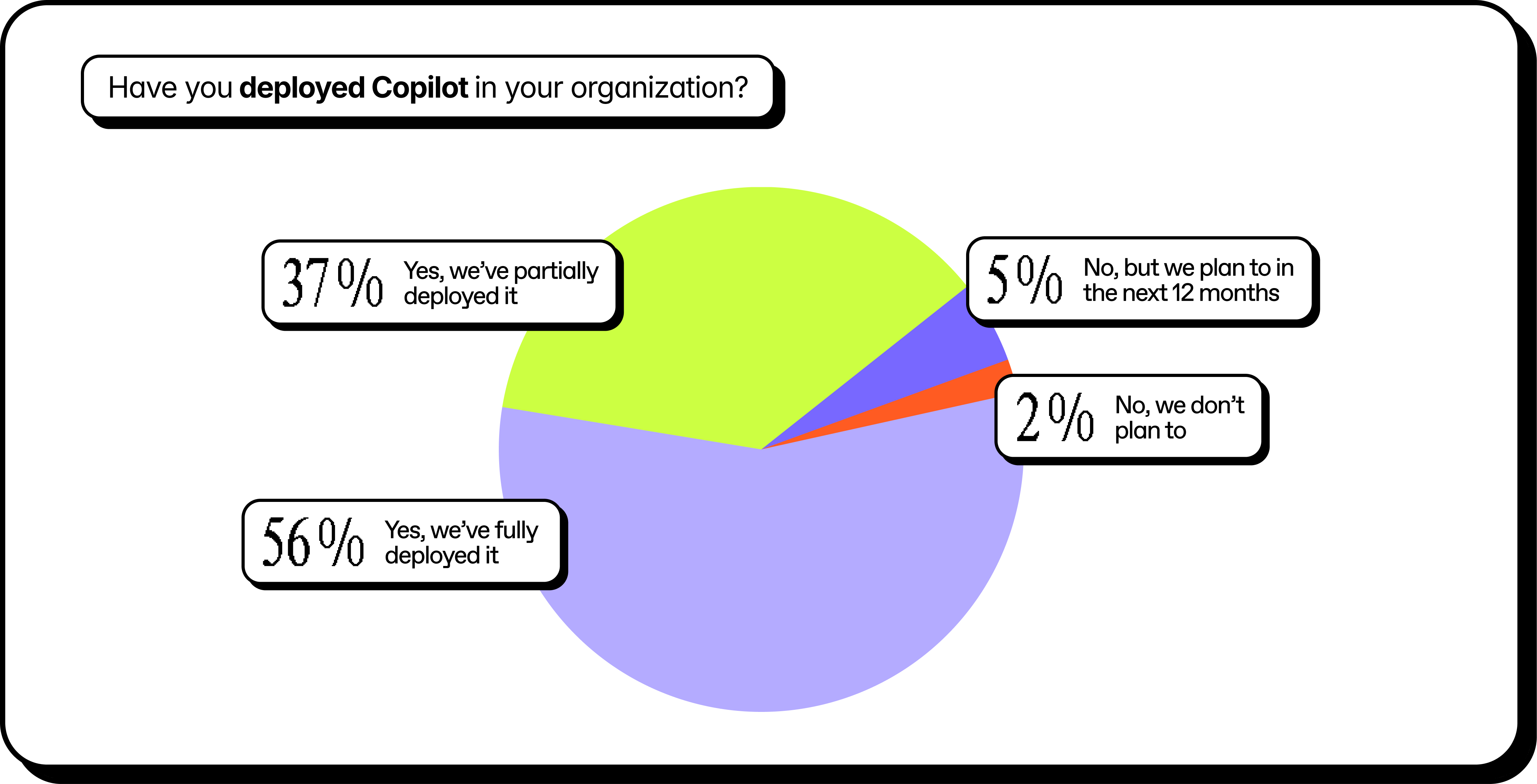
Copilot adoption has hit a tipping point. 93% have fully or partially deployed Copilot in their environment.
And confidence is high across the board:
- 93% say their Microsoft 365 governance framework is ready to support AI responsibly.
- 93% say their IT team has the skills and tools to remediate AI-related governance issues.
- 93% say they're confident Copilot's access reflects appropriate permissions.
But the incident data tells a different story.
29% say AI tools have surfaced sensitive internal data that it shouldn’t have had access to. Another 8% aren't sure either way. That's about 1 in 3 organizations with data exposure incidents despite all that confidence.
.png)
High adoption. High confidence. And still, a third are experiencing exactly the kind of incident that governance is supposed to prevent.
The gap isn't about competence. It's about visibility. Most teams are confident because they've done the work they know about. The problem is the work they don't know about—the forgotten shares, the inherited permissions, the content that's technically accessible but practically invisible.
Until now.
What kind of content is AI finding that it shouldn't?
We asked respondents who experienced data exposure from an AI tool to tell us what types of content were involved. They could select multiple categories. And many did:
.png)
These aren't obscure edge cases. This is the stuff that's supposed to be locked down. Contracts. Employee records. Strategic plans. Customer lists.
Depending on your industry, it's a compliance incident waiting to happen.
In most cases, nobody broke any rules to access it. The permissions were already there. Copilot just followed them.
That's the uncomfortable truth: AI tools don't create oversharing. They expose it. At speed. At scale. To anyone with a prompt and the right (or wrong) level of access.
How oversharing becomes a data exposure risk with AI
Here's the thing: Copilot is doing exactly what it's supposed to do.
It surfaces content based on what users have permission to access. It doesn't break through security barriers. It doesn't bypass access controls. It follows the rules you've already set.
The problem is that those rules were built for a different era. Before AI, oversharing was a slow-moving risk. A forgotten "anyone with the link" share. A team site that never got locked down after a project ended. Guest access that was never revoked. Permissions inherited from five reorgs ago.
These things accumulated quietly over years. They were technically accessible, but practically invisible. Nobody was going to manually dig through 10,000 SharePoint sites to find that one sensitive file.
Copilot will. In seconds.
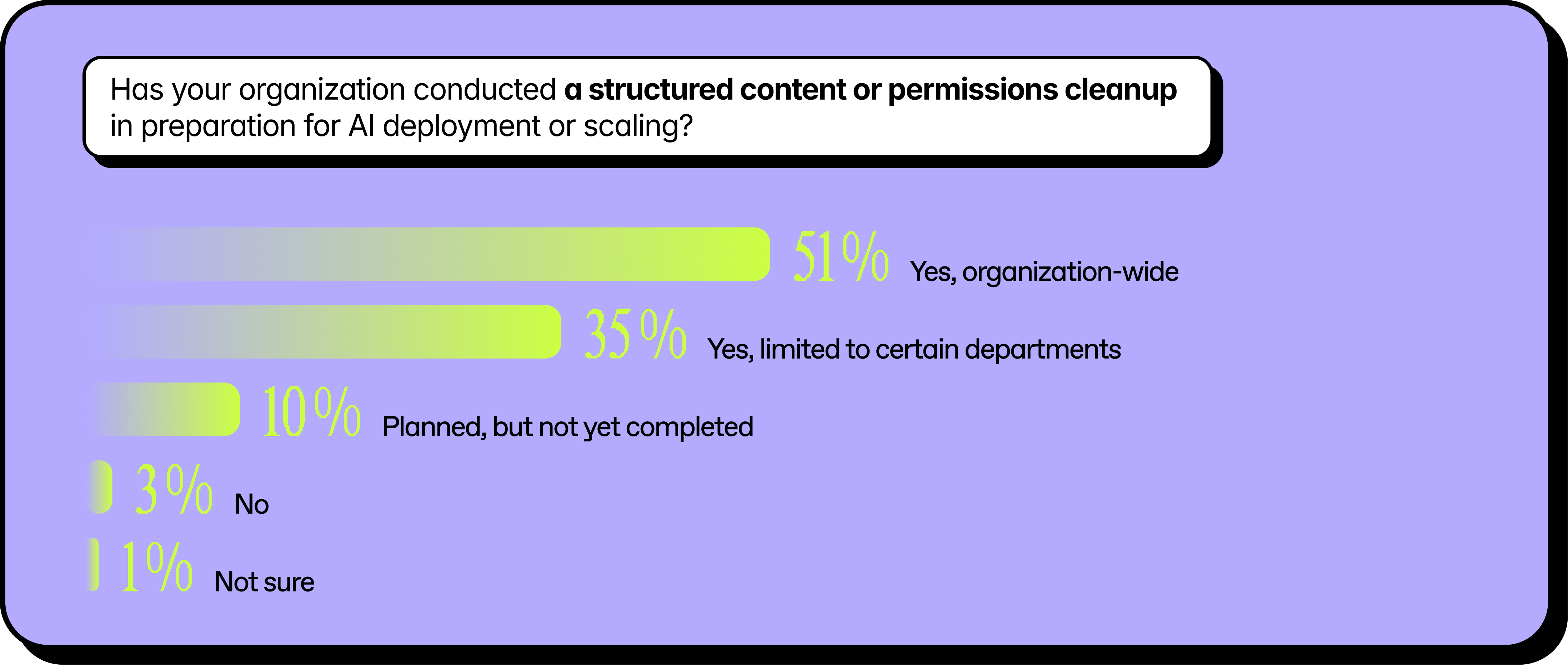
That's why 86% of organizations in our survey have done some form of content cleanup in preparation for AI. But here's the catch: only 51% did it organization-wide, the other 35% limited cleanup to specific departments and the rest didn't do any cleanup.
Partial cleanup means partial protection. And AI doesn't care about your phased rollout plan. It indexes everything it can see.
The organizations avoiding data exposure aren't the ones who deployed Copilot more slowly. They're the ones who got honest about their permissions first.
AI governance is creating more work, not less
If you've felt stretched thin since enabling Copilot, you're not alone.
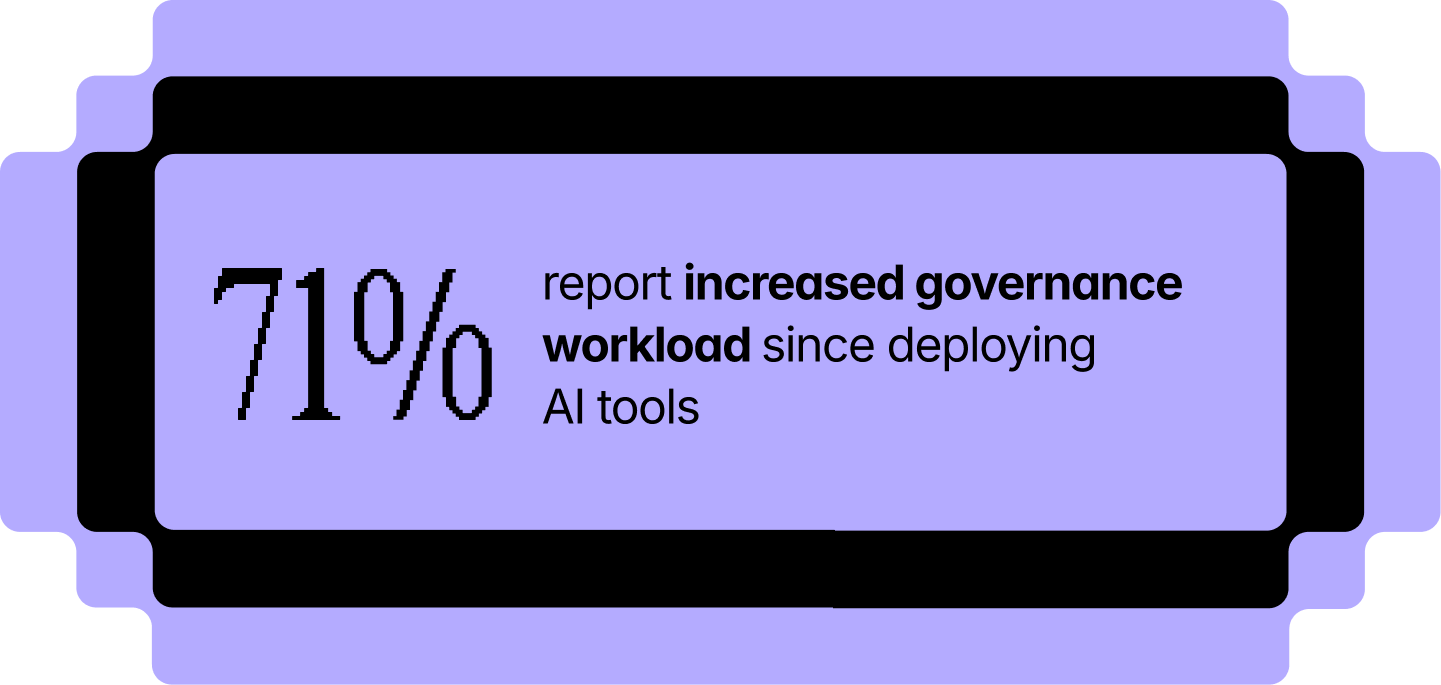
71% of respondents say their governance workload has increased since deploying AI tools. Nearly a quarter say it's increased significantly.
That tracks. AI doesn't just expose existing problems—it creates urgency to fix them. Suddenly, that permissions audit you've been putting off is a priority. That guest access review can't wait until next quarter. That sprawling SharePoint environment needs attention now.
But here's the challenge: most teams are still running governance manually.
Only 37% of organizations describe their governance as highly automated and continuously monitored. Another 26% say they're operationalized with consistent enforcement. That leaves more than a third stuck in a mostly manual or reactive mode, just addressing issues as they come up.
Manual governance doesn't scale. Not when AI is surfacing risks faster than your team can review them.
The workload increase isn't going away. The question is whether you absorb it with headcount and heroics, or whether you use purpose-built tools and scalable systems that can keep up.
No governance clarity, no ROI confidence
More work without clear results is a hard story to tell leadership.
When we asked what's blocking AI ROI measurement, the top two answers were cost visibility (51%) and governance complexity (47%). In other words, teams can't prove value because they can't see clearly. And it’s not just what AI is costing, but what it's touching and how it's being used.
This isn't lost on decision-makers. 78% say governance activities directly impact their organization's confidence in AI investments. If you can't show that permissions are under control and sensitive data is protected, the next round of funding gets harder to justify.
The math is simple: 49% of organizations report AI-related costs are eating 11% or more of their IT budget. That's real money. And without governance clarity, it's money without a measurable return.
How to reduce Copilot data exposure risk and build ROI confidence
There's no silver bullet for preventing AI data exposure or for proving ROI overnight. But the fundamentals that have always reduced risk are the same that build confidence: cleanup, monitoring, and ownership.
Cleanup needs to be organization-wide, not piecemeal
Only half of respondents did a full content and permissions cleanup before deploying AI.
Partial cleanups leave gaps. And AI doesn't respect rollout phases. It indexes everything it can see.
From an ROI perspective, messy environments are harder to measure. When you don't know what Copilot is pulling from, you can't attribute productivity gains to clean data versus lucky guesses. A full cleanup gives you a baseline you can actually measure against.
Monitoring needs to be continuous, not occasional
48% use continuous automated monitoring to track how Copilot and other AI tools are being used. The rest rely on periodic reviews, manual spot checks, or only investigate after something goes wrong. Quarterly reviews aren't fast enough when AI surfaces risks in seconds.
Continuous monitoring also helps you prove progress. When leadership asks what AI is doing, you need an answer beyond "we think it's going well." Visibility gives you the data to back up your investment.
Ownership needs to be clear
48% have a clearly defined AI governance owner with formal policies and consistent enforcement. Another 26% have an owner, but enforcement varies by department. The rest are working with shared ownership or none at all. No owner means no accountability.
And no accountability means no one to champion the business case. When ROI conversations happen at the leadership table, someone needs to own the story—and have the data to tell it.
How to close the AI governance gap in Microsoft 365
If you’re feeling less confident in your AI governance than you were 10 minutes ago, don’t worry. First, you’re not alone. Lots of other people are in the exact same position. Plus, you’ve got us for backup.
Second, you can get started on assessing your AI governance pretty quickly by asking your team these three questions:
- Do we know who has access to what across our Microsoft 365 environment?
- Can we identify overshared content before AI surfaces it?
- Is our governance continuous or just occasional?
If you can't answer “yes” to all three, don’t panic. You just need visibility across your tenant, accountability, and a system that scales.
We built an IT governance toolbox to help. It has step-by-step checklists from Microsoft MVPs covering AI risk reduction, scalable governance, and Copilot fundamentals.















.jpeg)

Don’t just migrate it, ShareGate it.
Your source is never touched — ShareGate only copies.
Re-running is safe, included, and free.

