.svg)

.png)
Making the case for M365 governance pitch deck
Use this template to show the importance of a good governance strategy!
Download now%20(1).avif)
Master Hacks: Migrate like a pro
Check out our video series to help you turn migration projects into masterpieces!
Table of contents
TL;DR: The cost of Microsoft 365 sprawl shows up in three ways: wasted spend on inactive workspaces and unused licenses, security and compliance exposure from oversharing and orphaned access, and IT operational drag from reactive cleanup. AI made each of the three more expensive. Most organizations underestimate all three.
You already know you have sprawl. Every M365 admin does. Orphaned Teams channels, SharePoint sites nobody owns, sharing links that outlived the project they were created for. That part isn't news.
What's news is the invoice. Not the one from Microsoft, the one nobody's writing: the total cost of letting sprawl sit there while AI tools, price hikes, and compliance deadlines pile on top of it. If your leadership ever asks "how bad is it?" and your honest answer is "I'm not sure," this article is for you.
The cost of Microsoft 365 sprawl breaks into three categories: wasted spend, security and compliance exposure, and IT operational drag. AI just made all three worse. We'll break each one down with real numbers, then show you a free way to measure what sprawl is actually costing your tenant.
Cost #1: Wasted spend you're paying Microsoft every month
Microsoft 365 sprawl waste is the recurring cost of licenses, storage, and workspaces your organization pays for but nobody actively uses. It's the line items that survive every renewal because nobody audited them.
Think about what's sitting in your tenant right now. Inactive teams with full E3 licenses attached. SharePoint sites eating storage for projects that ended two years ago. Mailboxes for people who left the company three quarters back.
Now put a number on it. Microsoft's July 2026 price increase adds $3/month per E3 user. Across 500 users, that's $18,000 more per year before you even touch what you're wasting on licenses nobody needs. Industry estimates put SaaS license waste at 10 to 30% of total spend in unaudited tenants. Do that math on your license bill and try not to wince.
And it's not just base licenses. Copilot runs $30/user/month at enterprise scale. Plenty of orgs assigned Copilot broadly to "see what happens." But without a plan to see if those licenses are being used, they could just be adding to wasted spend.
On top of that, AI tools inflate storage faster because users generate more content in less time. More drafts, more summaries, more outputs filling OneDrive and SharePoint. The meter's running.
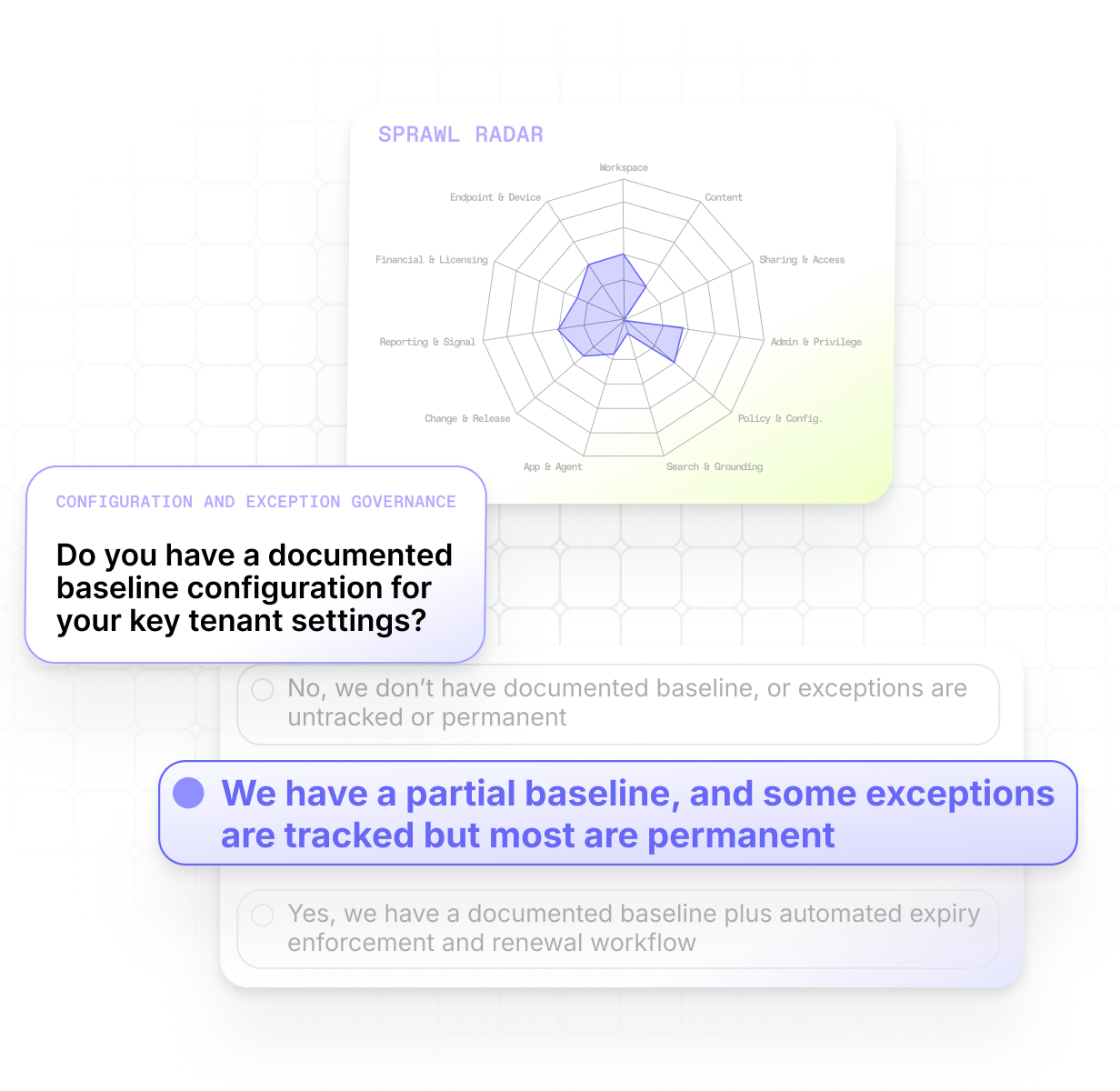
We recently built a Microsoft 365 Sprawl Risk Radar, a self-assessment tool that helps you see where sprawl is an issue in your tenant. It also estimates the kinds of costs you risk from exposure based on your tenant and industry. You can use it to get some rough numbers so that you're not guessing when budget conversations come around.
.png)
Cost #2: Security and compliance exposure that AI just made bigger
Microsoft 365 sprawl can also create security risks. When you have overshared content, orphaned workspaces, and permission drift that leaves sensitive data accessible to people and AI tools who shouldn't see it, it can impact your org's finances, time, compliance, and reputation.
And this isn't just a hypothetical. Exposure from sprawl is happening every day.
We recently surveyed 850 IT leaders. 93% say they're confident in their AI governance. But 29% have already had AI surface sensitive content it shouldn't have had access to.
Sprawl isn't new. Overshared SharePoint sites. Orphaned workspaces with no identifiable owner. Permission creep from years of "just give them access." "Anyone with the link" sharing that was supposed to be temporary in 2022. They've always been problems we could put at the bottom of the to-do list.
But that's changed. The permissions drift that existed before AI was technically a problem but rarely caused real damage. No human was going to search through every file they could access.
AI tools do. In seconds.
The permissions model is exactly the same. But the likelihood of sensitive content being surfaced just went from "someone would have to go looking for it" to "an AI tool will find it by default if it has access." That's a fundamentally different risk profile.
For Microsoft 365 admins, this isn't just a Copilot story. Most organizations use multiple AI tools now, like Claude, ChatGPT, or Perplexity, that connect to Microsoft 365 data through MCP.
The Sprawl Risk Radar maps oversharing, permission creep, and orphaned-workspace patterns to the risk scenarios where exposure is most likely, so you can see exactly what your tenant's security gaps are and how much they might be costing you.
Cost #3: IT operational drag you won't find on any invoice
The third cost of Microsoft 365 sprawl is the one that doesn't show up on any bill: your team stuck in reactive cleanup instead of proactive governance.
Somebody flags a SharePoint site with external sharing enabled. You spend 45 minutes tracking down who created it, whether it's still active, and whether that external access was intentional. Multiply that by every alert, every access review, every "hey, who owns this team?" message in your queue. That's your week.
AI made it worse in two ways.
First, there's a whole new sprawl category: agent sprawl. Power Automate flows and Copilot Studio agents are popping up across tenants. Nobody owned this category a year ago. Most orgs still haven't figured out who should.
Second, existing sprawl areas got bigger. AI makes it trivially easy for users to create and share content faster. Your cleanup backlog grows faster than your team can work through it.
The numbers tell the story. 71% of IT pros say their governance work has increased since deploying AI, and that makes sense when you learn that only 51% did an organization-wide cleanup before deploying Copilot. The other half inherited every stale permission, orphaned workspace, and overshared site into their AI environment. Now they're cleaning it up reactively.
Manual find-and-fix doesn't scale when AI-driven sprawl moves faster than admin-center clicks.
See where your tenant's sprawl actually stands
Three costs. All getting worse. And most teams don't have clear visibility into them.
That's the real problem. Most teams know they have sprawl but can't articulate which types, how much, or what it's costing. Without a baseline, every governance investment is a hunch. Which can make getting leadership to invest in purpose-built governance tools that much harder. Which means governance work gets harder. Which makes investing harder. And that's how teams find themselves in a negative feedback loop.
That's why we built the M365 Sprawl Risk Radar. It's a free self-assessment that gives you the numbers you're missing. You answer questions about your tenant, and you get a maturity score across 11 sprawl types against industry-actual baselines, not vendor-marketing baselines. It then maps your answers to 18 risk scenarios, each with annualized USD exposure ranges so you can see what sprawl might be costing you in real dollars.
5 minutes. No PowerShell. No tenant connection.
Try it out, then share the results with your CIO.


Frequently asked questions

It depends on your tenant size and how long sprawl has gone unmanaged, but the costs fall into three categories: license and storage waste, security and compliance exposure, and IT operational drag. AI is making all three more expensive. For a 500-user org, the license waste alone can run tens of thousands per year. The M365 Sprawl Risk Radar maps your specific answers to risk scenarios with annualized dollar ranges so you can size it for your environment.
Yes, AI tools like Copilot, Claude, and ChatGPT surface content based on existing user permissions. They don't bypass security controls, but they're far more likely to find and surface content that's technically accessible but practically hidden. 29% of organizations have already had AI surface sensitive content it shouldn't have had access to, even though 93% feel confident in their AI governance.
Yes. AI inflates storage and sharing-link exposure as end users create and share content faster. Agent sprawl from Copilot Studio and Power Automate is a new category nobody owned before. And AI-driven volume outpaces manual find-and-fix cleanup work.
Most M365 tenants have sprawl. The question is which types, how much, and what it's costing you. The signs include unmanaged workspace counts, owners you can't find, sharing links you can't audit, and storage growth without a clear driver. The M365 Sprawl Risk Radar can help you map out where you have sprawl in your tenant, what the biggest associated risks are, and how to find and fix it.
















Don’t just migrate it, ShareGate it.
Your source is never touched — ShareGate only copies.
Re-running is safe, included, and free.