


.svg)
%20(1).avif)
Master Hacks: Migrate like a pro
Check out our video series to help you turn migration projects into masterpieces!
Table of contents
Most organizations don't know what they're actually paying for. Not in a "we haven't checked lately" way. More like a "licenses from a merger three years ago are still assigned to people who left" way.
That's what we took away from our webinar with Microsoft MVPs Eric Overfield and Noorez Khamis on how to stay in control of your M365 costs with a basic licensing strategy. With Microsoft's recent price increases and a new premium license, the session sparked a lot of discussion.
So we turned the key insights into this guide. Here's what to look for, where the waste actually hides, and what you can do about it.
The real problem hiding in your M365 bill
When Microsoft 365 costs keep climbing, the easy assumption is that prices are just going up. Eric and Noorez of Creospark know this all too well. A lot of organizations they work with can't produce an accurate list of their current Microsoft 365 licenses. For example, they can't answer which licenses are actively used. Which features are deployed. Which seats are assigned to people who left six months ago.
"Licenses have been accumulated over the years. Mergers happened. Team changes happened. No one really did a clean audit. Some teams are over-licensed. Some features are being paid for that are completely unused." —Eric Overfield, Microsoft MVP
So when costs go up, organizations tend to absorb the increase and add it on top of existing waste.
What Microsoft 365 costs now
Microsoft raised commercial prices on July 1, 2026. If your renewal already passed, you're on the new numbers. If it hasn't, you're looking at them.
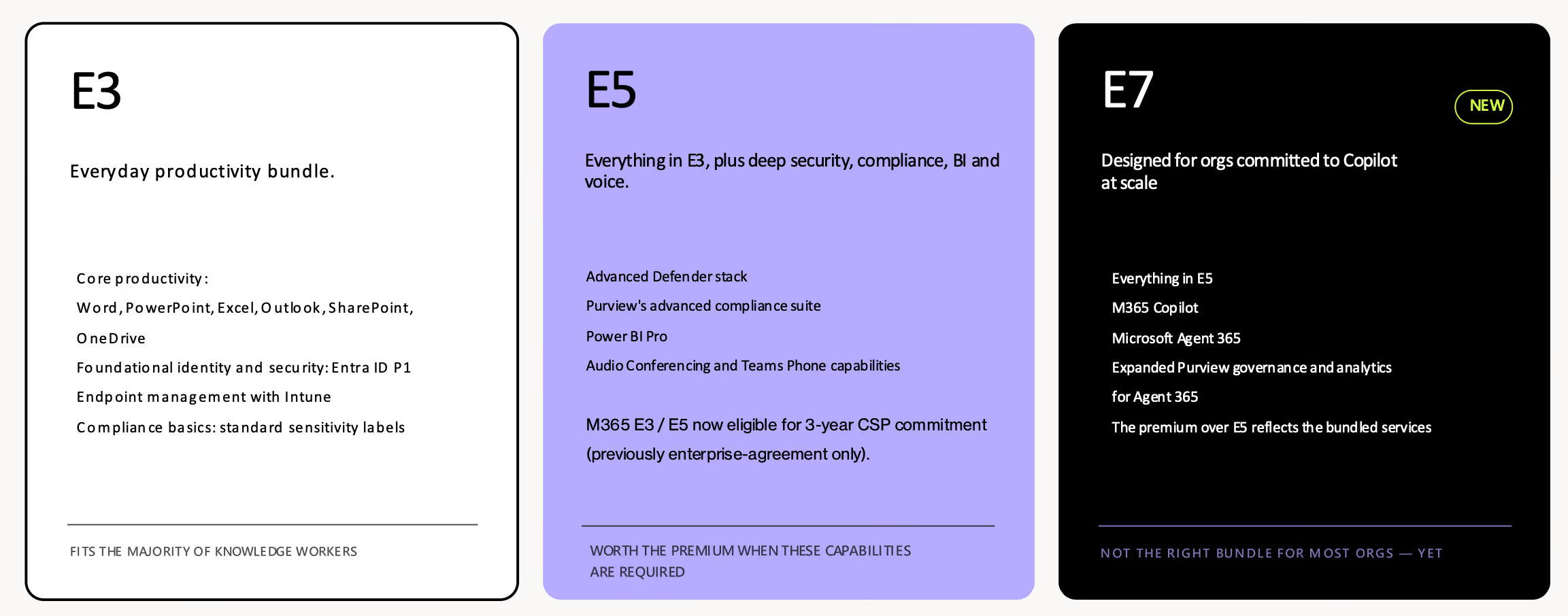
Here's the US pricing list, per user, per month, annual commitment.
Suites with Teams. Microsoft publishes separate no-Teams pricing.
5 overspending patterns in your tenant
Across hundreds of Microsoft 365 engagements, Creospark finds the same five patterns every time. Here's what they look like in practice.
1. Inactive licenses
Contractors who finished their projects. Staff who left but whose accounts weren't fully decommissioned. Roles that changed without the license changing with them.
In a typical mid-size environment, 8–15% of all assigned licenses are sitting completely unused, according to Noorez and Eric. In a 1,000-user organization on E5 at $60 a seat, 8–15% is 80 to 150 idle licenses. That's $4,800 to $9,000 a month, or $57,600 to $108,000 a year, for seats nobody is touching.
The fix is simple once you can see the data. The hard part is that most organizations don't have a live view of this so it accumulates quietly between annual reviews.
2. Duplicate capabilities
You're paying for a third-party MFA tool even though Entra MFA is included with E3. Your legal team has Purview eDiscovery but also maintains a legacy eDiscovery platform from before Purview was capable. Your analytics team has Power BI Pro in their E5 license and a Tableau subscription.
In every case, the duplicate predates the M365 capability that replaced it. The technical fix is usually straightforward. The political fix (who owns the legacy tool, who championed it) is harder.
3. Wrong tier for the user
This is the highest-leverage problem in most environments. E5 assigned to users who only ever use Word, Excel, and Outlook. E3 assigned to users who genuinely need Purview compliance tools and Power BI.
The result is the worst of both worlds: you pay for E5 for people who don't use it, and you under-serve the users who actually need the advanced capabilities.
"You end up paying for E5 for users who don't use it, and under-protecting the users who actually need the protection. That's the worst of both worlds." —Noorez Khamis, Microsoft MVP
The gap between E3 and E5 is now $21 per user per month. Two hundred people sitting one tier too high is $50,400 a year.
4. Ungoverned add-ons
Audio Conferencing. Power BI Premium per user. Defender for Cloud Apps. Power Apps per user. Project. Visio.
Each one was bought for a specific use case—a project, a team, a person. The project ended. The person moved on. The add-on stayed. Individually, each one doesn't feel worth fighting about. Collectively, they can represent hundreds of thousands of dollars a year in spend that nobody's actively using. They almost never come up in tier-level licensing discussions, which is exactly how they survive for years.
5. No ongoing visibility
This is the pattern that makes all four others possible.
When you only run a license review annually (or less), the other patterns accumulate quietly in between. Nobody catches the contractor whose license wasn't reclaimed. Nobody flags the add-on that lapsed into non-use. Without ongoing visibility, wasted spend grows in the background while everyone's looking somewhere else.
Right-size by persona, not by org
The most common licensing mistake Creospark sees isn't a SKU choice. It's treating the entire organization as a single user type.
Most orgs have at least four to six distinct personas. Each one has genuinely different productivity, security, compliance, and AI needs. Assigning E5 to knowledge workers because someone decided "we're an E5 company" wastes money. Assigning E3 to your security team because of a blanket policy leaves capability gaps.
The license tier should follow from the persona. Not the other way around.
A common breakdown looks something like this:
- Knowledge worker—the bulk of the workforce. Office apps, SharePoint, OneDrive. E3 covers everything they actually do.
- Power user—builds Power BI reports, runs Power Automate workflows, needs advanced analytics. May already justify E5 without a security driver.
- IT and security professional—lives in Defender, Intune, Purview. The premium tier is the job, not a bonus.
- Executive—may need advanced compliance and mobile management. Assess individually.
- Contractor—time-boxed access, needs strict offboarding. Often a candidate for F-tier licensing or a scoped add-on approach.
- Frontline worker—different apps, device patterns, and licensing model entirely.
Here's a tip:
"Stop thinking of licensing as a decision for your whole org. It really should be persona-based." —Eric Overfield, Microsoft MVP
The lifecycle is where persona models break down
Persona-based licensing only works if it's connected to the user lifecycle. Onboarding, role changes, leave, and offboarding all create moments where licenses drift from where they should be.
A parental leave means a license sitting idle for months. A promotion means someone carries E5 features they no longer need. Offboarding (especially in fast-moving environments) leaves orphaned seats that nobody reclaims.
You need a governance process tied to each lifecycle event. And a tool like ShareGate Protect gives you that continuous visibility and helps enforce the cleanup automatically instead of relying on someone remembering to do it.
Copilot, agents, and why the math is changing
Copilot is still an add-on for E3 and E5 users. E7 bundles it at the SKU level, which makes commercial sense for organizations already on E5 with a genuine plan to roll out Copilot to most of their workforce.
But for most organizations, Creospark estimates only 20–30% of users will actually get enough ROI from Copilot to justify the per-seat cost.
The question isn't who could theoretically benefit. It's who will actually use it enough to earn back the license. That's usually a much shorter list.
Why agents change the equation
AI agents are where the cost-value model gets interesting and where per-seat licensing logic starts to break down.
Per-seat licensing assumes value scales with headcount. More users, more productivity tools, more cost, right?
But agents don't work that way. One agent can serve many users. One agent can replace a licensed workflow entirely. As Eric put it:
"Agents run a process. They don't sit at someone's desk."
His point is that as organizations shift from "Copilot for every employee" to "agents handling specific business processes," you may actually need fewer premium seats. But the licensing model hasn't fully caught up to that reality yet. So decisions you make now on per-seat tiers could lock you into a structure that doesn't match how your org actually uses AI in 12 months.
Keep your agents in check
The governance side matters just as much, and most organizations haven't caught up to it.
Agent 365, bundled into E7 or available as a standalone add-on, gives IT a centralized registry of every agent running in the organization. Each agent gets its own identity, a named human sponsor, and a defined lifecycle: create, review, retire.
The principle is simple: every agent needs a human owner. An ownerless agent is an accountability gap. It can drift from its intended purpose, trigger unintended workflows, and create compliance exposure that's hard to trace back.
If agents are already running in your tenant—sanctioned or not—this is the governance layer that keeps them under control.
What to do
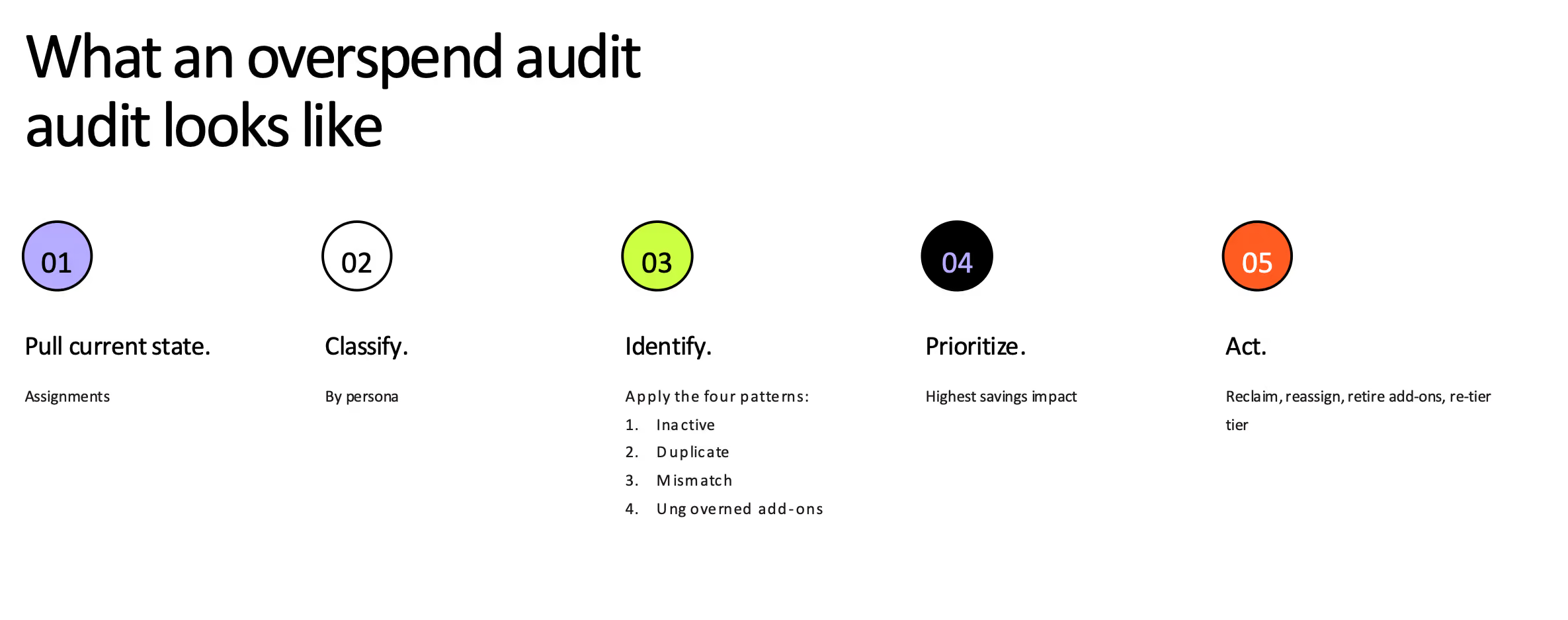
You don't need to redesign everything at once. Here are five concrete starting points that can help you save costs:
Want to dive deeper? Watch the full session on demand.
Build the renewal case
Knowing you're overspending isn't the same as being able to prove it. Procurement doesn't move on "we think there's waste." Your Microsoft rep definitely doesn't.
Get these numbers before the renewal meeting:
1. The reclaim number: Assigned minus active
Start with a list of every license you're paying for. Next to it, put who's actually used one in the last 90 days. The difference between those two lists is money you could stop spending.
Why 90 days and not 30? Because 30 catches everyone who took a long vacation and labels them waste. Show that list to a department head and you've lost the room in the first five minutes. Ninety days is long enough that nobody can argue with it, and short enough that it's still true by the time you're at the table.
Then price it at the new rates, not last year's. A hundred idle E5 seats used to cost $5,700 a month. Now it's $6,000.
2. The downgrade number: Tier minus need
Pull up everyone on E5. Then check who hasn't touched Defender, Purview, or Power BI in the last three months.
Those people are E3 users. You're just paying E5 for them.
Move one of them down and you save $21 a month. Do it for two hundred people and you've found $50,400 a year. In most tenants this is the biggest of the four numbers, and the one that surprises people most.
3. The drift number: Add-ons nobody uses
Audio Conferencing. Power BI Premium per user. Project. Visio. Defender for Cloud Apps.
Every one of these was bought for a good reason. Ask around and you'll usually find the reason ended two years ago.
So make a list, track down who owns each one, and ask a simple question: what breaks if we turn this off? When nobody can answer, you've got your answer.
These almost never come up in tier-level negotiations, which is exactly why they survive for years. Check your standalone components while you're in there—those all went up in July too.
4. The deferred-growth number: storage you're about to buy
Storage is invisible until the day you have to buy more of it. Meanwhile, inactive workspaces and abandoned OneDrives keep eating your quota years after the last person who cared about them left the company.
Archiving through M365 Archive can cut the storage cost of archived content by around 75%. Just be careful how you frame it. This isn't money coming back. It's a bill you don't have to pay yet.
Then annualize it and name the owner
Add the four numbers. Multiply by twelve. Put one figure at the top of one page, with the four components underneath and a named owner beside each.
You can't fix what you can't see
The organizations that manage M365 spend well are the ones who know exactly what they own going into that conversation AND have the visibility to keep it clean in between.
ShareGate Protect gives you that continuous visibility:
- License allocation reporting. Which licenses are inactive, which were bought and never assigned to anyone, and what each of those is costing you per month.
- Dollar amounts attached to inactive workspaces, unused licenses, and orphaned OneDrives. So cleanup gets a business case instead of a maybe.
- Automated cleanup policies. Archive or delete rules for Sites, Groups, and OneDrives, running on their own instead of waiting for someone to remember.
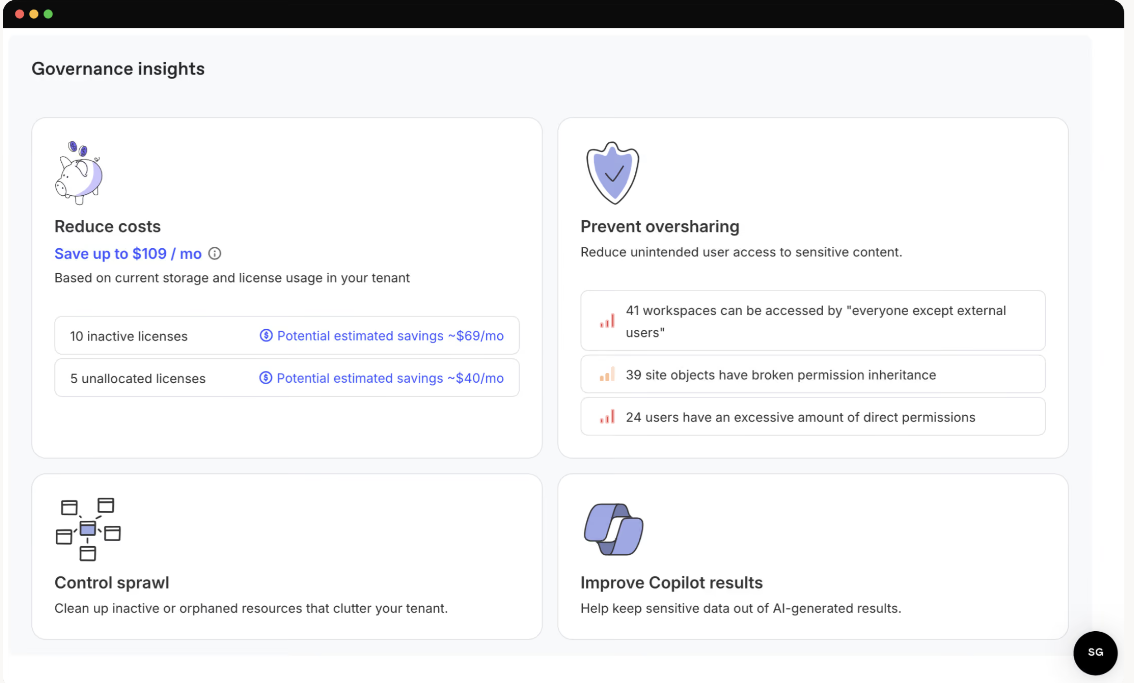
In this image: Reduce costs sits in the same view as oversharing, sprawl, and Copilot readiness. Inactive and unallocated licenses each get their own potential estimated savings, so the cost conversation starts from the same data as the governance one.
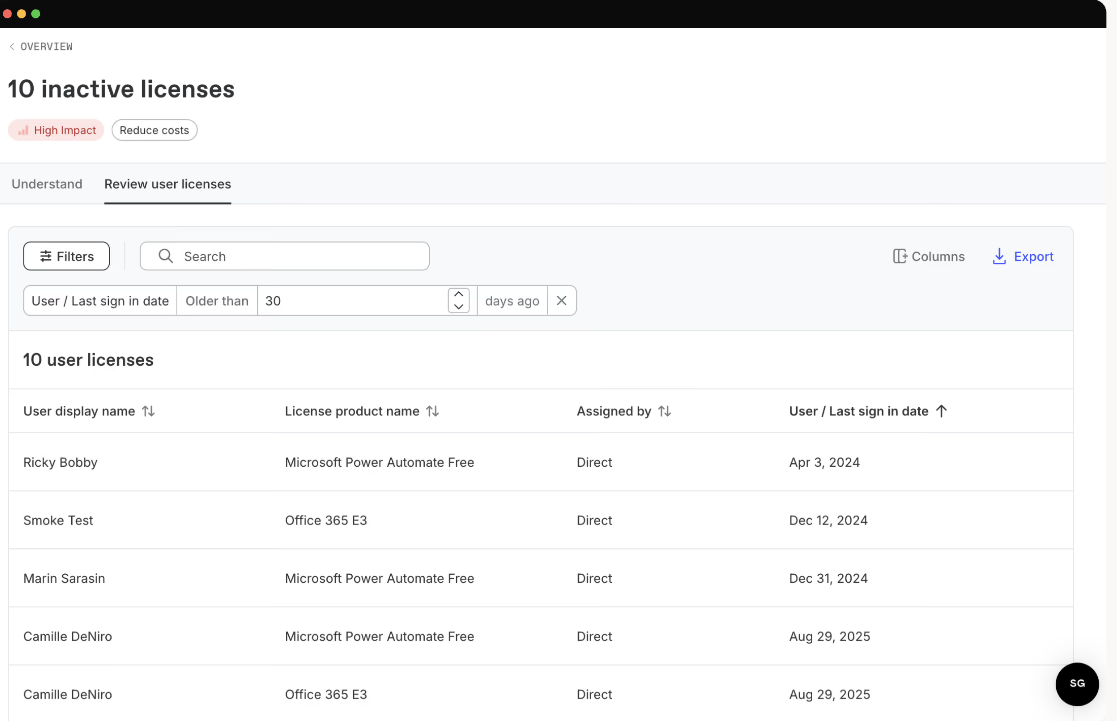
Because the waste doesn't accumulate all at once. It happens quietly, one orphaned seat at a time.
Book a demo to see what Protect surfaces in your tenant.


Frequently asked questions

Microsoft 365 governance licensing means tying license decisions to governance data instead of headcount assumptions. Instead of assigning tiers by department or blanket policy, you use activity, access, and workspace data to decide who needs what. Then keep those assignments accurate as people join, change roles, and leave.
Between 8% and 15% of assigned licenses sit completely unused in a typical mid-size tenant, according to Microsoft MVPs Eric Overfield and Noorez Khamis.
Compare assigned licenses against actual service activity over a 90-day window, and treat anything assigned with no activity as a reclaim candidate. Use 90 days rather than 30: a shorter window flags people on parental leave or extended vacation as waste, which undermines the exercise the moment you show it to a department head.
Tools like ShareGate Protect flag inactive and unallocated licenses with the estimated monthly cost already attached, so you're not building the comparison by hand.
Microsoft 365 E7 is worth it if you're already on E5, already paying for Copilot, and have real agent deployment plans. It bundles all of that into one SKU at $99 per user per month. If your Copilot adoption is still a pilot, or most of your users wouldn't touch it daily, the $30 Copilot add-on on top of your existing plan is the more careful path.
No. Most organizations have four to six distinct user personas with genuinely different productivity, security, and compliance needs. Assigning one tier across the whole org overpays for knowledge workers who only use Office apps, while giving nothing extra to the security team that actually needs advanced tooling. Match the tier to the persona, not to the org.















Don’t just migrate it, ShareGate it.
Your source is never touched — ShareGate only copies.
Re-running is safe, included, and free.

