


.svg)

.avif)
Microsoft 365 governance made simple
Fix what matters, faster, without complex rules or tool switching!
Free trial%20(1).avif)
Master Hacks: Migrate like a pro
Check out our video series to help you turn migration projects into masterpieces!
Table of contents
Microsoft is making some major changes to Microsoft 365 in 2026. Two things IT leaders and admins should know:
- Microsoft 365 pricing will increase for seven SKUs: Microsoft 365 Business Basic, Microsoft 365 Business Standard, Office 365 E3, Microsoft 365 E3, Microsoft 365 E5, Microsoft 365 F1, and Microsoft 365 F3.
- Microsoft will launch its premium Microsoft 365 E7 suite for companies ready to scale AI.
For IT teams, this raises some important questions.
How much will these changes increase your Microsoft 365 costs? Do your current license assignments reflect how employees actually use Microsoft 365? Where might there be opportunities to optimize your Microsoft 365 footprint before costs increase?
Let's dive in.
Key takeaways
- Review your Microsoft 365 footprint before Microsoft’s pricing update. Even small price increases can add up quickly across hundreds of users.
- Understand how licenses are actually used before adding new ones, and especially before adopting premium tiers like the new Microsoft 365 E7 or expanding Copilot.
- Tenant sprawl hides additional costs. Inactive Teams, unused SharePoint sites, and orphaned OneDrive accounts accumulate without regular cleanup or lifecycle governance.
- Getting licensing wrong will become more expensive. Unused or over-provisioned licenses can quietly drive up Microsoft 365 costs.
- Tools like ShareGate Protect help IT teams see license usage, clean up inactive workspaces, and reclaim storage.
🎥 ON-DEMAND WEBINAR: How to get more value from your licenses before M365 prices go up. Watch now→
What’s changing with Microsoft 365 pricing?
Microsoft’s pricing updates will take effect July 1, 2026. These changes will apply to new subscriptions and contracts that renew after that date. Depending on the license type, prices will increase by roughly 5% to as much as 33%.
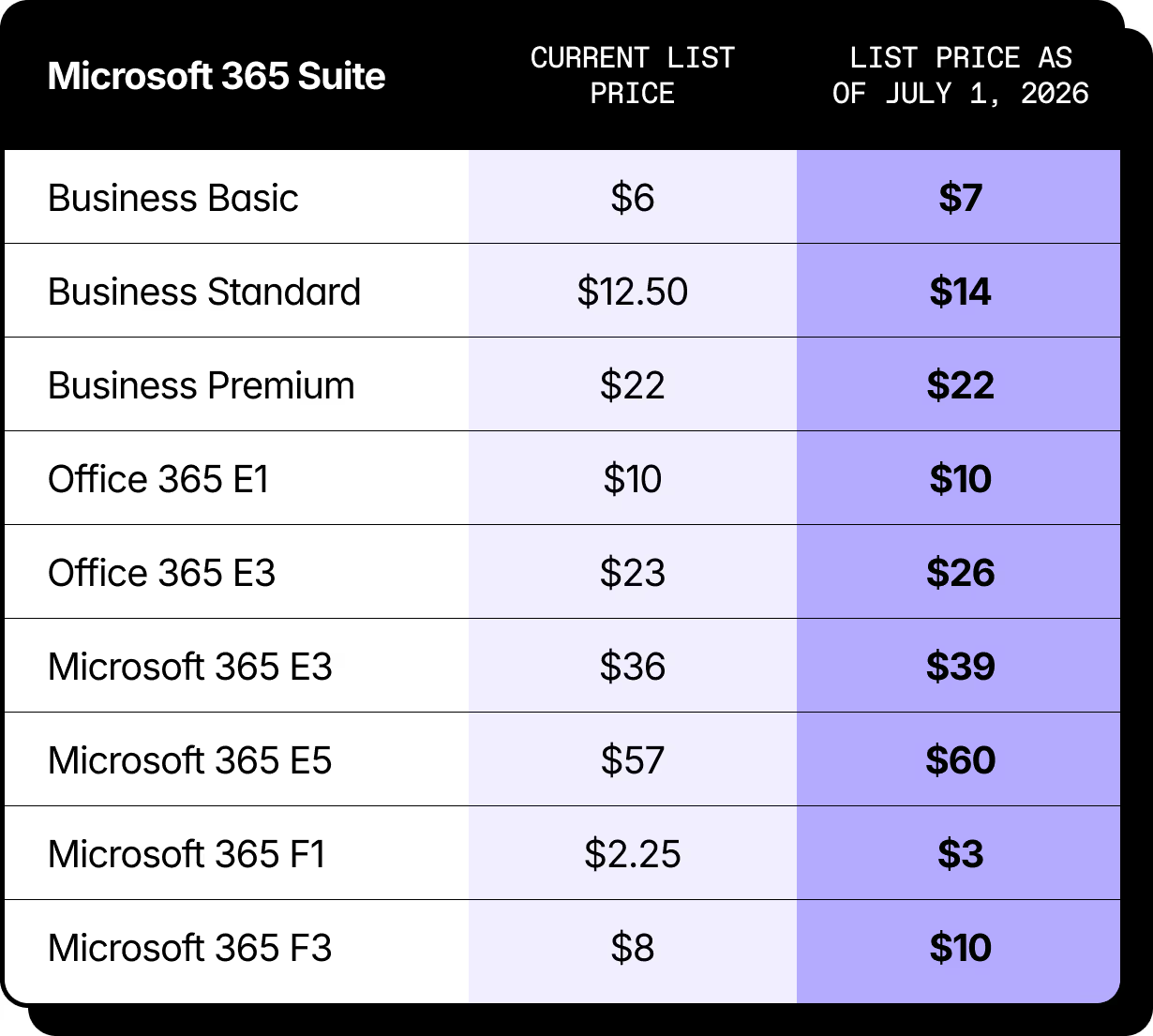
To put this in perspective, if your organization licenses Microsoft 365 for hundreds of users, even a small per-user price increase can quickly translate into tens of thousands of dollars in additional annual spend.
For example, a $3 monthly increase on Microsoft 365 E3 equals $36 more per user per year across every licensed user. So let’s say in a 500-user organization, that’s $18,000 in additional annual spend.
Now is the time to review your Microsoft 365 footprint and make sure you’re not paying more than you need to before the new pricing takes effect.
Microsoft’s new premium license: Microsoft 365 E7
Alongside pricing changes, Microsoft is also launching a new top-tier enterprise license called Microsoft 365 E7, generally available on May 1, 2026.
This new suite will combine productivity, security, and AI capabilities into a single subscription, including:
- Microsoft 365 E5
- Microsoft 365 Copilot
- Entra Suite for identity and access control
- Agent 365 as the control plane to govern and scale agents
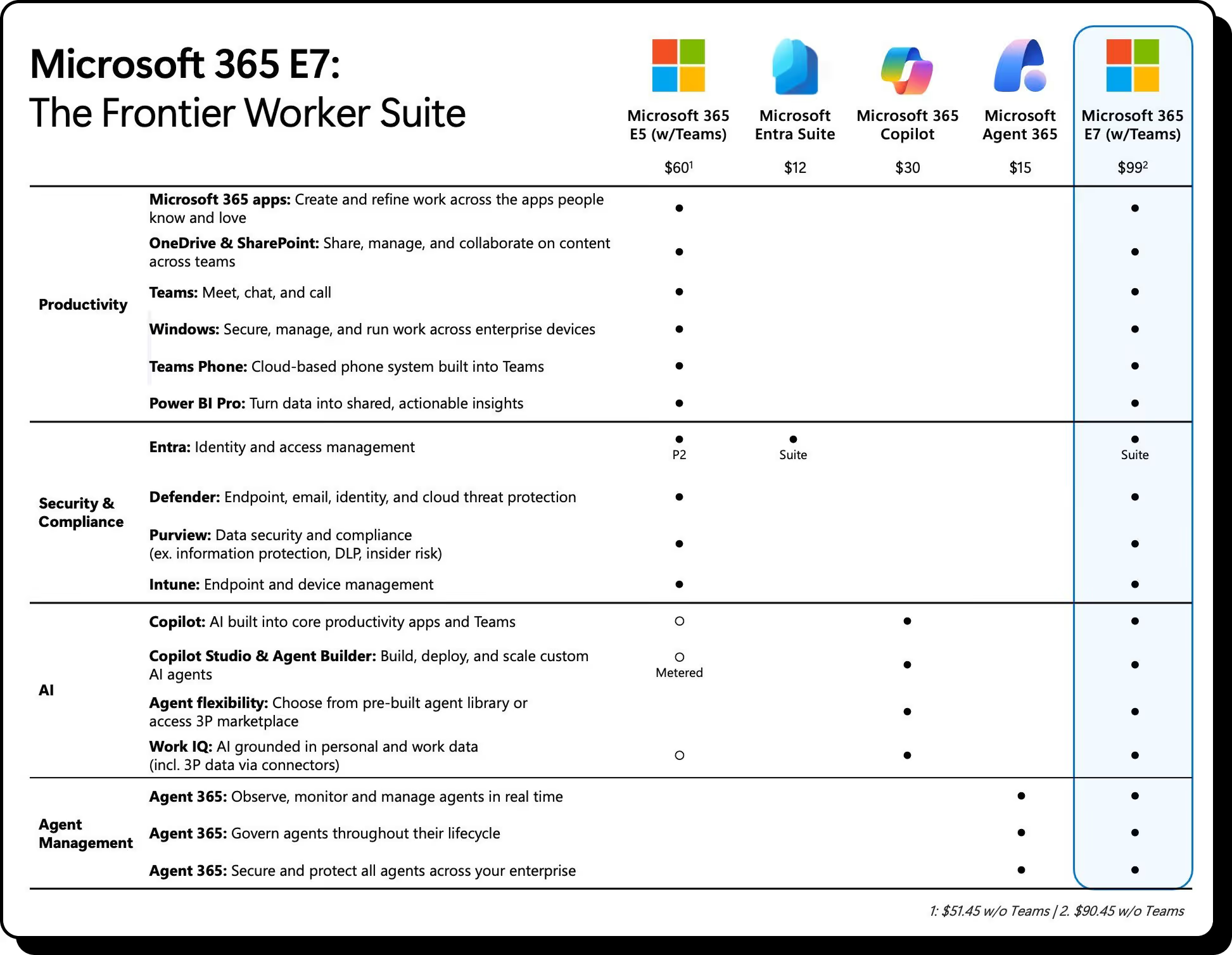
In other words, E7 is positioned as an AI-first enterprise license where advanced AI tools, security, and governance are deeply integrated into the Microsoft 365 platform. And it no doubt represents Microsoft’s vision for the next phase of enterprise productivity.
But the introduction of another premium license tier also raises an important question for IT teams: Who actually needs it?
Before considering new licensing tiers like E7 or expanding Copilot usage, it's a good idea to first understand how your existing licenses are being used.
What Microsoft’s pricing update means for your organization
For many orgs, the bigger impact is that Microsoft 365 licensing is becoming more expensive to get wrong.
With new AI capabilities, higher-tier plans, and the introduction of licenses like Microsoft 365 E7, organizations will need to pay closer attention to how licenses are assigned, used, and managed across their environments.
If those basics aren’t under control, the 2026 pricing update could mean paying more for inefficiencies that were already there.
Unused licenses increase unnecessary spending
Unused licenses are one of the most common sources of Microsoft 365 overspending. Gartner estimates that organizations waste 25–30% of their SaaS spend on unused or underutilized licenses, which often includes Microsoft 365 environments.
Employees leave, roles change, or projects end. But licenses assigned to those users often stay in place. Without regular license reviews, organizations can end up paying for seats that nobody is using. And when pricing increases, those unused licenses become an even bigger drain on IT budgets.
Over-provisioned or mismatched licenses drive higher costs
Even when licenses are actively used, they’re not always the right ones. For example, some users get enterprise licenses with advanced security, compliance, or analytics capabilities, even though they only need core productivity apps like Outlook, Teams, and SharePoint.
Inactive workspaces quietly accumulate
Over time, Microsoft 365 environments start to collect things that nobody is really using anymore. Inactive Teams, duplicate or outdated SharePoint sites, and orphaned OneDrive accounts left behind after projects or employees move on.
Those inactive workspaces still take up storage, clutter the tenant, and make it harder for IT teams to understand what’s actually being used. And when environments grow without regular cleanup, it becomes much harder to spot where unnecessary costs are hiding.
Should you renew early?
It might be tempting to renew early to avoid higher pricing. In some cases, that can potentially help secure current rates and help save money.
Before making that call, it’s worth taking a closer look at your environment. If you renew without auditing first, you could end up carrying forward unused licenses, over-provisioned or mismatched plans, inactive workspaces, or unnecessary storage costs.
Reviewing your Microsoft 365 footprint now gives you a clearer picture so you can clean things up and make a more informed decision about what comes next.
How to optimize Microsoft 365 costs and prepare for your next renewal
Seeing where the waste in Microsoft 365 is happening that drives up unnecessary cost is harder to spot than it should be. Especially In large tenants with hundreds of users and workspaces, unused or over-provisioned licenses often go unnoticed because Microsoft’s reporting doesn’t clearly connect user activity with assigned licenses.
That’s where ShareGate Protect comes in. Giving you clear visibility into licenses, workspaces, and activity across your tenant.
See every license in your tenant and how they're assigned to users
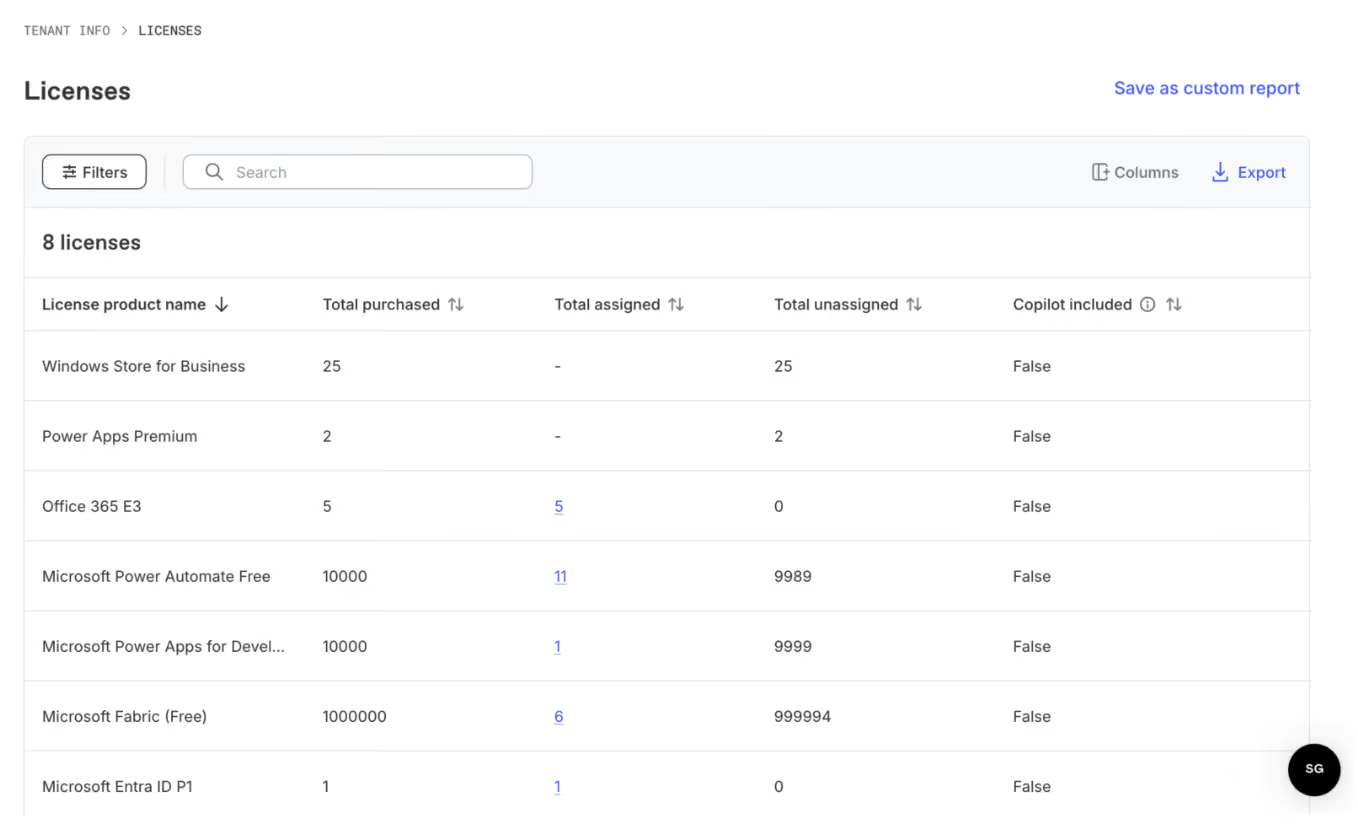
The license report includes the following allocation details for each Microsoft 365 license in your tenant:
- Product name
- Total purchased
- Total assigned
- Total unassigned
- Copilot included
- SKU
- Expired
- Status
Find inactive workspaces that waste storage

Protect crawls your tenant and evaluates activity signals across workloads like SharePoint, Teams, and group mailboxes. It surfaces inactive workspaces and users that add clutter, increase storage costs, and make governance harder.
You can open a pre-built report to see what’s inactive, understand the impact, and take action right where you spot the issue.
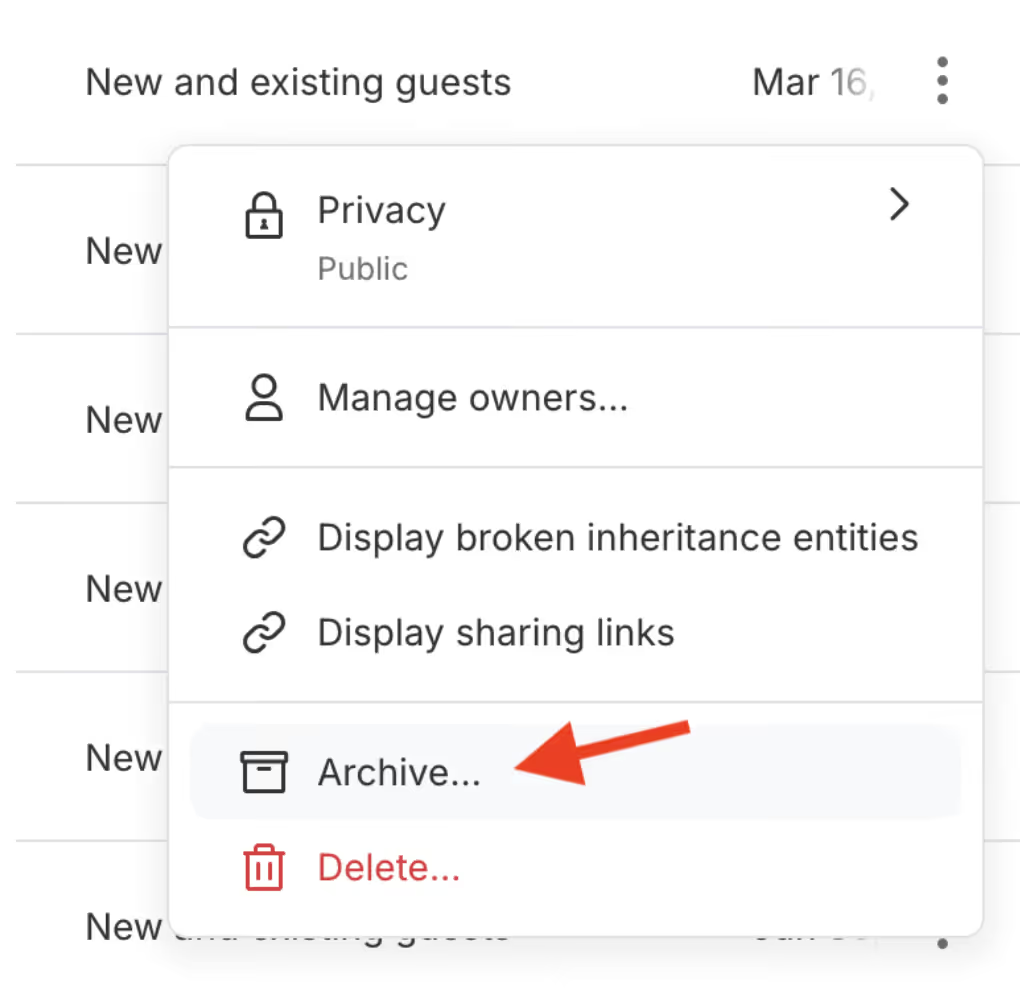
Archive workspaces to reclaim storage
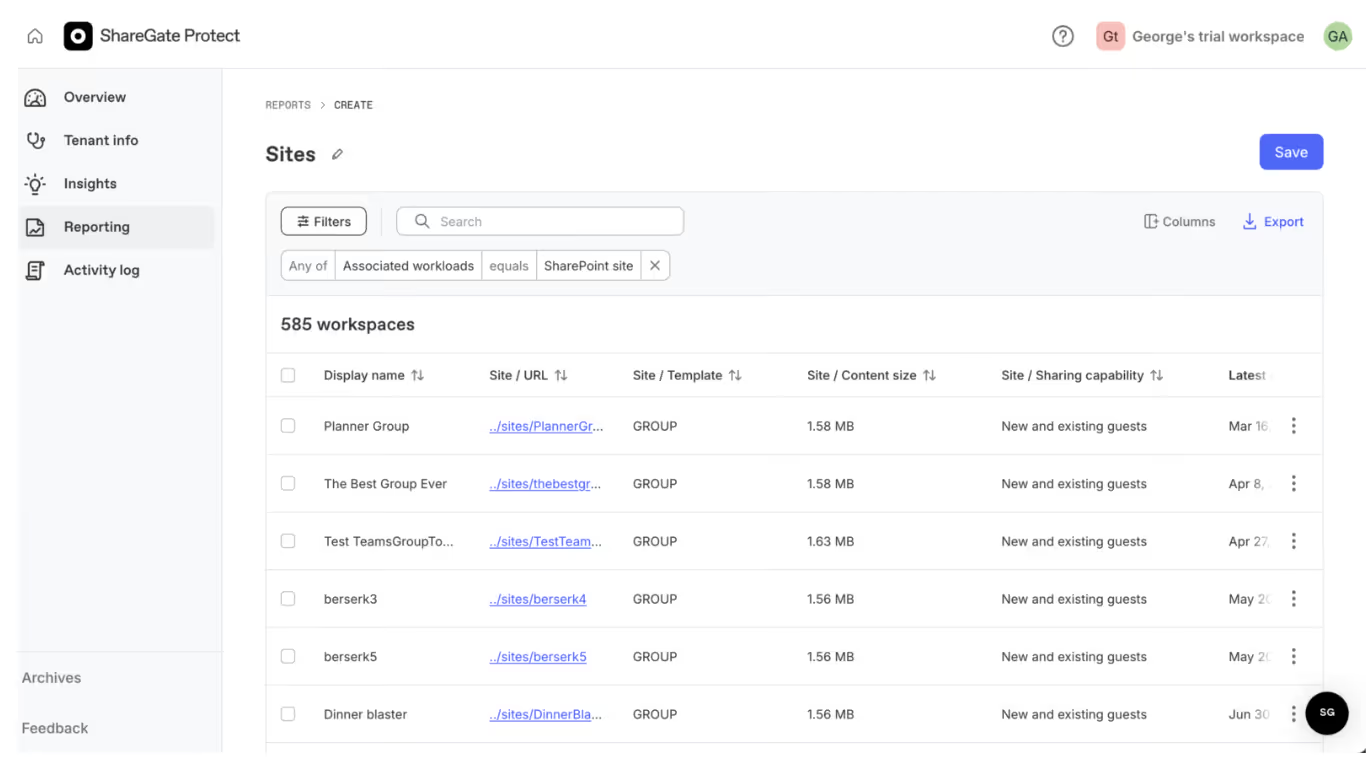
To archive a single workspace, select the three dots in the row for the item you want to archive. You can also select multiple workspaces and click on the Bulk actions button.

Want to see how it works? Ask for a walkthrough from one of our experts.












.avif)




Don’t just migrate it, ShareGate it.
Your source is never touched — ShareGate only copies.
Re-running is safe, included, and free.

