Microsoft 365 governance in your AI chat
ShareGate MCP brings Protect into your favorite AI tools: Claude, ChatGPT, and Microsoft Copilot. Ask anything about your tenant. Get clear answers. Fix what's risky.



























Your team works with AI. And now, so does your governance.

Faster answers, fewer detours.
A clear line from question to action.
More time for the work only you can do.
Full Microsoft 365 governance in one prompt
All your governance data
- Tenant health at a glance
- Active and inactive workspace inventory
- Policy history and change log
- Guest access and external sharing exposure

Which sites have broken inheritance, who owns them, and what were their last activity dates?
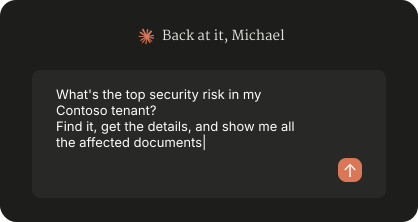
Richer answers from richer data
Show me teams that are inactive but still have premium licenses assigned. Create a report on how we can optimize costs.
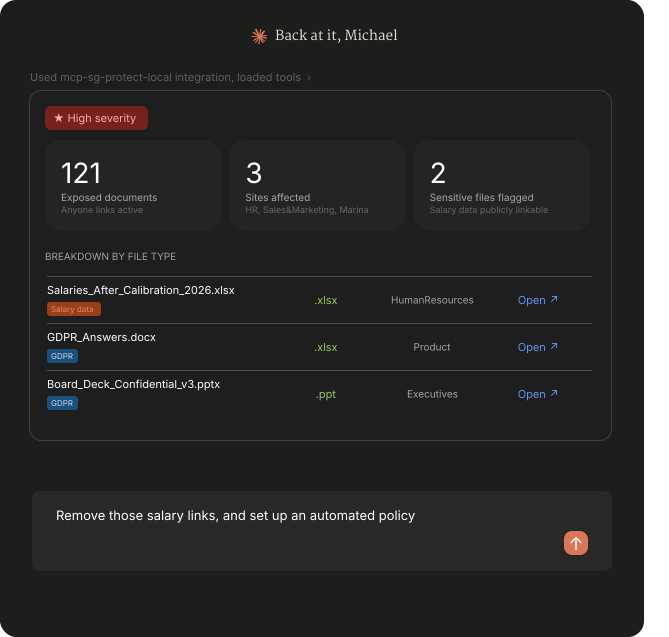
Action guided by insights
- Remove unsafe sharing links
- Adjust group ownership
- Create automated policies
- Preview every change in plain language before it executes
Create a policy that removes Anyone links on files containing "Salaries" or "Compensation.”
Connected ≠ exposed

Sign in with OAuth

Keep your permissions

Revoke anytime
Connect to the power of ShareGate
ShareGate is the operational governance system that helps IT pros keep Microsoft 365 environments clean, secure, and audit-ready. It's where the access data, policies, and activity log all live.
ShareGate MCP plugs straight into that foundation. Every action you run and policy you create goes through ShareGate, and every change is logged in its activity log, so you can see exactly who did what and when.

AI security

Oversharing and access
Cost optimization
Frequently asked questions

Yep, ShareGate MCP is a way to access ShareGate, not a separate product. The good news: if you're already using ShareGate, the MCP is included in your plan at no extra cost, and you can start using it as soon as you connect it to your AI tool of choice. If you’re not already a customer, you can book a personalized demo or start a 15-day free trial to test it yourself.
Every action can be previewed in plain language before it runs, so you see exactly what the AI intends to do. If the AI misunderstands your request, like suggesting the wrong sharing links or the wrong workspace, you can catch it in the preview. Set your AI tool to always ask permission for ShareGate MCP write tools, and you approve, adjust, or cancel each change. You can also disable ShareGate MCP from taking actions in your tenant from your workspace settings page.
Automated policies follow the same rule: they're created in ShareGate in a paused state, and you review and activate them yourself. For destructive policies, you're required to check an "I understand the impact" confirmation before launching.
Every action, whether triggered manually or by a policy, is logged in ShareGate's activity log, so you have a full audit trail.
ShareGate MCP exposes the full set of Microsoft 365 data ShareGate already tracks, plus the read and write actions ShareGate supports.
Data you can query:
- Microsoft 365 workspaces (sites, teams, groups, OneDrives) and their owners
- Sharing links, permissions, and access exposure
- Sensitivity labels, activity, and lifecycle signals
- License assignments and usage, including live Microsoft signals like sign-in activity
- Read actions:
- Tenant health snapshots and governance insights
- Filter and sort across any tracked entity
- Drill into specific issues or run natural-language queries
- Export results to CSV or generate branded PDF reports
Write actions:
- Remove sharing links
- Add or remove group owners
- Change group visibility (public/private)
- Archive or delete sites and delete groups or OneDrives
- Create automated policies for any of the above
Every write action can be previewed in plain language first. Every change is logged in ShareGate's activity log, tagged by source.
MCP—Model Context Protocol—is an open standard that lets AI tools like Claude, ChatGPT, and Copilot connect securely to other software. For Microsoft 365 governance, that's a meaningful shift.
Instead of using AI in isolation and then jumping into a separate tool to actually do governance work, you can ask, investigate, and take action on your tenant directly from the AI tool you're already using. ShareGate MCP is the ShareGate connector that makes this possible.
Yes, that's exactly what ShareGate MCP makes possible. With ShareGate MCP, you can use Claude, ChatGPT, or Microsoft Copilot to ask questions, build reports, and find risky sharing or access issues. You can also fix problems on the spot and set policies that run automatically in ShareGate through your AI chat. Every change can be previewed first, so you stay in control.
Microsoft Copilot is great for productivity tasks, and Microsoft Purview offers powerful compliance controls. But neither was built to give IT teams operational, day-to-day governance over Microsoft 365 access, sharing, and lifecycle. ShareGate Protect fills that gap, and ShareGate MCP makes it accessible through the AI tool you already use. Many ShareGate customers use it alongside Purview and Copilot to handle the operational governance work those tools weren't designed for.
Nope, ShareGate MCP is included in every plan. If you're already a ShareGate customer, you have access today. Go try it out! If you're new to ShareGate, you can test it out in a free trial.
ShareGate MCP uses OAuth 2.1 for authentication. Each user signs in with their own ShareGate account through their AI tool of choice. No shared credentials, no tokens to paste.
For authorization, ShareGate MCP only ever surfaces data each user already has access to inside ShareGate. Access can be revoked at any time from your AI tool's connected apps or from ShareGate.
For Conditional Access specifically: ShareGate authenticates against Microsoft 365 through a registered Entra ID enterprise app, so any Conditional Access policies you've applied to that app apply here too.
Dig deeper into
ShareGate MCP
ShareGate MCP Starter Prompt Pack

MCP governance without leaving your AI chat
Ask. Fix. Done.
See how ShareGate MCP makes governance feel less like a chore and more like a conversation.