
Master Hacks: Migrate like a pro
Check out our video series to help you turn migration projects into masterpieces!
Table of contents
Here at the ShareGate partner channel team, we've been having a lot of conversations about mailbox migration lately.
Many of you are curious about what ShareGate can do, and the best way to find out is to try it on a real project. But finding the time and budget to test a new tool, with client work already on your plate, isn't easy.
So we wanted to make it easier to find out.
Until March 31, 2027, partners who are new to ShareGate mailbox migration can get a free 12-month ShareGate Mailbox Essentials subscription to try our Exchange Online mailbox migration and Gmail migration on a real project.
Keep reading for more details.
ShareGate mailbox migration: What's changed and what you get
You might know ShareGate for SharePoint migration. Mailbox migration has been part of the tool for a while too, and we've added a lot, including Litigation Hold settings, archive mailboxes, Teams meeting links at the destination, Microsoft 365 Group mailboxes, resource mailboxes (rooms and equipment), and booking policies.
Today it covers every mailbox type, from planning to reporting. See everything it does on our Exchange Online migration page and Google Workspace migration page.
Essentials Mailbox is the ShareGate plan for one job: moving your mailboxes and calendars from Exchange Online or Gmail. It includes mailbox migration, planning, support and updates, and one machine activation (one computer that can run migrations).

How it works
ShareGate’s mailbox migration copies Exchange Online mailboxes and calendars from one Microsoft 365 tenant to another, and moves Gmail with Google Calendar and Google Contacts into Microsoft 365. You run it with the Copy feature in the ShareGate desktop app.
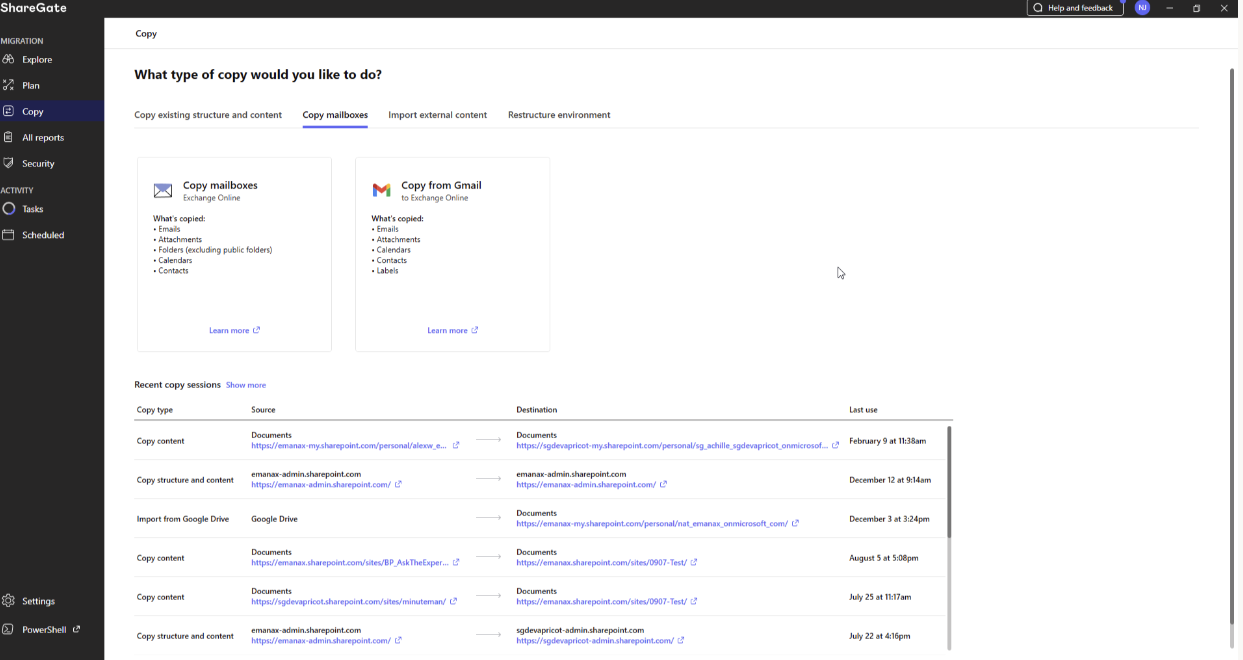
- To start, select Copy in the sidebar
- Select the Copy mailboxes tab
- Click Copy mailboxes or Copy from Gmail
Plan before you move. See a summary of your configured migration before you make the move. ShareGate flags any mailbox with no match.
What it migrates. Essentials Mailbox migrates Exchange Online mailboxes and calendars, plus Gmail with Google Calendar and Google Contacts. For Exchange Online, that includes emails, attachments, folders, categories, calendars, contacts, contact folders, inbox rules, archives, automatic replies, and Litigation Hold settings.
Incremental migration. Copy over what’s changed since your first copy, so users don't lose the content created in the meantime.
Mapping. Essentials Mailbox includes automatic mailbox and recipient mapping, plus manual edits and CSV import/export. Mappings are saved for reruns. Unmapped mailboxes are not copied, and recipient remapping only applies to internal recipients in the destination tenant.
The free Essentials Mailbox subscription: What's included
Once you've completed the steps below, we'll give you one 12-month Essentials Mailbox subscription, free.*
You can move as many mailboxes as you need on your registered client tenants.
One thing to keep in mind: subscriptions on eligible deals need to be issued before March 31, 2027, so we'd love for you to get started well before then.
How to get your subscription
1. Complete the mailbox migration training in the partner portal. It takes about 60 minutes and is separate from the certification.
2. Register a mailbox migration deal. The person who completed the training needs to be the one who submits it. Approval usually comes within an hour. A manual review can take up to 24 hours.
3. Contact your ShareGate partner manager once the deal is approved and your project is won. Subscriptions aren't issued automatically, so a quick note from you gets yours on its way.
4. Optional: Book a pre-migration planning call with a ShareGate mailbox migration expert. It's a great way to talk through your plan before you start.
Who qualifies
Every partner, at every level, including partners brand new to the program. The one requirement: you haven't used ShareGate mailbox migration before.
Good to know
We have offices in several countries. Do we each qualify? The offer is per legal entity. If your US and UK arms are separate legal entities, each can claim one subscription. If you have 10 legal entities in one region, each one qualifies.
What if the client is already registered by another partner? If the deal is already registered to another partner, it isn't eligible.
I buy through a distributor. Does anything change? No. We issue the free subscription directly to you.
What if the project needs more than mailboxes? The free subscription covers Essentials Mailbox. If the project includes other things to move, you can buy additional packages to fit your client's needs.
Does this count toward my partner tier? No. It's a standalone offer and doesn't change any level requirements.
What support do I get? Standard support follows your partner level. And if it's your first mailbox migration, you'll also get enhanced support through the pre-migration planning call, whatever your level.
Ready to get started?
Head to the partner portal to start the training. It takes about an hour and it's the first step to your free subscription. If you have questions along the way, your ShareGate partner manager is always happy to help. Just reach out.
When your migration wraps up, we'd love to hear how it went. And if you're open to it, we'd be thrilled to feature your work in a case study.
Thank you for everything you do with ShareGate. We can't wait to see what you move!
* One free subscription per partner entity. Only Essentials Mailbox is covered. If a deal is already registered to another partner, it isn't eligible. ShareGate's End User License Agreement (EULA) still applies to the free subscription. The offer is for partners adopting Mailbox for the first time.





Don’t just migrate it, ShareGate it.
Your source is never touched — ShareGate only copies.
Re-running is safe, included, and free.