


From ask to action: ECS 2026 showed the agentic shift in Microsoft 365 is here—are you ready?

.svg)
%20(1).avif)
Master Hacks: Migrate like a pro
Check out our video series to help you turn migration projects into masterpieces!
Table of contents
Agents like Cowork can now take action on your behalf.
Non-technical employees are building ad-hoc agents using just plain language rules in a Word document.
And SharePoint is the number one knowledge source for Copilot and your knowledge platform for AI.
Those three takeaways from the 2026 European Collaboration Summit (ECS) got my attention. And if you're responsible for data security in your organization, they'll probably get yours too. Let me walk you through what stood out and what IT admins need to pay attention to.
Key takeaways
- We're in the reasoning era. Agents are now taking action inside your M365 environment, not just responding to prompts.
- Ad-hoc agents are being built by non-technical employees right now. They’re using plain language rules in a Word document. No developer or IT ticket needed. If you don't have a framework for this, now’s the time to build one (keep reading for my advice).
- Cowork manages complex tasks in the cloud across devices and sessions on your behalf.
- Microsoft supports multiple AI models in Copilot. This means users get the best model for each task.
- Adoption is the hard part. Communication, training, and guidance are what turn demos into real productivity gains.
We've moved from "ask and find" to "plan and act"
For the past few years, AI was essentially a smarter search. You asked a question, you got an answer.
What's different now: with the latest reasoning models from Anthropic and OpenAI, AI can now plan and take action on your behalf. This is shown in the powerful new AI and agent features for SharePoint and Microsoft Teams.
That's the shift that defined ECS this year, and honestly, i was impressed.
Microsoft is predicting 1.8 billion agents in the workforce in just a couple of years. It already has 500,000 agents running in production internally. But in my experience, I've learned to take predictions like that with a grain of salt. Not every agent will deliver real productivity gains for employees.
Ad-hoc agents: the part every IT admin needs to act on now
Your users can already build agents. No developer. No Azure Foundry deployment. No IT ticket needed.
Microsoft calls these ad-hoc agents. They’re lightweight automations that non-technical employees can configure using plain language rules in a Word document. Employees can update those rules themselves.
The more complex processes live in Azure Foundry and need specific technical expertise and lots of testing. But the ad-hoc layer is already there for your users today.
This is the part that needs your attention. Agent governance is becoming more important every day. Without the proper controls, you're looking at shadow agents, data leaks, uncontrolled data access, oversharing, and misinformation.
Monitor agents with the help of Agent 365 and apply governance with Purview, Entra, Defender, and Intune. And work on your adoption strategy to guide your employees in the correct and safe use of these agents. Support them with those governance controls every step of the way.
WebMCP is worth noting here too. Microsoft and Google are working closely together through the W3C to develop this new standard for making websites agent-ready. Another area for IT to think about as agents proliferate.
Cowork: delegate work to Copilot and get it done
Copilot Cowork is Microsoft's latest innovation that lets Copilot do work for you on your behalf.
Describe the outcome you want and Cowork grounds the work in your emails, meetings, messages, files, and data via Work IQ. It turns your request into a plan, executes it in the background, and checks in before applying any changes. You stay in control throughout.
In practice, this covers a wide range of work:
- Cleaning up your calendar
- Protecting focus time
- Preparing meeting briefing documents and client-ready decks
- Pulling together company research from across internal and external sources
- Building out a full launch plan with competitive intel and coordinated deliverables.
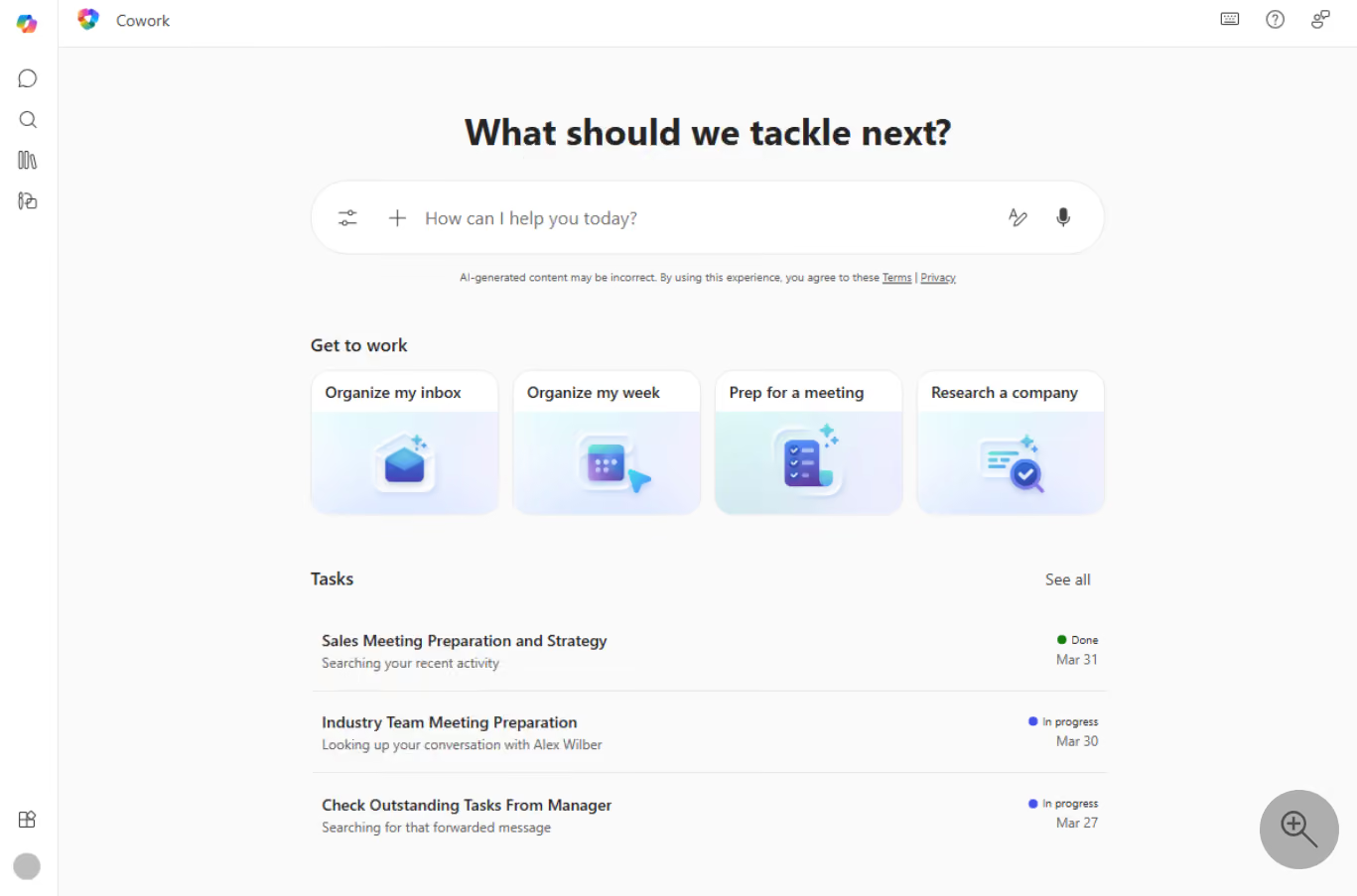
Cowork can draft your annual performance review based on a full year of your Microsoft 365 activity. Something that used to take many, many hours.
Because Cowork runs in a cloud environment, tasks continue across devices and sessions without you needing to re-prompt. It can coordinate multiple aspects of complex projects over time. Actions and outputs are auditable and it runs within your existing Microsoft 365 security and governance boundaries—identity, permissions, and compliance policies apply by default.
Your agenda assistant. Moving meetings, suggesting declines, drafting responses to organizers, and much more. Definitely something I’m really looking forward to.
Researcher: two models, one output, and automatic sensitivity labeling
Researcher is an intelligent assistant in Copilot that helps with complex work. It gathers and analyzes information from both your workplace data (emails, files, meetings, chats) and the web.
And it just got an upgrade.
Researcher now uses two specialized reasoning models from Claude and GPT, working in tandem to improve the quality of reports.
The cherry on top is the automatic attachment of a sensitivity label. Because Researcher works over both external and internal protected resources, it can apply the right sensitivity label to make sure that important internal data is protected.
As a Data Security Consultant, this made me very happy. That's AI-aware data classification happening at the point of creation, without anyone having to think about it after the fact.
Apart from that, Microsoft is embracing more models within Copilot and Work IQ. Their goal is to provide the best possible experience. Right now, Claude is on the top of the world, but let's say another model takes over. Microsoft won't hesitate to integrate it. Smart move by Microsoft by not betting on one horse.
One note for European organizations specifically: in Europe, it's not always allowed to use Claude with company data because of privacy and data residency concerns. So shouldn't you use Claude? No, but be careful with the type of information you're using and feeding the model. This applies to all models, but a gentle reminder is always worth it.
Agentic capabilities are in every Microsoft 365 app and your governance needs to match
Microsoft made one thing clear at ECS 2026: agentic capabilities are being built in all the experiences in Microsoft 365. In Word, Excel, PowerPoint, Teams, you name it. That means your governance scope needs to extend beyond Copilot settings and cover every surface where agents can now act.
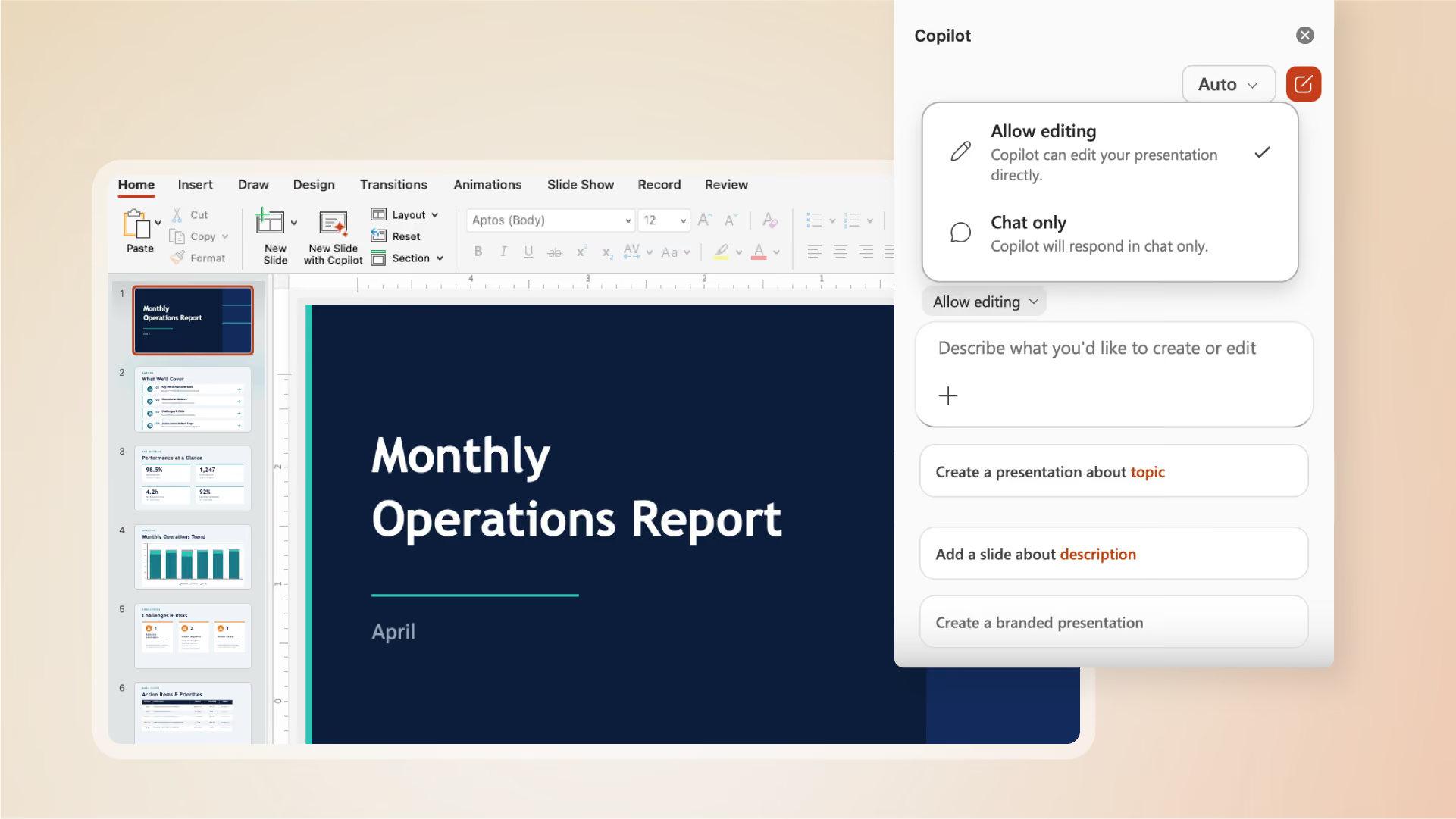
Copilot in PowerPoint now supports agentic tasks. Give Copilot a complex prompt and it breaks the task into a work plan and executes it with full understanding of how PowerPoint visual constructs work, including the ability to create and change content directly. Copilot now supports multiple models within the apps, Claude was used for this type of task at ECS. The agentic tasks really step it up with more complex questions and processes. Love it.
Project Opal now supports the execution of a prompt in combination with a virtual machine. It lets an agent perform tasks inside websites on behalf of the user, saving valuable time for repetitive tasks. Although it walks a fine line, it's another step forward. This one is worth watching closely as it matures.
Facilitator and Channel Agents: new capabilities your Teams governance needs to cover
I covered Teams agents, particularly Channel agents and Facilitator agents, in a previous blog. Here's what's new.
- Facilitator can now pull real-time web information mid-meeting and post it directly into the chat so everyone can access it in a shared way. After the meeting, it prepares a strategy document for leadership, ready to edit, and automatically creates a recap and assigns tasks and action items.
- Channel agents can now automate repeatable workflows that previously needed manual effort every week—connected to tools like Jira, DevOps, and GitHub. Every step is transparent: you can see what the agent is doing.
Microsoft confirmed that Teams plays a crucial role in the future of AI within Microsoft and that over 50% of their investment is still going into the core fundamentals of Teams and SharePoint. There have been over 100 improvements to the core user experience. Better threading, the triage experience for busy channels, Loop embedded into channels by default.
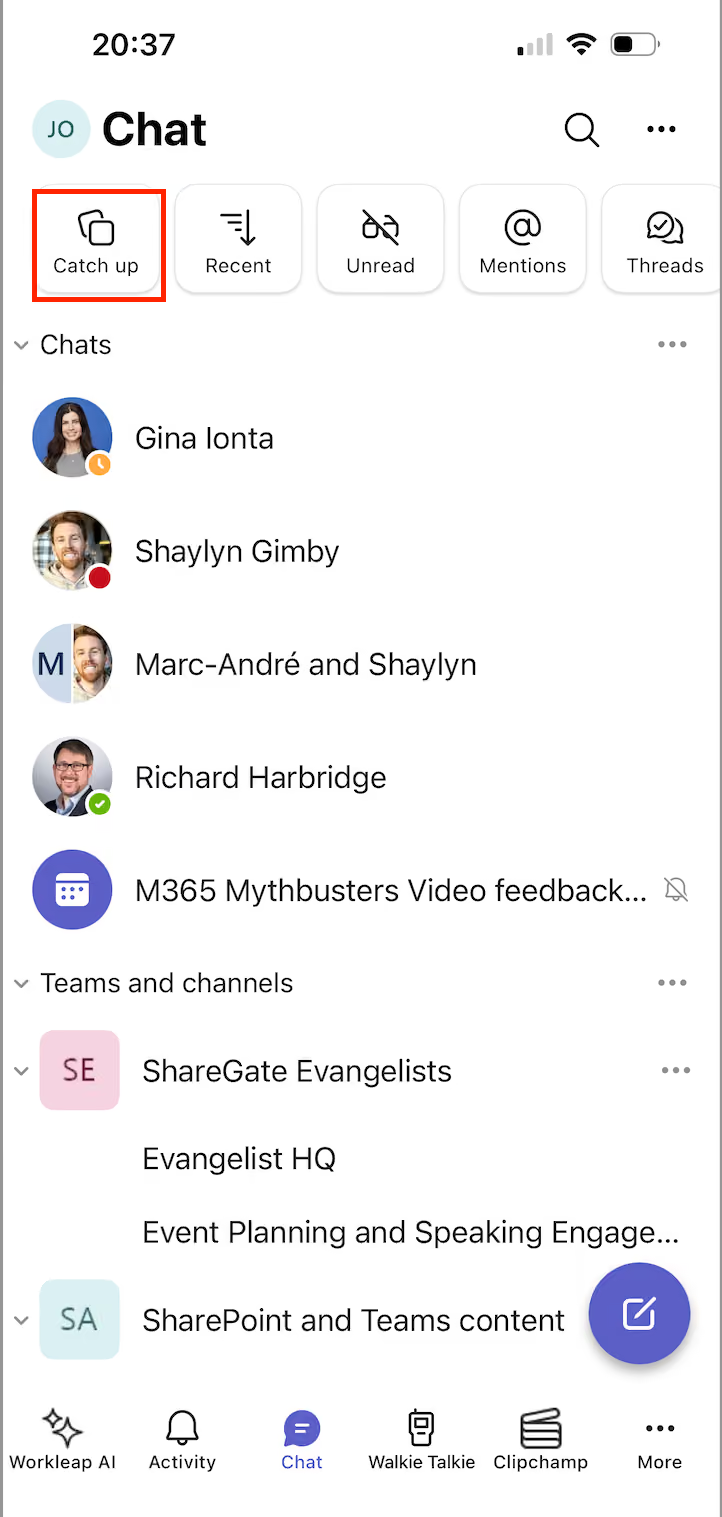
The Catch Up feature on Teams mobile is one I use daily. Super handy when you have many channels and conversations. Go to the mobile app, hit Catch Up at the top of your chat pane.
SharePoint is the knowledge source for Copilot—your AI strategy runs on it
Microsoft is centering SharePoint as the knowledge platform for AI. As someone who started their career as a SharePoint consultant, this makes me very happy.
SharePoint is the number one knowledge source for Copilot. Work IQ, the intelligence layer that contextualizes Copilot and the agents you're building, connects directly to SharePoint, Teams, and Outlook. The SharePoint team alone has 40 to 50 tools in the Work IQ namespace, covering everything from moving a file to extracting metadata. Work IQ is all about the full experience of working with the productivity applications you use every day.
AI Skills, now in public preview, lets organizations teach AI in SharePoint what to know and how to act. You can save prompts as skills to easily reuse them. Copilot is now tightly integrated — allowing you to prompt it to create custom SharePoint sites containing multiple lists and libraries with features around metadata, folders, and conditional formatting. Impressive.
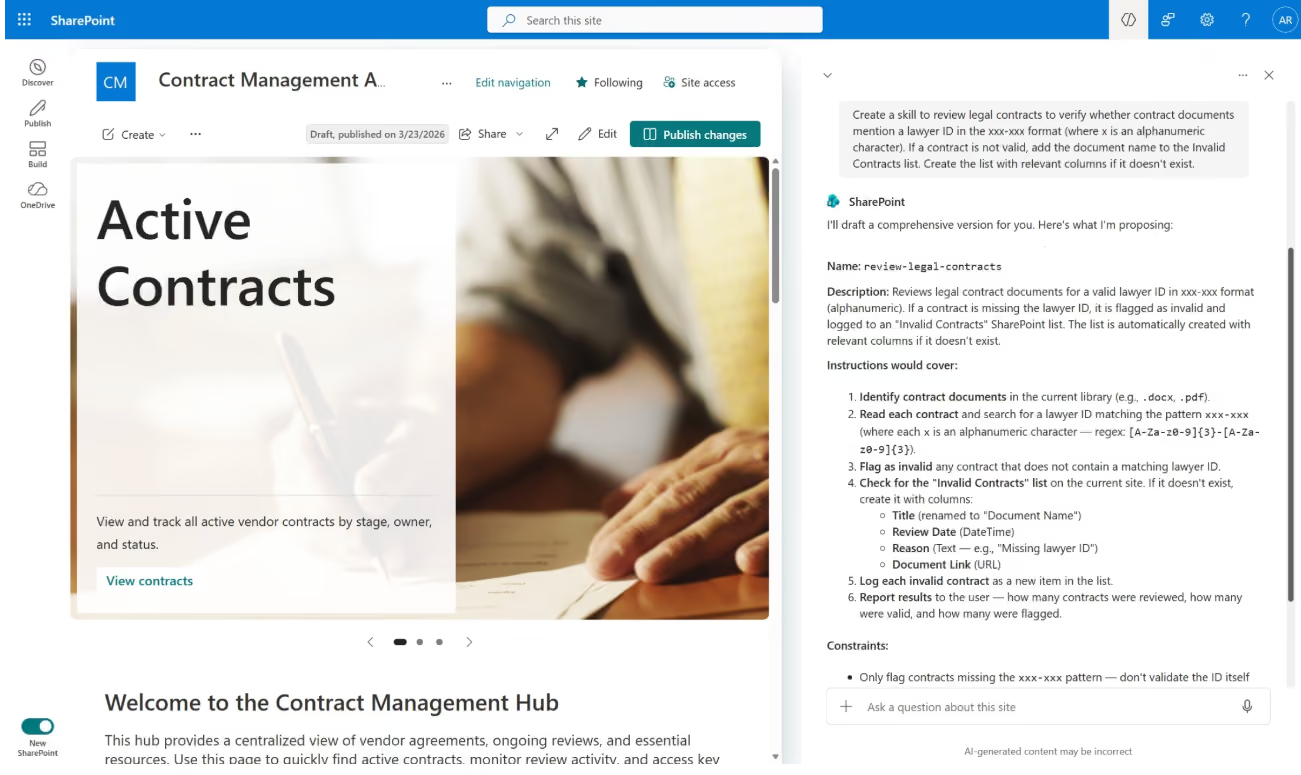
Microsoft confirmed that Copilot, Teams, and SharePoint are the three apps to anchor your AI strategy around. SharePoint is the foundation the other two run on. If you've been investing in SharePoint governance, that investment is paying dividends right now.
What all this means for your organization
I was impressed with the demos and new features at ECS 2026. These are actually helping employees and that matters.
But as the agentic platform grows, so do the governance and data security responsibilities that come with it. Shadow agents, data leaks, oversharing, and uncontrolled data access are real risks. And they grow in proportion to how fast your organization adopts these tools without the right controls in place.
That said, this is going to need an extensive adoption approach with communication and training sessions. Most people don't have the time to figure all of this out by themselves and need guidance. That's the adoption challenge sitting in front of every IT pro right now. The ones who tackle it with a clear plan will get real results.



.jpeg)






.avif)
Don’t just migrate it, ShareGate it.
Your source is never touched — ShareGate only copies.
Re-running is safe, included, and free.

