



.svg)

%20(1).avif)
Master Hacks: Migrate like a pro
Check out our video series to help you turn migration projects into masterpieces!
Table of contents
Microsoft MVP Jasper Oosterveld brings you his take on the AI-driven direction showcased at ESPC25—what stood out, what’s shifting, and the questions every organization should be thinking about next.
The ESPC25 keynote from Jeff Teper, President of Microsoft 365 Collaborative Apps and Platforms, was packed with demos, sessions, and a very clear message: AI is driving everything Microsoft is doing in Microsoft 365.
And I mean everything.
In my notes, the first thing I captured was that the entire keynote was about AI and Copilot. That set the tone for the hour that followed.
Based on what Jeff shared, from Copilot updates to new Teams and SharePoint agents, Microsoft has already laid out the roadmap for the next phase of AI-powered work.
Let’s walk through what stood out and what I think IT leaders, IT admins, and partners really need to pay attention to.
The three priorities for Microsoft 365
The keynote kicked off with Microsoft’s current priorities:
1. Security and quality
2. Microsoft 365 core
3. Microsoft 365 Copilot and agents
Even with AI dominating Microsoft’s messaging, Jeff said that two-thirds of engineering investment still goes toward strengthening the core experience.
As he put it:
“The most important thing is making sure the service, the products you bet on every day, is secure, reliable, performant, accessible…”
—Jeff Teper, Microsoft Collaborative Apps & Platforms President
That’s good to hear. As a data security consultant for M365, I can’t stress enough that this foundation matters more now than ever.
The rest of the keynote made it crystal clear that AI is the strategic focus for the foreseeable future. Let’s get into that next.
The evolution of AI in the workplace: From assistants to operators
There’s tension almost every organization is feeling right now. On one side, leadership is pushing for speed. On the other, employees are feeling overwhelmed. Sound familiar?
“Most employees say, "We're overwhelmed. Our organizations have gotten leaner. These technologies are wonderful, but they also create a lot of information overload." And so, we feel a big responsibility for threading the needle on this, to give people tools so they work smarter, not harder, and organizations can be more effective.”
—Jeff Teper, Microsoft Collaborative Apps & Platforms President
Microsoft sees AI as the key to breaking through that ceiling. Not just automation, but transformation.
We’re already starting to see the shift:
- AI assistants
- AI teammates
- AI operators
Right now, most organizations are sitting somewhere between phase one (AI assistants) and two (AI teammates).
Microsoft 365 Copilot: Beyond adoption, into everyday work
At ESPC, Microsoft dropped a big stat: Over 90% of the Fortune 500 are now using Microsoft 365 Copilot.
That’s not early adoption anymore. That’s mainstream. The focus now is helping organizations move from trying Copilot to relying on it every day, across teams.
Meet Work IQ: The intelligence layer enabling Copilot and agents
Work IQ was one of the top reveals at Microsoft Ignite 2025—get the full scoop in our recap.
During the keynote at ESPC, Microsoft explained that Work IQ is the new name for the intelligence layer behind Copilot. It’s what gives Copilot the context to not just guess, but know what you need.
Work IQ connects three key capabilities:
- Data: Your work content such as files, meetings, emails, and chats.
- Memory: Your patterns, like how you work, who you work with, and what’s important.
- Inference: The magic that turns it all into helpful, personalized outputs.
You can learn more about Work IQ from Microsoft’s solution page.
More model choices in Copilot

Copilot now lets you choose which large language model (LLM) to use for specific tasks. Microsoft is the only major vendor offering this.
For example, if you need fast, accurate synthesis across a lot of data, choose GPT-5. But if you’re looking for a different style, tone, or capability, then switch to another model like Claude. Copilot adapts to how you work, so you’re not locked into one model for every job.
Say hello to Researcher: Your tireless digital assistant
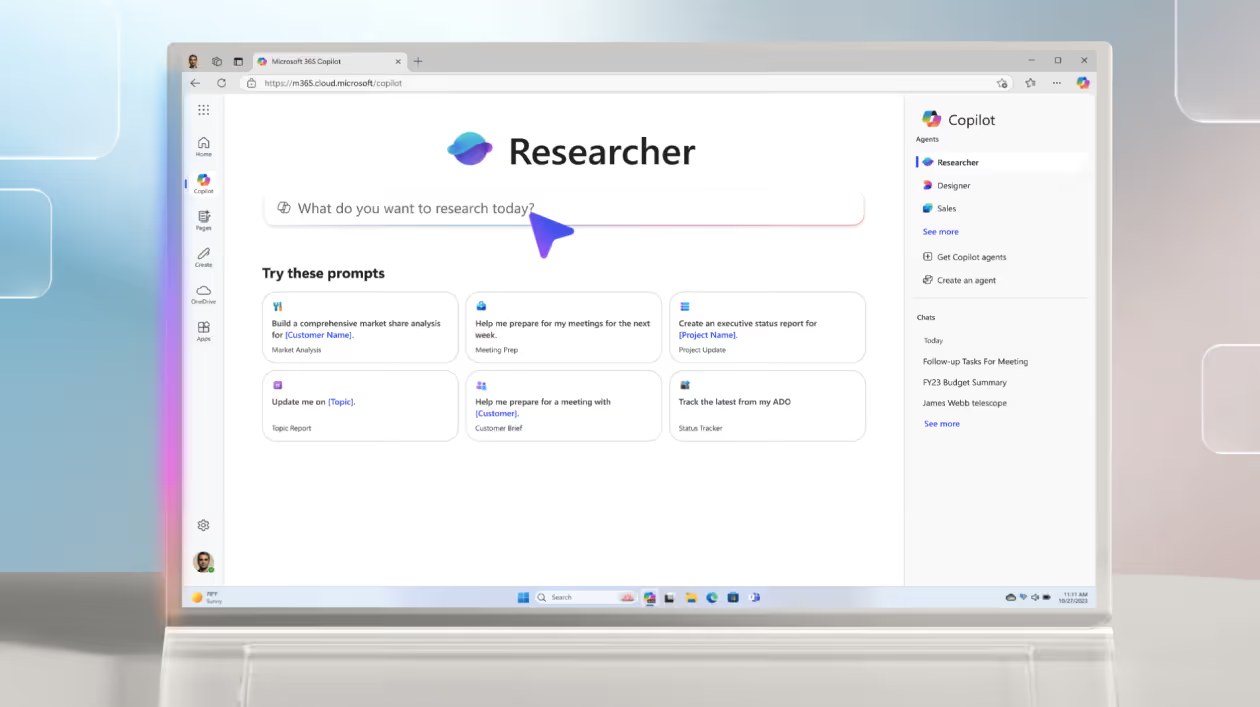
One of the standout new features is Researcher. It’s described as an intelligent assistant in Copilot that helps with complex, multi-step work. It works by gathering and analyzing information from both your workplace data (emails, files, meetings, chats) and the web.
Teams: AI agents become part of every workflow
Teams received a long list of UX updates over the past year, including:
- Threaded conversations
- More control over notifications
- Better ways to manage channels and chats
One of the major highlights was the introduction of Teams agents.
Channel Agent
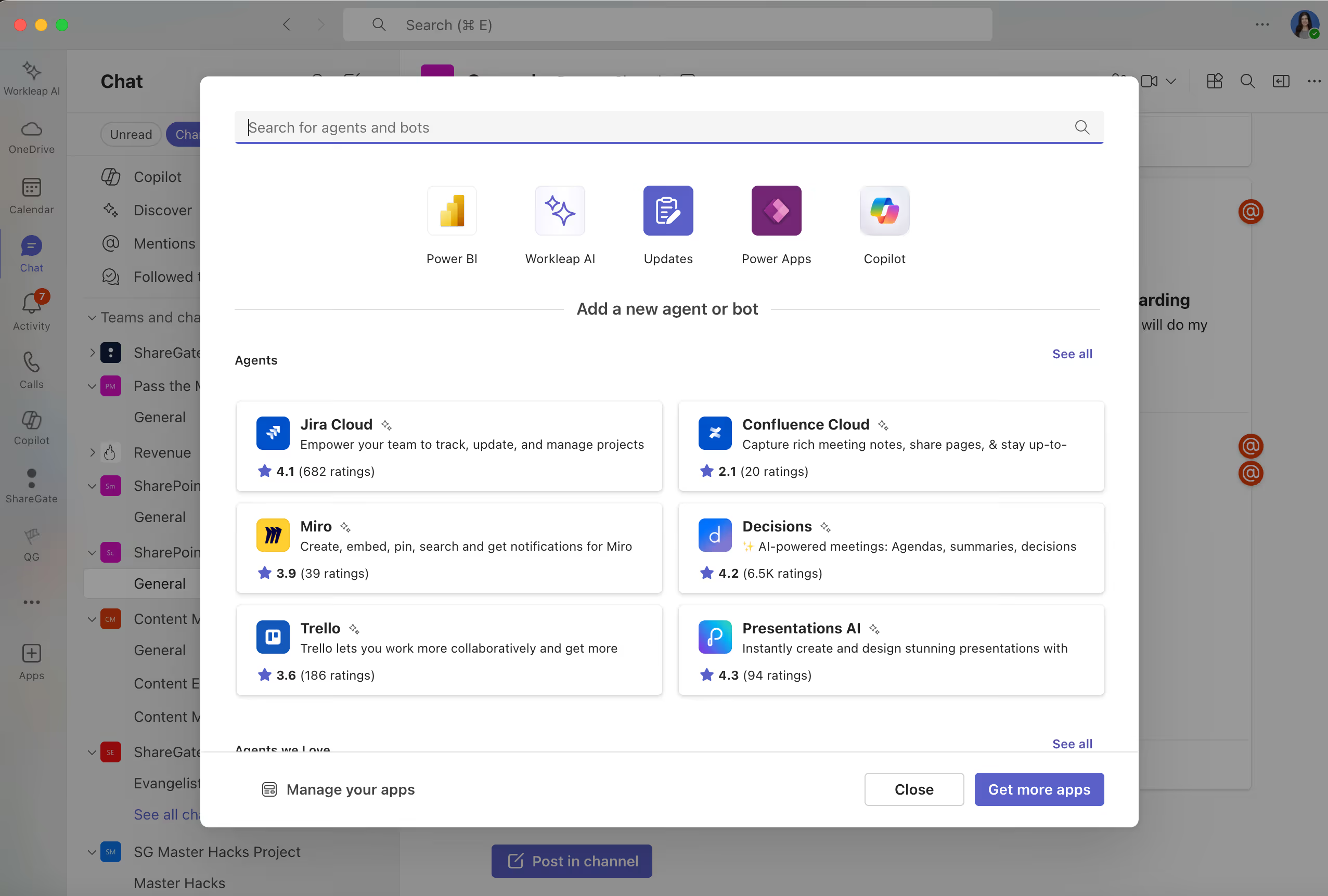
Every Teams channel now has a built-in agent that can:
- Use the associated SharePoint site and group as its primary context
- Pull data from external systems like Jira
- Infer team member identities (even without last names)
- Schedule meetings by analyzing people’s availability
- Support multi-user collaboration directly inside the channel
Facilitator agent
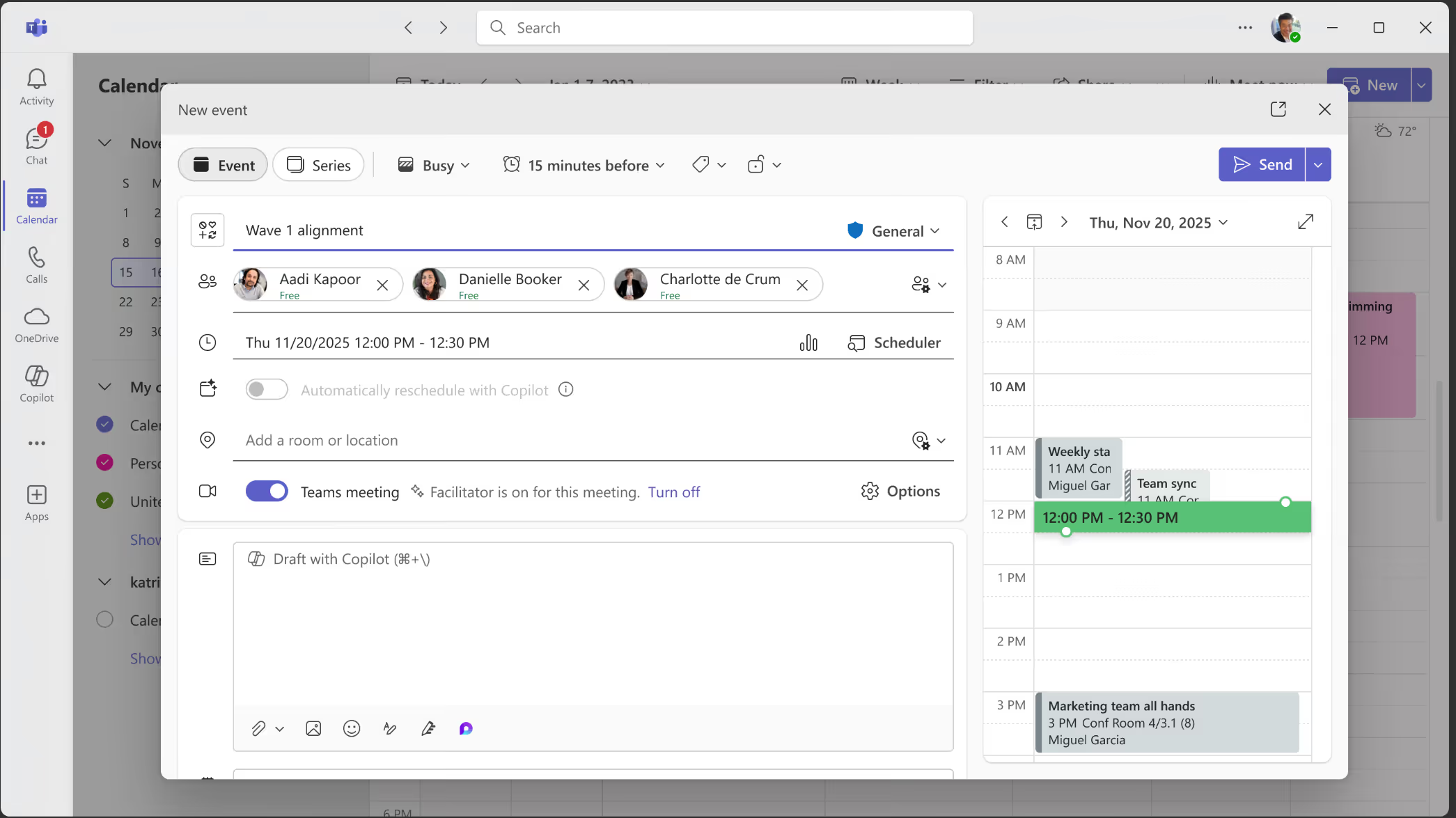
The Facilitator agent, now in general availability, includes capabilities like:
- Allocating and adjusting meeting time
- Extracting agendas from chat
- Capturing and structuring meeting notes from the live transcript
- Producing follow-up documentation such as launch plans
These agents are meant to reduce manual meeting tasks and make collaboration feel effortless.
SharePoint is the backbone powering Microsoft’s AI
A major milestone was announced: SharePoint has surpassed 1 billion active cloud users.
SharePoint continues to sit at the center of Microsoft’s AI strategy, especially in how people:
- Ask and find information
- Organize and analyze content
- Build and automate workflows
Knowledge Agent
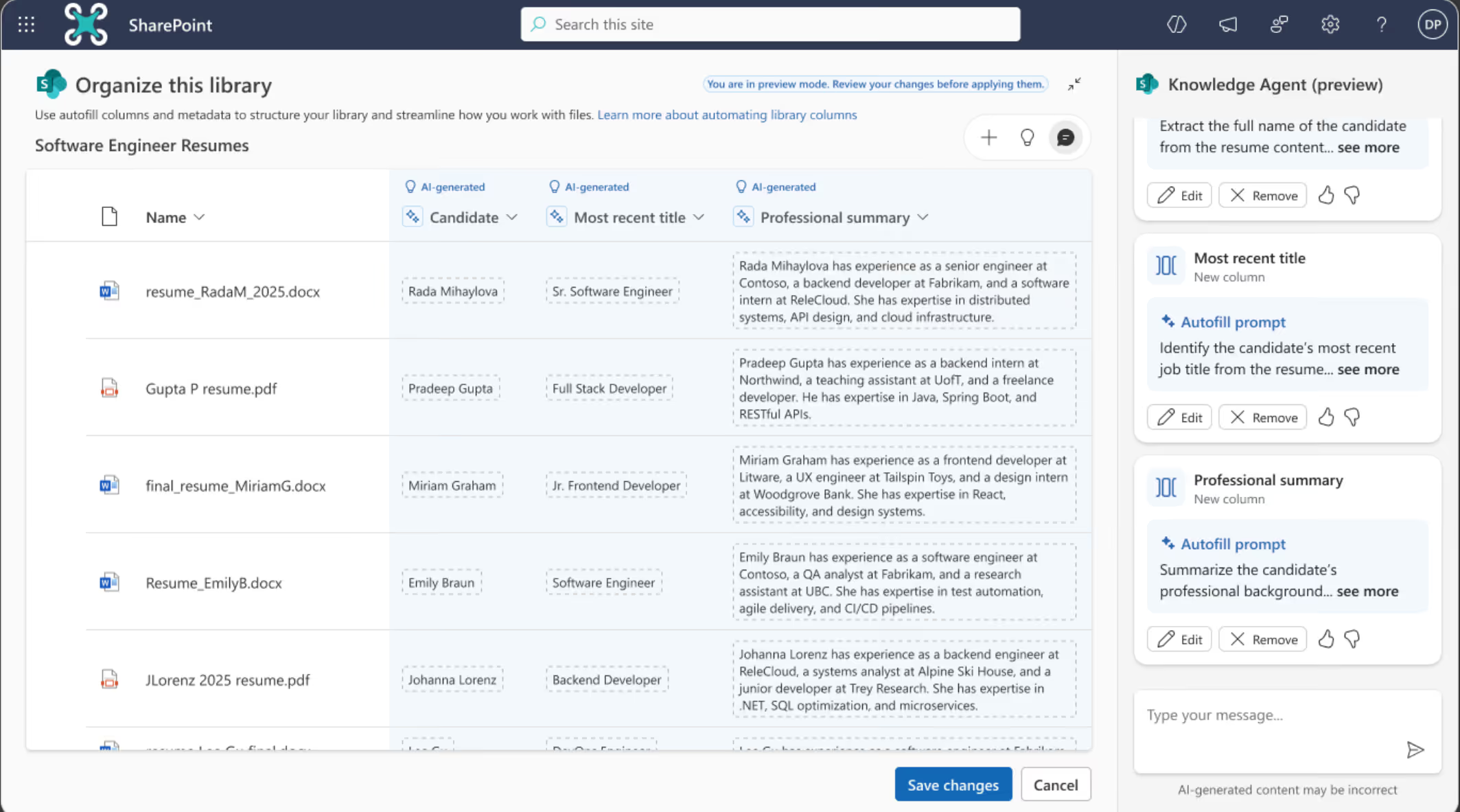
The Knowledge Agent is now live in public preview and brings context-aware AI directly into SharePoint. It can:
- Detect gaps on communication pages
- Extract metadata from images through OCR
- Suggest improvements based on search behavior
- Identify broken links and stale pages
- Restructure document libraries
- Create automations for new content
- Integrate with Teams so people can collaborate with SharePoint agents directly in Teams chats
Admins can manage SharePoint agents in the Microsoft 365 Admin Center.
Agent 365: AI governance
AI agents are about to explode in number. Already, over 1 million agents have been created using SharePoint and Copilot Studio.
“There will be more agents in the workforce than there are people. And of course, that needs a governance solution.”
—Jeff Teper, Microsoft Collaborative Apps & Platforms President
Makes sense. If organizations can create a billion SharePoint sites or Teams channels, they’ll definitely need a way to keep a billion agents in check.
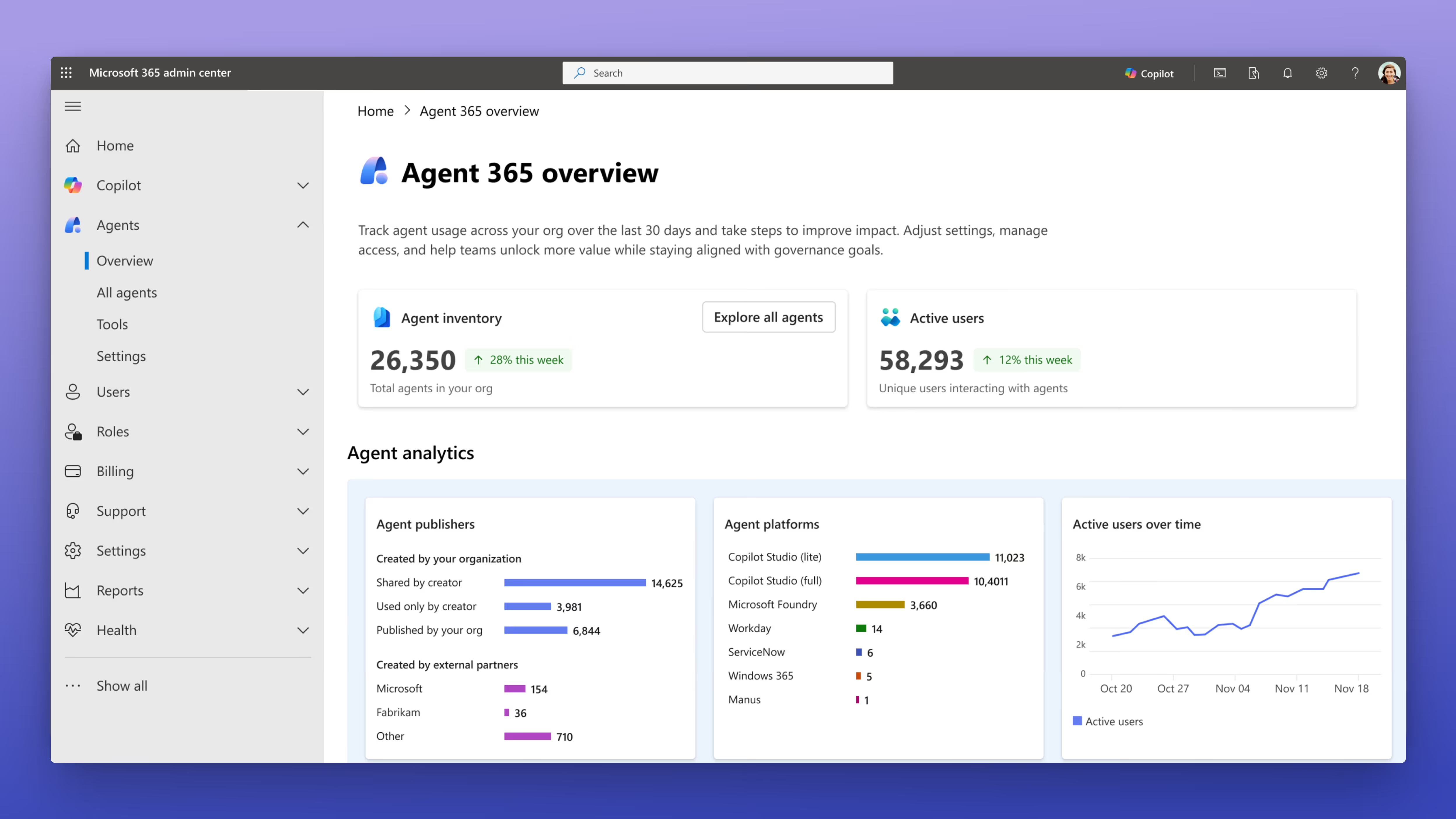
As it was announced at Ignite, Agent 365 is Microsoft’s new control plane for giving IT one central place to:
- See every agent running across the tenant
- Understand what each one connects to
- Spot security or compliance risks early
- Allow, block, or review agents as needed
- Track usage and activity trends
My take: The questions we still need to ask
As much as I’m impressed with what AI can do, I also think we need to be open and honest about the other side of it. The parts that aren't being addressed.
And to do that, we need to start asking a few important questions.
1. What does AI adoption really look like?
Hearing that 90% of the Fortune 500 are using Copilot is impressive. But how deeply is Copilot being adopted inside those organizations? Is it actually delivering meaningful business value? The keynote didn’t say.
AI adoption can’t just be “licenses deployed.” It has to be tied to real-world use cases. Meaningful AI adoption happens when employees understand where Copilot and agents help, how to validate outputs, and how to integrate them into their daily workflows.
If you want safe and effective adoption of Copilot or agents, here’s a good place to start:
- Show employees clear scenarios where Copilot and agents improve workflows
- Provide hands-on training
- Provide guidance on validating outputs
- Give follow-up support
2. What's AI’s impact on the workforce?
During the demo, one of the Microsoft presenters joked “My PA isn’t getting a holiday this week” referring to their AI-powered personal assistant working nonstop. It got a laugh, but it also made me pause. If AI is increasingly replacing tasks that people normally manage, what will happen to the people doing them?
There was no acknowledgement of that—no talk about job security, regulations, or the impact on employees. These conversations matter.
For large multinational companies, AI can easily become a way to reduce staff while still meeting shareholder expectations for constant growth. I’ve been in meetings with a customer who specifically wanted to use AI agents to handle support questions through their website to reduce full-time staff.
Don’t get me wrong, I’m excited about many new features like the Channel Agent, Facilitator, and Knowledge Agent—tools that genuinely improve productivity and reduce busywork. But leaders and executives won’t feel this shift the same way as everyone else.
As technical people and consultants, it’s easy to get wrapped up in the tech, but we have to look at both sides: the innovation and the impact.
3. Where does AI genuinely help?
Not all AI is equal. Focus on where it actually helps. I think these AI features really shine:
- Channel Agent: Smooth, fast, and extremely helpful for meeting coordination and connecting content across Microsoft 365.
- Facilitator: I’ve used it extensively, and it really simplifies meeting management without impacting job security.
- Knowledge Agent: Impressive speed and helpful suggestions for improving document libraries and SharePoint sites. This one just needs proper training so knowledge workers understand how to use it.
4. How prepared are we for governance challenges?
With the massive growth in AI agents, we can’t ignore the governance load coming our way.
On the positive side, I do appreciate Microsoft’s work on governance with Agent 365. It seems like they understand the importance of admin oversight for agent usage. The interface looks clean and easy to use, which is a good step forward. Time will tell how well it scales in the real world, but it’s movement in the right direction.
Remember, it’s critical to keep governance for M365 front and center.
5. Is your Microsoft 365 environment ready for real-world deployment?
I have to say, the demos at ESPC25 looked fantastic—polished, fast, and intuitive. But as always, real-world environments are more complex. For organizations to truly benefit from Copilot and agents, these tools need to connect to actual, everyday use cases.
That means:
- Meaningful adoption plans
- Solid governance foundations
- Clean and organized content
- Proper training for the people using the tools
These fundamentals are still the biggest determining factors for successful AI rollouts.
AI momentum is accelerating. How intentional is your AI strategy?
Microsoft isn’t slowing down. AI and Copilot are being pushed across the entire Microsoft 365 ecosystem. That’s exciting, but it also means organizations need to approach AI with clarity.
My advice?
- Be intentional about where you deploy AI
- Prioritize use cases that truly improve efficiency
- Protect the people impacted by these changes
- Anchor your strategy in governance and responsible use
Closing thoughts
Microsoft is pushing AI forward fast. The tools look promising, and many genuinely help. But none of it works without strong foundations and an honest look at how this all plays out for the people behind the screens.
So put the groundwork in place. Govern well. Roll out with intention. Support employees so they can use these tools effectively. And remember, there’s a human side to this shift, too.



.jpeg)







.avif)

Don’t just migrate it, ShareGate it.
Your source is never touched — ShareGate only copies.
Re-running is safe, included, and free.

