


How to roll out Microsoft 365 Copilot in a regulated environment: A 3-phase framework

.svg)

%20(1).avif)
Master Hacks: Migrate like a pro
Check out our video series to help you turn migration projects into masterpieces!
Table of contents
Recently, I worked with an organization running a Microsoft 365 Copilot pilot across a few departments. They were making solid progress.
They were cleaning up inactive teams. Switching sites from public to private. Assigning two owners per team. Reviewing potential oversharing. They also supported users with training and communication. Everything was on track.
Until a memo dropped from compliance and privacy.
The message was clear. Block all Personally Identifiable Information (PII) in Microsoft 365 using a sensitivity label. The goal? Prevent unauthorized processing of PII, driven by regulations like GDPR.
The impact was immediate. Panic, frustration, and real concerns about the future of the Copilot rollout.
Compliance expectations don’t always line up with how Microsoft 365 actually works, especially with Copilot in the mix. In this article, we’ll look at what happens when they collide and how to navigate it.
Understand the risk: 93% confidence in AI governance, yet nearly 1 in 3 organizations report data exposure incidents. READ MORE
Why Copilot pilots stall in regulated organizations
This situation isn’t unique. I’ve seen this pattern in regulated organizations before. A Copilot pilot starts with the right momentum. Governance activities are in place. Users are trained. Early results look promising.
But then compliance or privacy steps in.
Concerns about PII, data exposure, and regulatory requirements like GDPR suddenly take center stage. And without clear visibility into where sensitive data lives or how it’s being used, the safest option feels like the only option: stop or restrict the rollout.
That’s when pilots stall. And it’s not because the technology isn’t ready, but because organizations don’t yet have the visibility and controls in place to move forward with confidence.
Why blocking sensitive data isn’t the answer
Organizations tend to block. They block services, apps, external sharing, self-service site creation. The list is endless. The idea is to make the organization safer, prevent misuse, and helps with compliance.
In reality, it doesn’t work like that. Blocking PII with a sensitivity label feels like the right move, but it creates a false sense of security. The data is still there. Employees already have access to it. They can share it, take screenshots, or copy it into other tools.
You’re not removing the risk, you’re just moving it.
At the same time, you’re blocking the people who actually need that data. They can’t use Microsoft 365 Copilot anymore. The pilot slows down or stops completely.
So, what can you do instead?
Let’s look at a better approach.
How to roll out Copilot in a regulated environment: 3 phases
Before you start blocking Microsoft 365 Copilot, take a step back. Don’t guess. Don’t assume. Work with facts.
Phase 1: Monitor
First, try to understand what’s actually happening. How are employees using Copilot? Are they working with prompts or content that contains PII?
That’s what you need to monitor. The results will give you the data you need in the next phase to make informed decisions.
So where do you start? Start with defining your PII. Most organizations deal with the same types of information:
- Full name
- Physical address
- Social security number
- IBAN
- Passport number
- Client numbers
- Personnel number
- Birthdate
- Gender
- E-mail address
If you’re not sure what qualifies as PII in your organization, that’s already a signal. This should be part of your data classification and protection policies. Talk to the right people like Data Stewards, Data Protection Officers, Information Protection Officers, Data Quality experts. They own this space.
Once you have your PII defined, you need to detect it. That’s where Microsoft Purview comes in. Use Sensitive Information Types (SITs) to identify PII in your environment.
Out of the box, Purview won’t cover everything. That’s normal. You’ll need to create custom SITs or adapt existing ones.
And don’t skip testing. If your SITs don’t detect PII correctly, everything that follows will be off. Test them with real content. Tune them. Reduce false positives and false negatives as much as possible.
No real data to test with? Generate sample content. Even Copilot can help you with that.
Get this part right. Everything else depends on it.
Phase 2: Analyze the results
After a few weeks, you have enough data. Now you'll want to ask yourself:
- What’s actually happening with our PII in Microsoft 365 Copilot?
- Who’s accessing it?
- In which Copilot experiences?
- And does it make sense?
This is where Microsoft Purview Data Security Posture Management (DSPM) comes in.
DSPM helps you get visibility into how sensitive data is being used. In this case, you’ll use the Activity Explorer to review PII interactions within Microsoft 365 Copilot.
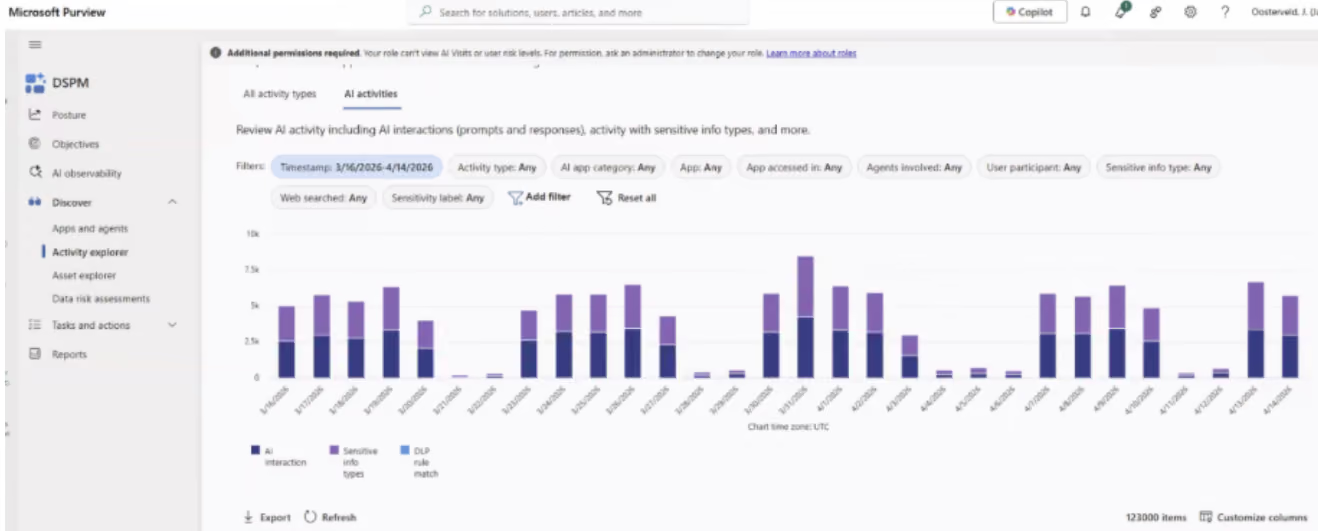
A few things to keep in mind when setting up your view:
- The timeframe is limited to four weeks
- Select Sensitive info types as the activity type (not AI interactions)
- Choose Copilot experiences & agents as the AI app category
- Include all Microsoft 365 Copilot apps (Chat, Word, Outlook, Teams, etc.)
- Filter on the Sensitive Information Types from your PII inventory
The results give you an indication of how much sensitive data is being processed in Copilot. It’s not perfect. You’ll have false positives, meaning items that are flagged but aren’t actually PII. That’s expected.
From here, you have two options:
- review individual activities; or
- export the data
Start with individual activities.
Individual activities
Click into an activity and look at the context. Who is the user? Does it make sense that this person is working with that type of data?
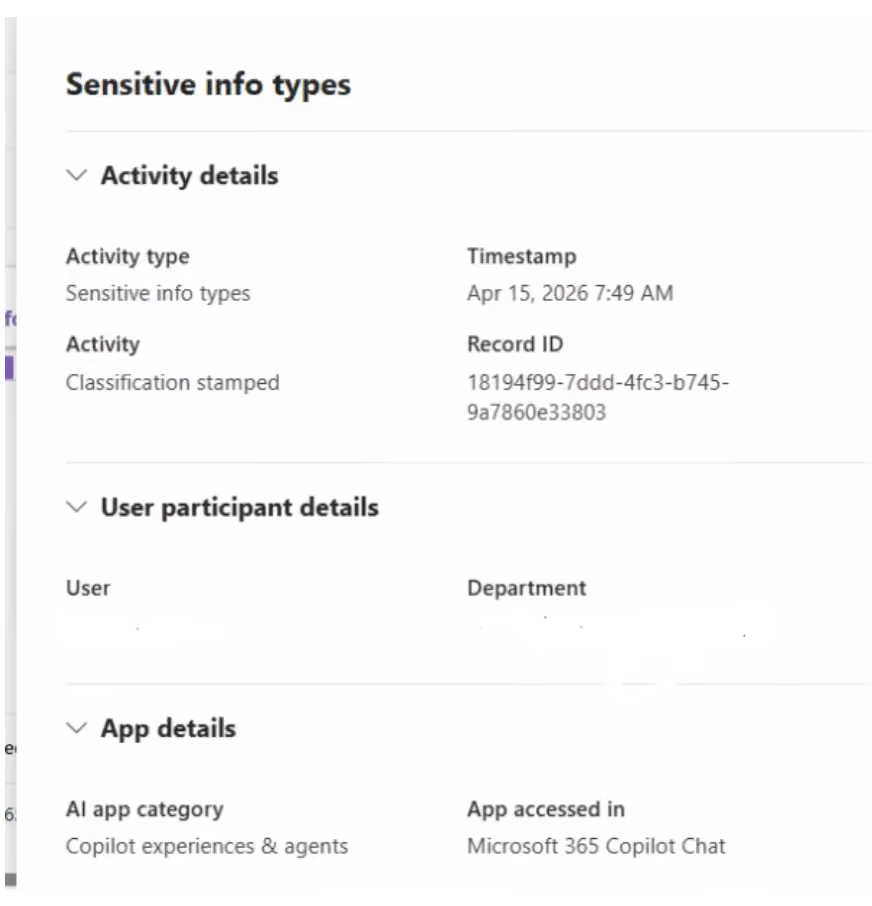
If you want more detail, you can view the related AI interaction. This helps you validate whether the detected PII is actually correct.
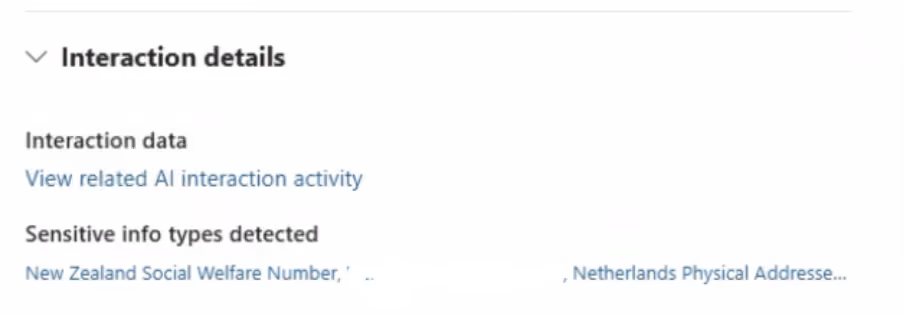
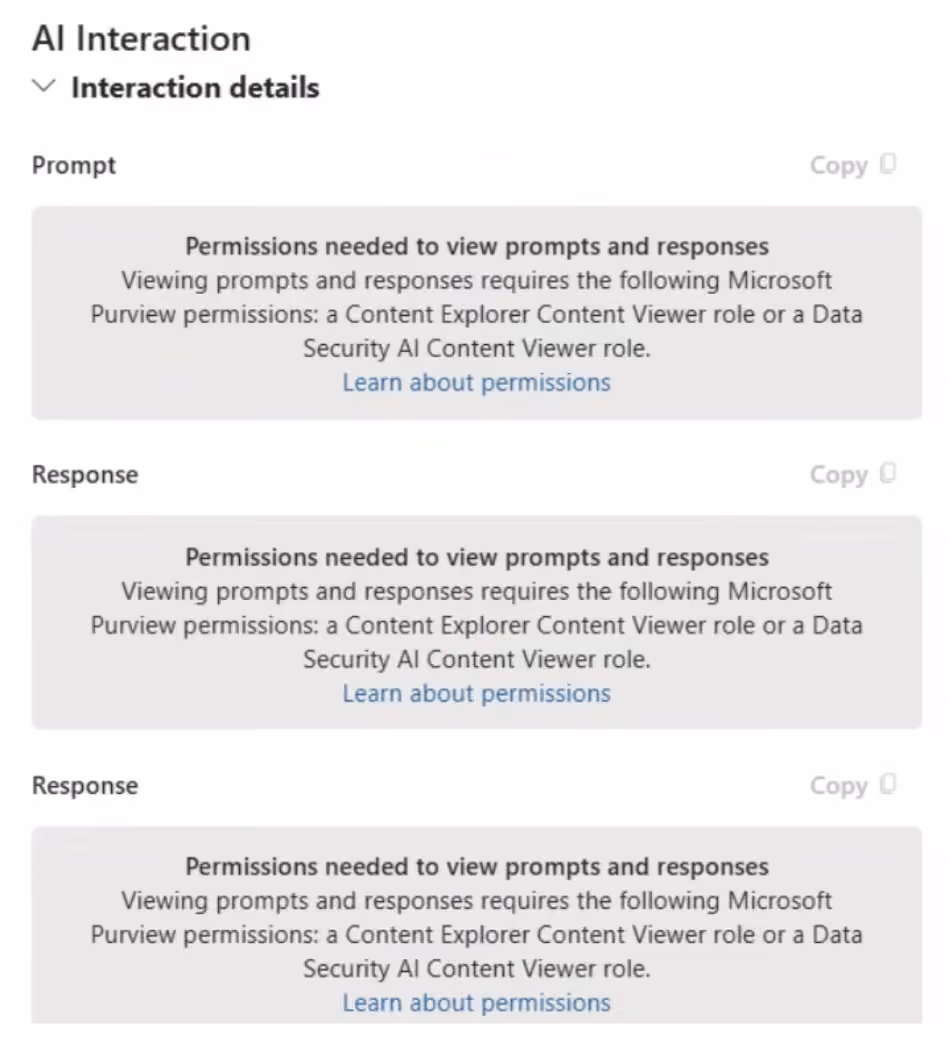
Keep in mind: access to this level of detail is restricted. For good reason. You’re dealing with sensitive and potentially personal data. Make sure you have the right permissions and that there’s a clear policy in place with your security, HR, and compliance teams.
If you need a broader view, export the data.
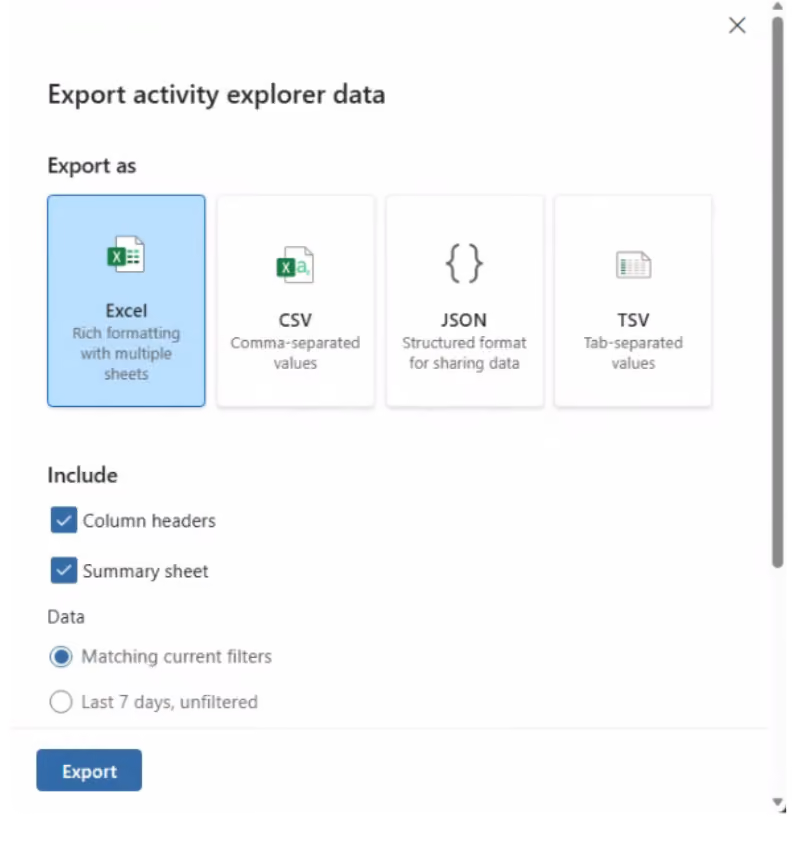
Export activity explorer data
The export gives you a better overview of patterns. You can see which types of PII are most common and where they show up. It also allows you to drill down beyond your initial filters.
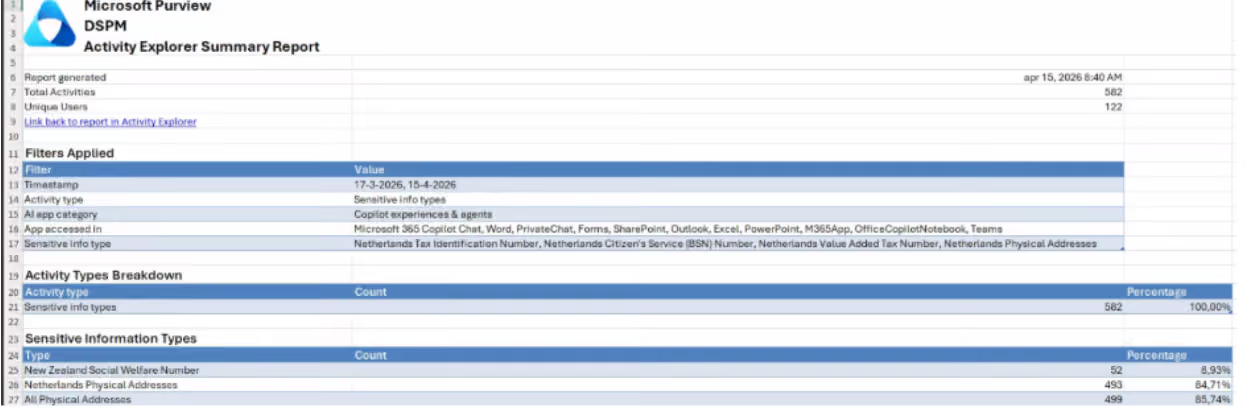
Going deeper: Department-level reporting when the export isn't enough
A question we kept hearing from this client was: "Which departments are working with sensitive information via Microsoft 365 Copilot, and how often?"
Getting that answer out of Activity Explorer turned out to be harder than expected.
The UI export is limited to 10,000 items. For an organization with active Copilot usage, 30 days of data can easily contain 80,000 to 200,000+ records. A partial export produces percentages that are either inflated or meaningless — and it affects both numbers you need: the total interaction count and the SIT detection count.
To understand why that matters, it helps to know how Activity Explorer structures Copilot data. Classification stamped is a subset of Copilot Interaction—every SIT detection is also a Copilot interaction, but not every interaction triggers a detection. To calculate what percentage of Copilot usage involves sensitive data, you need both numbers. Lose either one to an incomplete export and the percentages stop making sense.
To solve this, my team and I built a custom PowerShell script (with help from Claude) using the Export-ActivityExplorerData cmdlet, which pages through the full dataset in batches of up to 5,000 records. But the export cap was only part of the problem. Activity Explorer knows which user was involved in each interaction—it doesn't know which department they belong to. That data lives in Entra ID.
Calling Microsoft Graph once per user would be too slow for thousands of accounts. Instead, the script uses the Graph Batch API, which handles up to 20 user lookups in a single HTTP call:
$batchRequests = @{ requests = @() } for ($j = 0; $j -lt $batch.Count; $j++) { $batchRequests.requests += @{ id = "$j" method = "GET" url = "/users/$([Uri]::EscapeDataString($batch[$j]))?`$select=userPrincipalName,department" } } $batchResponse = Invoke-MgGraphRequest -Method POST ` -Uri 'https://graph.microsoft.com/v1.0/$batch' ` -Body ($batchRequests | ConvertTo-Json -Depth 5) ` -ContentType "application/json" One non-obvious gotcha
When we first built the report, SIT percentages looked extremely high. The cause was that Classification stamped rows and Copilot Interaction rows don't use the same value in the app column. Matching on both department and app made interaction counts look far lower than they were. The fix was to count total interactions by department only, then calculate percentages from that.
The script produces an anonymized CSV. Each row shows the department, Copilot app, and sensitive info type detected, along with the number of detections, unique users involved, total Copilot interactions from that department, and the percentage of interactions where a SIT was detected. No names, UPNs, or email addresses:
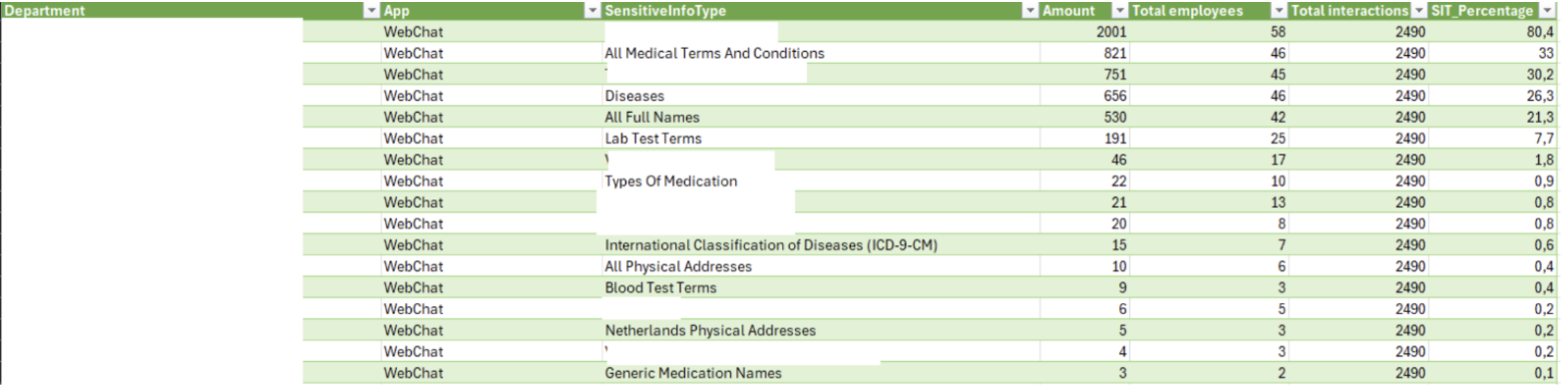
To run it, you’ll need:
ExchangeOnlineManagement v3+, Microsoft.Graph module, a Purview role with Activity Explorer export permissions, and User. Read.All in Microsoft Graph. The department field in Entra ID must also be populated. If it isn't, all users will fall under a single "no department" bucket.
This report adds to what Purview offers natively—it doesn't replace Activity Explorer, it picks up where the UI leaves off.
At this point, you’re ready to sit down with your stakeholders—CISO, compliance, security—and start making decisions.
Phase 3: Implement protection policies
After analyzing the results, you now have a clear overview of which PII is actually being processed by Microsoft 365 Copilot.
Now it’s time to act.
Look at your classification and protection policies. Identify the PII with the highest risk. That’s where you focus first.
Start with Data Loss Prevention (DLP) for Microsoft 365 Copilot.
There are two main conditions you can use in your DLP rules:
- Sensitive information types
- Sensitivity labels
Each comes with its own behavior.
With sensitive information types, you can control how prompts are handled:
- Processing prompts: blocks prompts from being processed in both Microsoft 365 search and web search (currently in public preview)
- Performing web searches: allows prompts in Microsoft 365 search, but blocks them from being sent to the web (also in preview)
With sensitivity labels, you take a different approach:
- Copilot is prevented from accessing and processing the content entirely
This only applies if you already use sensitivity labels in your organization.
One important nuance here. Even if content isn’t processed by Copilot or used in the response, it can still appear in citations. For some organizations, that’s still considered processing—because the content is exposed as a source.
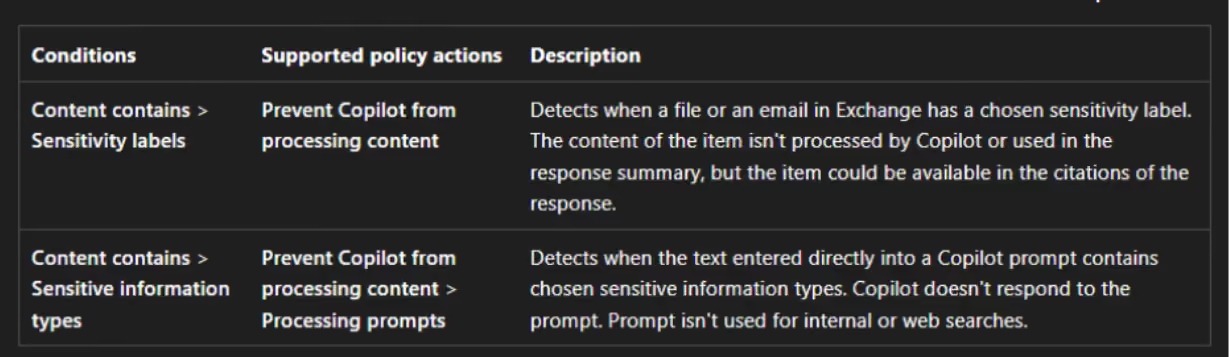
Something to be aware of when defining your policies.
Keep your Copilot rollout moving
Good news! The customer went with this approach and their Copilot pilot is moving again.
I’m a strong advocate for data security when it comes to Microsoft 365 Copilot. That doesn’t change. But that also doesn’t mean you should stop or delay your pilot because everything isn’t fully in place yet.
Because it rarely is.
If you wait for complete sensitivity labels, retention policies, and DLP, you’ll slow everything down.
In my opinion, governance and adoption should be your starting point. From there, you build and improve. And if those controls aren’t in place yet, that’s okay. You can implement them in parallel with your rollout.
That’s how you keep moving, while staying in control.









.avif)




Don’t just migrate it, ShareGate it.
Your source is never touched — ShareGate only copies.
Re-running is safe, included, and free.

