



.svg)
%20(1).avif)
Master Hacks: Migrate like a pro
Check out our video series to help you turn migration projects into masterpieces!
Table of contents
In the first article of this series, we explored the risks organizations face when Microsoft Purview isn’t used to its full potential—especially when sensitive data is left exposed. In the second article, we walked through the steps to protecting your data using Purview, like how to find what you have, classify and protect it, and roll out your sensitivity labels across your organization.
In this final installation, I’ll discuss a growing blind spot when it comes to sensitive data: Shadow AI.
Employees are increasingly using generative AI tools to work faster and more efficiently. The intent is rarely malicious. But the outcome can be risky: sensitive organizational data leaving Microsoft 365 through tools that were never reviewed, approved, or governed.
In this article, I'll explain what Shadow AI is, why it’s so difficult to control, and how to use Microsoft Purview and Defender for Cloud Apps to help you detect, assess, and reduce its impact.
What is shadow AI?
Shadow AI refers to generative AI tools that employees use without formal approval from IT, security, or compliance teams.
These tools often include:
- Public AI chatbots
- AI-powered research or writing assistants
- Browser-based generative AI services
From a user perspective, these tools are easy to access and super effective. But from an organizational perspective, they introduce challenges:
- You don’t know which tools are being used
- You don’t know who is using them
- You don’t know what data is being shared
- You can’t guarantee security, compliance, or data residency
Even well-intentioned users can unknowingly paste sensitive data like contracts, customer details, and internal documents into AI tools that store or process data outside your organization’s control.
This is where Microsoft Purview and Defender for Cloud Apps come in.
Why Shadow AI is hard to eliminate (but possible to control)
Completely preventing shadow AI is impossible. Employees will continue to look for tools that help them work faster.
So the goal isn’t total prevention, it’s risk reduction.
- Understand which AI tools are in use
- Evaluate their risk
- Guide employees toward safer alternatives
- Block tools that clearly violate your policies
Microsoft provides visibility and controls that help you take these steps in a structured way. Let’s take a look.
How to tackle shadow AI with Microsoft Purview and Defender for Cloud Apps
Step 1: Find generative AI apps within your organization
The first step in managing shadow AI is visibility.
Start by creating an inventory of all the generative AI tools being accessed and used by employees across your organization.
- Go to the Microsoft security portal: https://security.microsoft.com
- Click on Cloud discovery. Here, you can filter discovered apps by category, including generative AI.

- On the Cloud discovery page, click on Discovered apps. Then, select the Generative AI category and sort the results on Users.
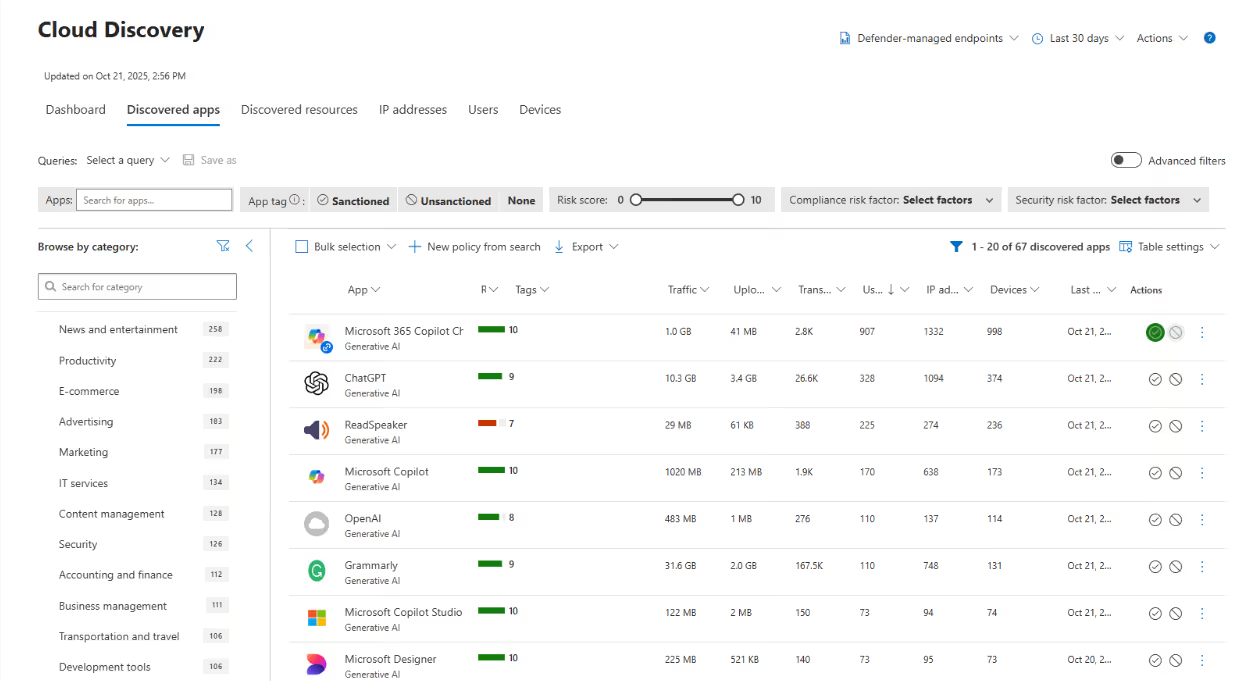
At this stage, it’s a good idea to:
- Export the results for further analysis
- Focus on external generative AI apps
- Exclude Microsoft Copilot-related services, which are already governed within your tenant
This inventory becomes the foundation for every decision that follows.
Step 2: Assess the risk of each generative AI app
The next step depends on your security, risk, and compliance policies. Each discovered app in Defender for Cloud Apps includes a cloud app risk assessment.
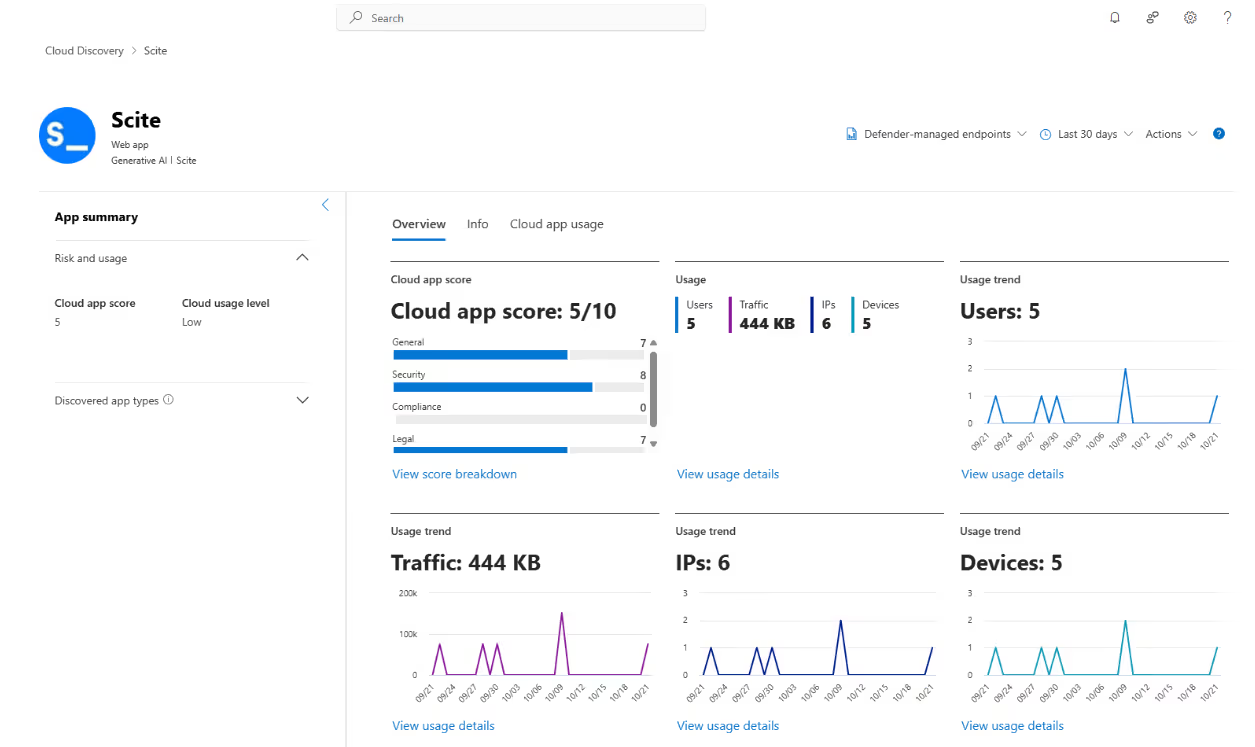
For example, Scite has a cloud app score of 5/10. The score is based on four key categories:
Category 1: General information

In the General tab, you’ll see basic information such as the vendor’s location, domain, and operational maturity. These fields are meant to show the company's stability at the most basic level.
For example, Scite's data center is based in the U.S. For many organizations, especially in regulated industries or regions like the European Union, data residency alone can be a disqualifier.
Category 2: Security controls
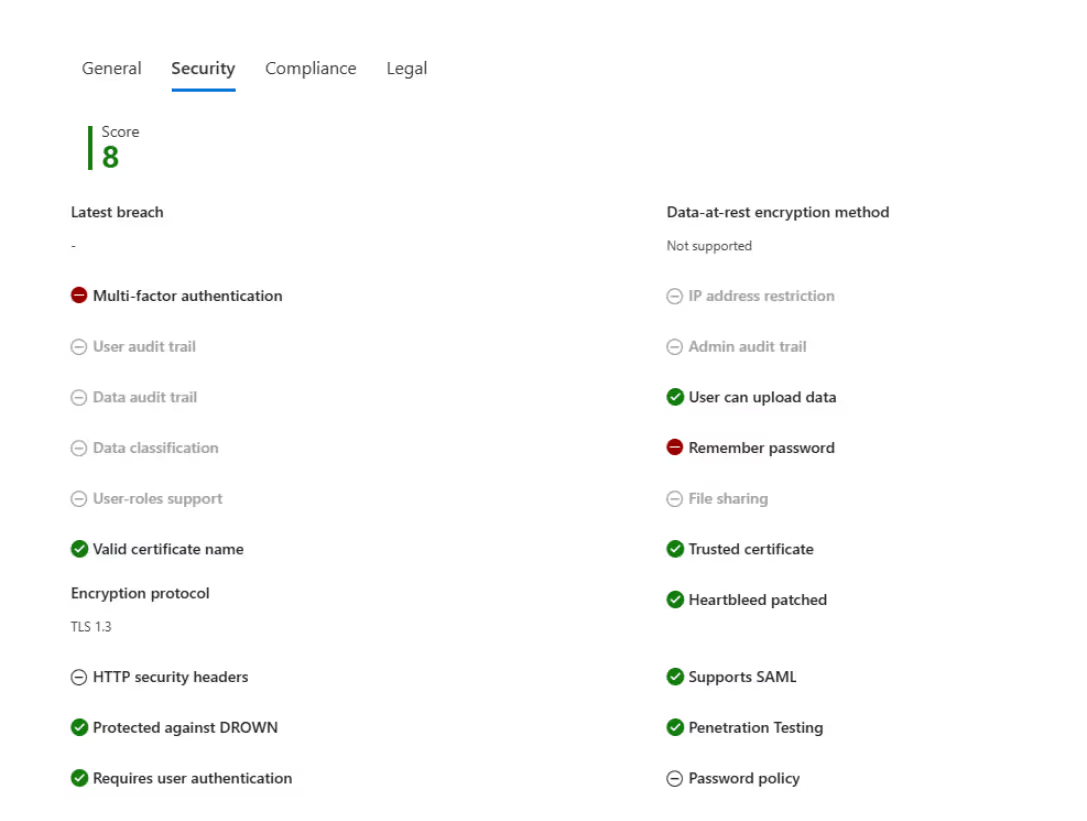
The Security tab highlights whether the app supports basic security practices such multifactor authentication, encryption, data classification, and data ownership.
You’ll need to decide what security controls are a potential issue. For many organizations, something like the absence of multi-factor authentication may already be enough to decide an app isn’t the right fit.
Category 3: Compliance standards

The Compliance section shows which compliance frameworks the vendor aligns with, such as HIPAA, PCI-DSS, or CSA. If an app lacks alignment with standards your organization depends on, the risk increases. In this example, things aren’t looking particularly good.
Category 4: Legal and privacy protections
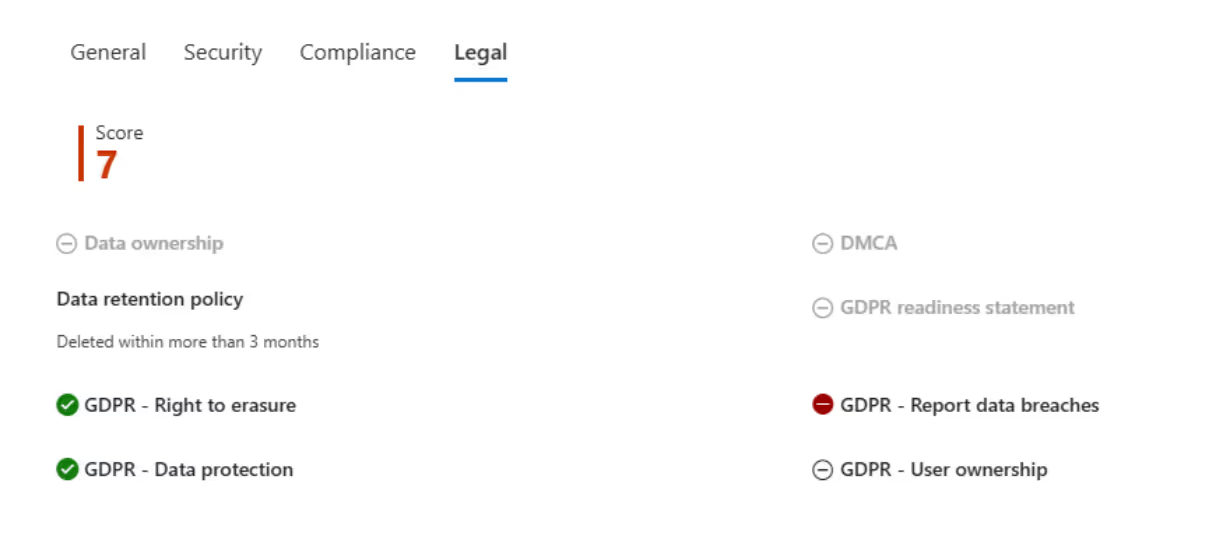
In the Legal tab, you’ll find information about data retention, privacy policies, and regulatory safeguards. These factors are critical when sensitive or regulated data is involved.
Microsoft is clear that these scores are indicators, not verdicts. Final decisions should be made by security, risk, and compliance stakeholders together, based on organizational policy.
Step 3: Understand who is using each AI app and why
Before blocking external generative AI apps, talk to the people using them.
In most cases, people are simply trying to get their work done faster. Blocking tools without understanding why they’re being used often leads to frustration—and users will just look for alternatives.
We strongly recommend contacting your colleagues before you start blocking external Generative AI apps.
In the Cloud app usage view, you can identify the users behind each app and understand how frequently those tools are being accessed.
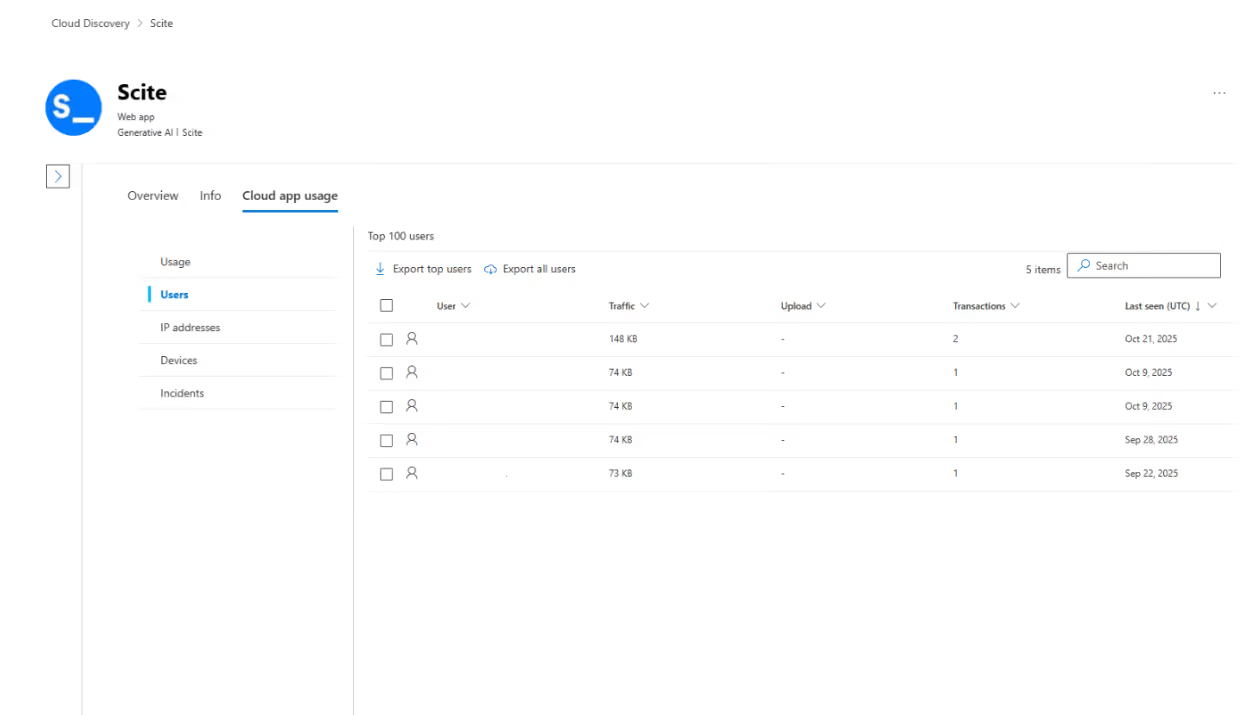
Export this information and start a conversation.
Ask users what they’re using the tool for and what problem it helps them solve. In many cases, you’ll find that Microsoft Copilot can already support the same use cases without the same data protection risks.
When users understand why a tool is being phased out and what they can use instead, adoption of safer, sanctioned AI becomes a lot easier.
Step 4: Block shadow AI apps that don't meet your policies
Once users have a safe alternative—such as Microsoft Copilot—it becomes much easier to take action.
At this point, you can start blocking external generative AI apps that don’t align with your security, risk, or compliance requirements. This works through Defender for Cloud Apps, but it does rely on a few foundational controls being in place, including:
- Turning on Cloud Protection in Microsoft Defender for Endpoint
- Turning on Network Protection in Microsoft Defender for Endpoint
- Installing the Microsoft Defender Browser Protection add-on across all non-Microsoft browsers in your organization
Microsoft documents these prerequisites in detail, and it’s worth reviewing the official guidance before you proceed.
Defender for Cloud Apps also requires an active connection with Microsoft Defender for Endpoint to enforce blocking effectively. Check out Microsoft’s documentation on how to govern discovered apps using Microsoft Defender for Endpoint.
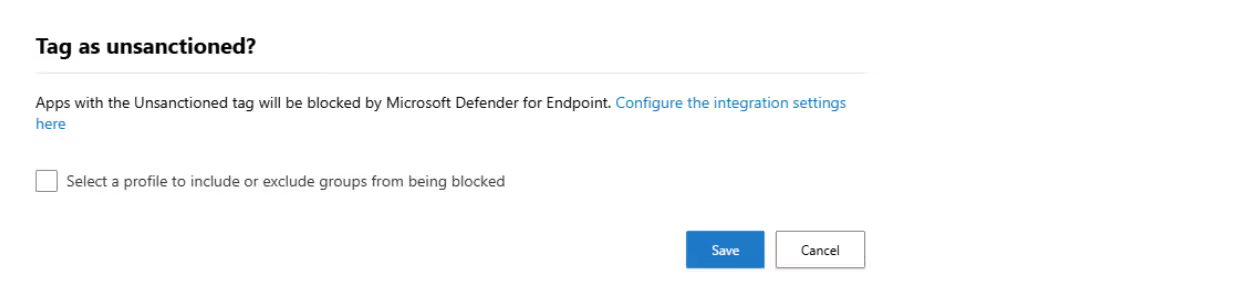
From there, enforcement is straightforward. Apps that don’t meet your policies can be marked as unsanctioned, preventing users from accessing them going forward.

After clicking on the unsanctioned button, the following pop-up appears:
Once you’ve blocked the generative AI apps that don’t align with your policies, the work isn’t done. New tools appear all the time, which means Shadow AI needs ongoing attention—not a one-time cleanup.
Step 5: Continuously monitor for new shadow AI tools
You can periodically monitor for new generative AI apps in Defender for Cloud Apps. This can be done manually if needed. I recommend setting up an app discovery policy to make this easier over time.
Microsoft provides official instructions on how to create cloud discovery policies.

Another option is Data Security Posture Management (DSPM) for AI within Microsoft Purview. This allows you to monitor the use of external AI solutions. Microsoft documents the prerequisites required to enable DPSM.
Turning shadow AI into a manageable risk
Shadow AI introduces real and often invisible risk. Data leaves Microsoft 365 through tools that were never assessed, approved, or governed, making it difficult to understand exposure, let alone control it.
Addressing this starts with knowing which generative AI tools are in use, understanding how they are being used, and evaluating whether that usage aligns with existing security, risk, and compliance requirements.














Don’t just migrate it, ShareGate it.
Your source is never touched — ShareGate only copies.
Re-running is safe, included, and free.

