
.svg)

ROI calculator
See how much you can save by using ShareGate Protect to govern and secure your tenant
Calculate your savings%20(1).avif)
Master Hacks: Migrate like a pro
Check out our video series to help you turn migration projects into masterpieces!
Table of contents
There are 8 updates this month, and most of them answer a question someone's about to ask you. What can this person reach? When was this workspace last reviewed? What's the plan for this migration? Where does our data get processed?
October gave you better answers to all of them, and faster ways to act on what you find.
Protect got three updates. Migrate got three. And two land across all of ShareGate. Let's dig in.
ShareGate Protect
Access questions come from two directions. Sometimes you start from a site and ask who can get in. Sometimes you start from a person and ask where they can get to. This month Protect answers both, lets you clean up what you find in one pass, and hands the internal half of access reviews to the people who own the workspaces.
User and Group access reports: Start from a person or group
Who has access to what? What can Copilot reach?
We just unlocked two new ways to answer those questions.
The User access report starts from people: pick a user and see every site collection they can reach, plus exactly how they got there. The Group access report does the same for groups: pick M365 groups, security groups, or built-in groups like Everyone Except External Users (EEEU), and see what content they can reach and how.
You'll find the User access report in Reports, right next to the Permissions matrix report (PMR) or from the Permissions tab of a user’s details page. Search by name, filter to guests, unlicensed or deactivated accounts, and select as many people as you need. Expand any site collection and its permissions appear, most permissive first.
Every permission has a story, and the access path tells it. Click the icon and you get one row per route through:
- Site collection admin roles
- Direct grants
- Groups
- Nested groups
- Sharing links
- Broken inheritance
Guests get a tag, so they stand out from members at a glance.
Together with the PMR, that's three ways into the same question. Start from content and ask "who can access this?" Start from a person or group and ask "what can they access?" Same data, whichever direction you're coming from.
Both reports are read-only for now, with remediation on the way.
Permissions matrix report: Clear a crowded object in one pass
You open a folder in the PMR and it's a mess. Six direct grants that should have gone years ago, two sharing links, and a SharePoint group padded with people who've changed teams. Last month you could remove each of those, one at a time. Now you can select them together and remove them in a single action.
Bulk removal works on one content object at a time and covers:
- Several direct permissions: Users, M365 groups, security groups, built-in groups and SharePoint groups, plus sharing links on folders and files.
- Several members of one SharePoint group.
- Several site collection admins on one site.
Pick a row and the PMR greys out anything that can't be combined with it, so every selection you build will run.
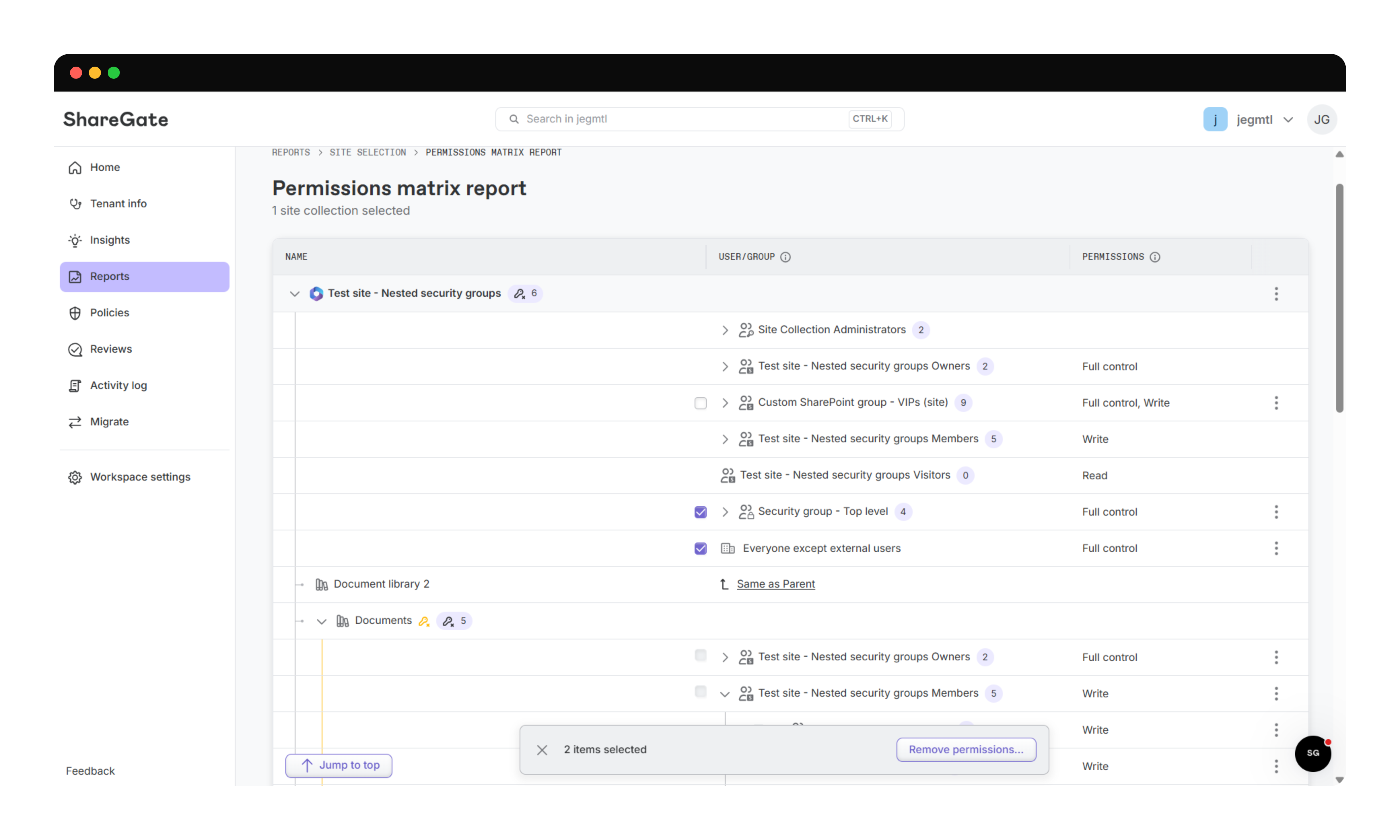
Bulk actions have the same safety net as single actions, a confirmation that previews what changes, an Activity Log entry, and updated remediation impacts on your Home page. The report also shows more of who actually has access.
Site collection admins now sit at the top of each site with Full control, because they bypass every item-level permission. You can remove the admin role right from the report, and any other access that person has on the site stays put.
Nested groups now expand. M365 groups and security groups open up into the people behind them, through every level of nesting, and each type gets its own label and icon so you can tell them apart at a glance.
Built-in guardrails keep cleanup safe. Every site keeps at least one site collection admin, and the principals Microsoft relies on, like a group-connected site's Owners group or a OneDrive's original owner, stay protected. Removing members from a SharePoint group removes their access everywhere that group grants it, and the confirmation tells you so before anything applies.
Delegated reviews: Internal access and new improvements
Delegated reviews launched in July, making it easy to get end users to decide whether an inactive workspace, guest, or stale link should be kept, archived, or deleted.
But guests and external links are only half of who can get into a workspace. The other half is internal: org-wide links, "people in my organization" links, and members who joined for one project three reorgs ago. Each one is a way people and AI tools can reach content that they were never meant to see.

Now you choose what owners review:
- Group membership: Guests, internal members, or both.
- Sharing links: External, internal, or both.
You can also decide which actions—archive or delete—end users can take when they don’t want to keep a workspace. This can be a gamechanger for teams in regulated industries.

If your retention rules say reviewers can't delete anything, leave Delete out. If you don't use archiving, leave Archive out. The review follows your policies, not the other way around. And owners only get asked about what you put in scope.
Every workspace also gets a Last reviewed date for each review type, plus an overall date. It's set when the owner submits, not when you launch. Filter your workspace reports on it, for example "every workspace where members haven't been reviewed in 180 days." Reviews from the past several months already count.
Now the date an auditor asks for is an easy-to-find, easy-to-fix a column.
ShareGate Migrate
This month's Migrate updates cover the whole arc of a tenant-to-tenant move.
- Before it: an assessment and a plan built from your own tenant data.
- During it: the conversations people actually care about.
- After it: somewhere for a leaver's mail to live, without paying for a license.
Migration projects: Assess, then plan, all on the web
Migration projects are now live on the web for every ShareGate customer, trials included. Connect a source tenant and the assessment sizes up your users, SharePoint, OneDrive and Teams, then flags what will slow the move down, like ownerless teams, unused sites and extra large OneDrives.
An assessment tells you what you have. The next question is always "so, what do we do?" That's where the new Plan tab comes in. It builds a migration plan from your own tenant data:
- Scope: Your workloads as toggle cards, each with an inline data summary.
- Risk level, with reasons: Each traced to something specific in your tenant and tagged Low, Medium or High.
- The big numbers: Estimated volume and users in scope.
- A recommended sequence: Which workload moves first and why. Identities before content, active before inactive.
- What to avoid: Common mistakes that can trip up migrations like yours, such as rushing cutover or skipping cleanup.
%20(1).gif)
Your job shifts from building a plan to reviewing one. And because every suggestion is based on your own data, not one-size-fits-all best practices guide, it's a plan you can defend when someone asks why.
Teams private chat migration: Bring the conversations with you
Channels hold the official record. Private chats hold the rest: what was agreed, who signed off, why the deadline moved. In M&A and compliance-driven moves, that history has to come along.
Now it does. The new Copy-Chat PowerShell command copies 1:1 and group chats between tenants with full history, original senders, and original timestamps. Messages land in Teams under the real user's name. Not a service account. Not a pile of messages all stamped with migration day.
Re-runs are incremental, so only new messages move as you head toward cutover. Don't need ten years of history? New-ChatCopyOptions lets you start from a date or copy a set number of recent days.
It's PowerShell-first, with a click-through experience on the way. For mapping tips and the full rundown, read our Teams private chat migration deep dive.
User to shared mailbox mapping: Keep a leaver's mail without the license
Every merger has leavers. Their mail often needs to stick around, but paying for a full license to hold an inbox nobody signs into is a tough sell.
In the Select mailboxes screen of Copy mailboxes, you can now map one or multiple source user mailboxes to a destination shared mailbox. Shared mailboxes don't need a license, so the mail stays and the license doesn't. Mappings work with CSV import and are remembered for your next migration between the same tenants. Email is what moves, and messages keep their original addresses. Details are in Copy mailboxes - Mappings.
Across ShareGate
Two updates this month aren't features you'll click on. They're answers to the security questionnaire that always seems to land right before the project starts.
SOC 2 Type 1: A clear answer for your security review
Every vendor security review opens with the same question. Are you SOC 2?
As of this month, ShareGate is! We completed our SOC 2 Type 1 attestation after an independent auditor checked our security controls and confirmed they were suitably designed and implemented.
That gives your next security review a solid starting point. And we're not stopping there. SOC 2 Type 2 is the next milestone, and we're working toward it in 2027.
Data residency: EU data now stays in the EU at rest and in transit
If you want to store your ShareGate data in Europe, the processing can now happen in Europe, too.
That covers ShareGate Protect, Migration projects and the Migration assessment. For public sector teams and regulated industries, especially those whose rules say data can't leave the EU even briefly, it's a gap closed.
That's a wrap on October 2026
October was about having the answer ready before someone asks.
In Protect, you can answer “who has access to what?” more easily and from more angles.
In Migrate, an assessment now turns into a plan you can defend, private chats make the trip with their history intact.
And across the board, procurement's security questions just got easier to answer.
Spooky season's here, but the scariest things in your tenant just got a lot easier to find. So go enjoy some candy. Until next month!






.avif)

Don’t just migrate it, ShareGate it.
Your source is never touched — ShareGate only copies.
Re-running is safe, included, and free.