What an Exchange Online mailbox migration actually costs and the line items that blindside your budget
.svg)

%20(1).avif)
Master Hacks: Migrate like a pro
Check out our video series to help you turn migration projects into masterpieces!
Table of contents
TL;DR An Exchange Online migration cost has two layers: the tool or license you buy, and the project work around it (scoping, waves, and remediation). The surprises hide in how each option is priced, from per-mailbox and per-user data caps and archive add-ons to Microsoft's native per-user license. A flat-rate tool like ShareGate Migrate covers the whole migration for one predictable annual price, so mailbox count and archives don't blow up the bill. Know both layers before you commit to a number.
You set out to price an Exchange Online migration, and you hit a wall of pricing models. Go native with Microsoft, and the cross-tenant move bills per user. Go third-party, and one tool charges per mailbox, another per user, a third by the gigabyte. Same job, different meters. Good luck lining them up side by side.
And the number on the quote is only one layer. It buys the tool and stops there. The scoping, the migration waves, the remediation, or the admin hours: all still on you. Per-mailbox pricing looks especially clean: a tidy number times a tidy count. Then the archives, the oversized mailboxes, and the extra passes show up. The tidy number stops being tidy. The price you were sold isn't the cost you pay.
What actually matters for IT teams and partners is a total cost you can predict, with no mid-project bill you didn't see coming. ShareGate takes the opposite approach: a flat annual rate, so scale doesn't move the number.
Both layers decide your real Exchange Online migration cost. Price them honestly, and your budget holds when the project gets real.
The quote isn't the cost: tool license vs. project cost
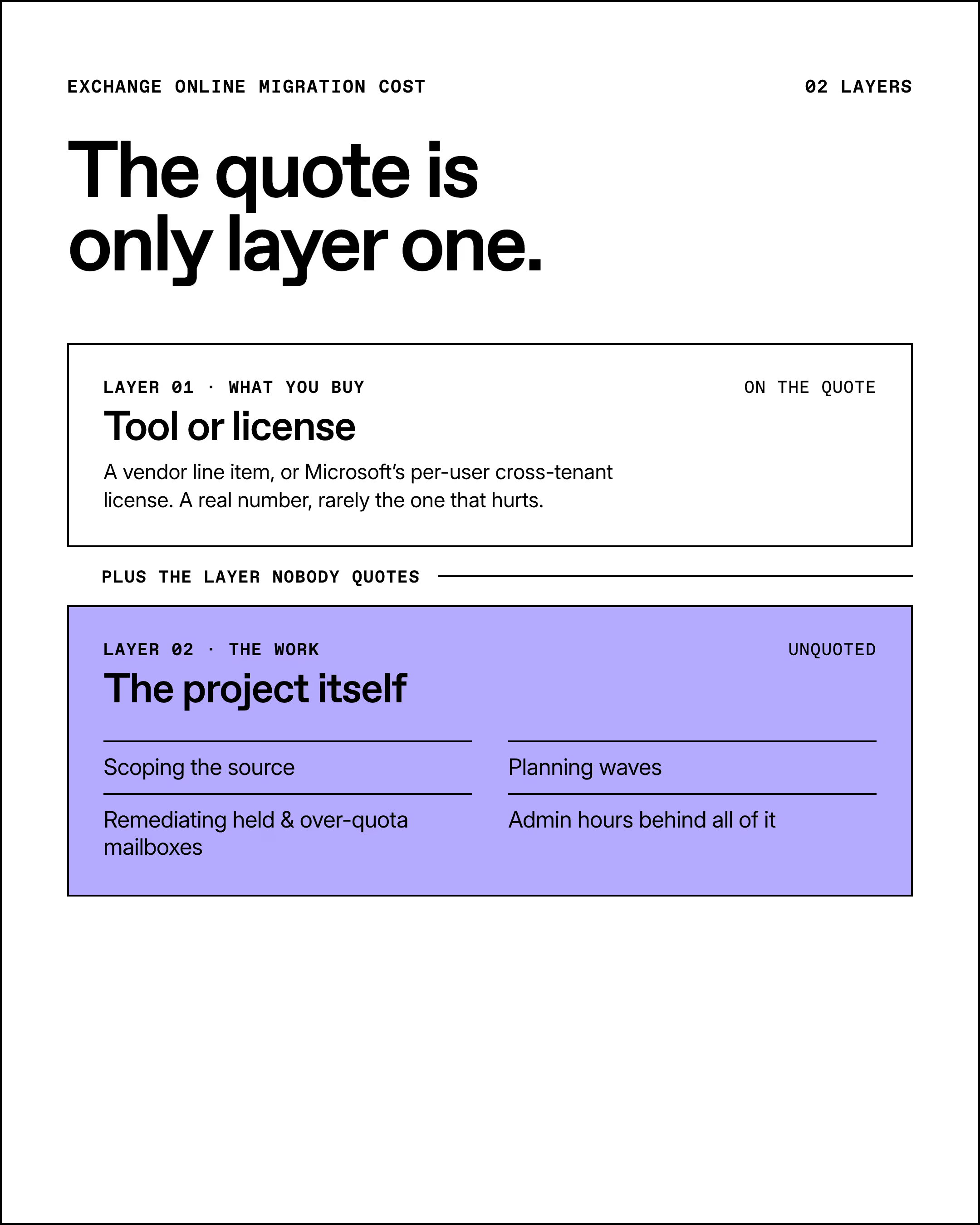
Every Exchange Online mailbox migration carries two cost layers, and the quote only covers one. Layer one is the migration tool or license you buy. Layer two is the project itself, and it's the layer that decides whether you finish on budget.
Layer one is easy to see. It's the line item on a vendor's quote or the per-user license on Microsoft's order form. It's a real number, and it's rarely the number that hurts.
Layer two is the work. Scoping the source. Planning migration waves. Fixing mapping conflicts. Remediating over-quota and held mailboxes that refuse to move. And the admin hours behind all of it. This is where the hours pile up.
The tool you pick in layer one directly shrinks or inflates layer two. A tool that surfaces conflicts before you run cuts remediation hours. A tool that meters by the gigabyte pushes you to trim scope you shouldn't. You have two buying options, and each is priced on its own logic: Microsoft's native route, or a third-party tool. Start with the one that looks free.
What Microsoft's native route actually costs (and what it leaves out)
Microsoft's native cross-tenant mailbox migration runs through Exchange Online PowerShell and the Mailbox Replication Service. It's the built-in path for moving mailboxes between tenants. No third-party tool required, which is exactly why teams assume it's free.
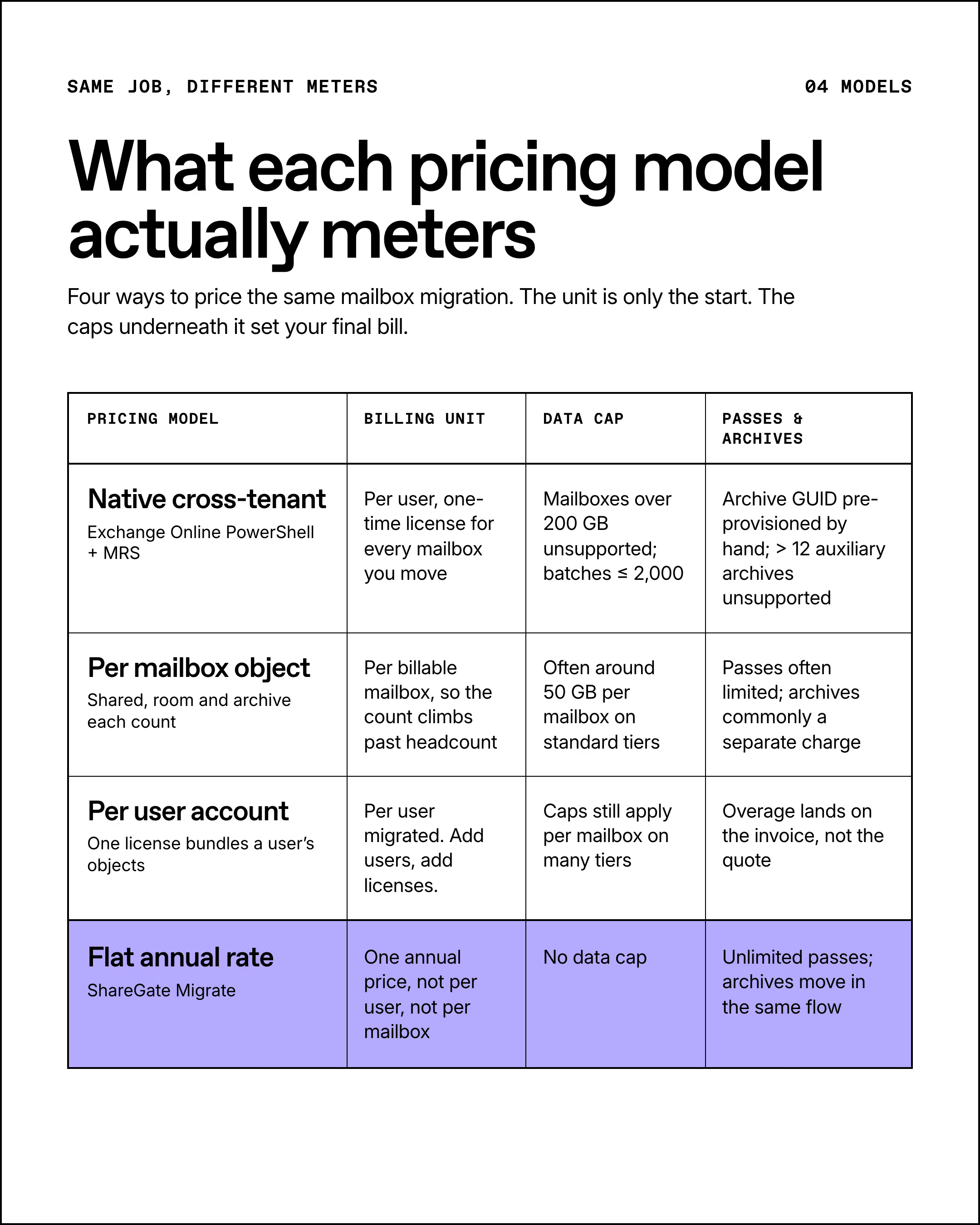
It isn't. The native move needs a per-user "Cross-Tenant User Data Migration" license, a one-time fee for every mailbox you move. Migrations fail without it, and Microsoft documents no exceptions. So the "free" route opens with a per-user bill scaled to your mailbox count.
What you get for it is a solid core. The native move carries email, contacts, calendar, tasks, and notes to the target tenant. For a straight mailbox-to-mailbox move, that covers the essentials.
There's an honest plus here, too. That per-user license also covers OneDrive migration, so one license moves both a user's mailbox and their OneDrive. Credit where it's due.
What it still leaves out is where the "what's included" question bites. It won't move Teams chat history or Microsoft 365 Groups, and SharePoint sites run on a separate cross-tenant capability. So the license stretches past mailboxes, but it doesn't cover the whole tenant. Budget only for what it includes and the rest of your migration still has no line item.
Then there's the manual setup and the hard limits, and this is the part that turns into hours:
- Archives need prep: the ArchiveGUID has to be pre-provisioned on the target, so archive-heavy tenants mean manual groundwork before anything moves.
- Auto-expanded archive ceiling: mailboxes with more than 12 auto-expanded auxiliary archives aren't supported, and if an archive expands mid-migration, the move fails.
- Holds block the move: a mailbox on any hold is blocked until it's released, so held mailboxes stall your wave.
- Over-quota mailboxes fail: they need remediation before they'll move, which is more admin time on the clock.
- Batch and size caps: Microsoft recommends batches of no more than 2,000 mailboxes, and mailboxes over 200 GB aren't supported by the native tool at all.
Timeline matters too, because admin hours track runtime. Per Microsoft's published guidance, a 50 to 100 GB mailbox runs roughly 2 days at the 50th percentile. Actual velocity varies with throttling and network conditions, so treat that as a planning midpoint you'll want to pad.
Add it up. The per-user license, the manual archive prep, the blocked and oversized mailboxes, the batch limits. The native route looks free and then bills you in licenses and labor. That's layer two inflating in real time.
What per-mailbox tools cost at scale
A per-mailbox migration tool prices your project by counting mailboxes, then metering the data inside each one. It's the most common third-party model, and it reads clean on a quote. But the billing unit itself varies: some tools charge per mailbox object, others charge per user account.
Per mailbox object means every mailbox is its own billable line. One employee often owns several: a primary mailbox, plus shared, resource (room and equipment), and archive mailboxes. So your billable count climbs faster than your headcount. Per user account works differently. One license bundles that user's objects, but you pay for each user you migrate. Add users, add licenses. Two units, two very different totals. Count both your mailbox objects and your user accounts before you compare quotes, then check which unit each tool meters.
The unit is only the start. On top of it, many cap data per mailbox, often around 50 GB on standard tiers. Some limit how many migration passes you get. And they can charge extra the moment a mailbox runs large or carries an archive. Every cap is an overage waiting to land on your invoice.
At scale, that per-user math balloons. A few hundred mailboxes over the data cap, a batch of archives outside the base license, a second pass you didn't budget for, and the tidy quote is a memory. What sets your final bill is the meter running underneath it.
For named-vendor numbers, the comparison pages carry the specifics: see how per-mailbox tools compare on price, or go head-to-head with ShareGate vs. BitTitan and ShareGate vs. Quest.
The archive-mailbox surprise: why in-place archives are often billed separately
An in-place archive mailbox is a second mailbox attached to a user, with its own separate storage. It's where old mail lands to keep the primary mailbox lean. And it's the single most common reason a quote comes in low and the invoice comes in high.
The size is the problem. An archive mailbox starts at 100 GB, and auto-expanding archiving can grow it to 1.5 TB. Turn it on and it's a one-way switch. It stays on.
And archives are everywhere. Per the Exchange Online service description, the plans most companies run on include one. Microsoft 365 Business Basic, Business Standard, and Exchange Online Plan 1 include a fixed 50 GB archive. Exchange Online Plan 2, Microsoft 365 E3 and E5, and Business Premium include the auto-expanding kind that grows to 1.5 TB. Either way, most of your users are carrying an archive already, and it's a big, common chunk of data that many tools put behind a separate charge.
That separate charge is where budgets crack. Many per-mailbox tools exclude archive migration from the base license. So a user with a 40 GB primary mailbox and a 300 GB archive isn't one clean unit. It's a base charge plus an archive upgrade you find out about mid-project.
What "included" should actually mean is simple. Archives migrate alongside the primary mailbox, in the same flow, with no separate bundle to buy. One mailbox, one move, one price.
How to build a defensible mailbox-migration budget
A defensible budget models the cost drivers before you pick a tool, while the numbers can still change. It's a short list, and each item maps to a real line on your final bill. Model these, and your number holds up when someone senior asks where it came from.
- Mailbox count and types: user, shared, resource, and Microsoft 365 Group mailboxes don't all behave the same, so count them by type.
- Archive presence and size: flag every in-place and auto-expanding archive, because these drive the biggest overages.
- Total data volume vs. any per-mailbox cap: compare your real gigabytes against the tool's cap to expose overage risk early.
- Passes and waves: staged migrations with multiple passes cost more than a single cutover, so plan the approach up front.
- Remediation candidates: over-quota and held mailboxes need fixing before they move, so count the labor now.
- Per-user license count: only if you go the native route, tally one Cross-Tenant User Data Migration license per mailbox.
- Admin labor and timeline: map runtime to the hours your team spends babysitting waves, because time is the cost that hides.
One move before you total it up: budget the route you'll actually take. The same drivers price out differently depending on how you migrate. The native path adds a per-user license plus the manual hours to clear held, over-quota, and archive-heavy mailboxes. A per-mailbox tool adds data caps and overages. A flat-rate tool folds most of these drivers into a single number. So don't count Microsoft's native-only limits against a tool that never uses that route. Same tenant, three different bottom lines. Pick your route first, and the drivers above tell you what it really costs.
What flat-rate pricing looks like
You can't delete every cost driver, but you can pick a pricing model that removes the surprises. Flat-rate pricing means one annual price covers the migration, regardless of how many mailboxes you move or how much data they hold. The meter goes away, and so does the overage.
ShareGate Migrate is a tenant-to-tenant Microsoft 365 migration tool, and here it has one job: shut off the meters. You pay a flat annual price, and every counter you just read about goes quiet. No per-mailbox count. No data cap. No archive surcharge. No per-pass fee.
Archives move in the same flow as everything else, and reruns don't cost you a cent. So you migrate every mailbox for the number you already budgeted, and the price doesn't move when the project does. This is how ShareGate answers each cost driver on that list:
- Flat pricing: one annual price that covers every user and mailbox, so scale doesn't inflate the bill.
- Mailbox types covered: user, shared, Microsoft 365 Group, room, and equipment mailboxes move in one flow, so there's no per-type upsell.
- No data or rerun caps: unlimited data and unlimited migration passes, so overage and extra-pass charges don't exist.
- Conflict detection up front: archive presence, mailbox size, and mapping conflicts surface before execution, so you fix them before they become remediation cost.
- Archives in the same flow: in-place and auto-expanding archive mailboxes migrate alongside the primary mailbox, so there's no separate bundle to buy.
- Beyond mailboxes: the same tool also moves SharePoint, Teams, OneDrive, and Entra ID identities (preview), so you skip a stack of per-workload licenses.
A quick word on plans. Mailbox migration comes with the Migrate Pro and Enterprise plans. The entry-level Essentials tier doesn't include it. The plans differ by how many migrations you can run at once: up to 5 on Pro, up to 25 on Enterprise. There's no per-user or per-mailbox limit either way. Migrate Pro lists at $9,995 per year, but pricing can change, so confirm the current rate on ShareGate pricing before you budget.
Want the full scope? See everything ShareGate migrates and how it handles tenant-to-tenant migration across workloads.



Frequently asked questions




.avif)











Don’t just migrate it, ShareGate it.
Your source is never touched — ShareGate only copies.
Re-running is safe, included, and free.