
.svg)

%20(1).avif)
Master Hacks: Migrate like a pro
Check out our video series to help you turn migration projects into masterpieces!
Table of contents
TL;DR: Microsoft 365 license optimization stalls until someone attaches a real dollar figure to the waste. "$32 a month" gets ignored. "$6,000 a year" gets budget approved. This post walks through why percentages and gigabytes don't move stakeholders, the storage and licensing math Microsoft doesn't spell out for you, and how to turn technical waste into a budget line your leadership will actually act on.
Your IT team already knows where the waste is. The inactive Teams. The seats nobody logs into. The OneDrives belonging to people who left last spring.
Detection was never the hard part. You've got the reports. You've got the gut feel. You could point to the real costs of Microsoft 365 sprawl in your sleep.
Here's what stalls the cleanup. You walk into a budget conversation with "12% storage overage" and watch the room glaze over. A percentage doesn't scare a CFO. A gigabyte figure doesn't move a renewal decision.
But "$6,000 a year sitting idle" lands differently. Suddenly, people lean in. The waste didn't change. The framing did.
That's the whole game. Microsoft 365 license optimization isn't a technical-cleanup problem. It's a stakeholder-communication problem. And the currency of that conversation is dollars, not data.
The gigabyte problem
The gigabyte problem is simple. Technical metrics don't translate to business stakeholders, so waste stays invisible in the conversations where budget actually gets decided.
You know what 400 GB of orphaned OneDrive storage means. Your CFO doesn't. To them it's a number without a nerve ending.
Percentages fare no better. "We're 12% over on storage" sounds like a rounding error to someone who thinks in quarterly spend. It reads as "fine for now."
Here's the trap. The more precise your technical reporting gets, the less it moves anyone. You hand leadership a dashboard full of GB, seat counts, and utilization rates. They nod politely. Nothing happens.
The metrics that impress your fellow admins are exactly the metrics that put decision-makers to sleep. You're speaking fluent IT to a room that only reads dollars.
The $500-a-month test
Watch what happens when the number finally clicks. There's a moment in a budget conversation where waste stops being abstract and starts being real. It happens at a dollar figure, not a data point.
We saw it play out in a live demo. A customer put it plainly: "$32 a month is not an impressive saving for any type of organization." Fair. Nobody reorganizes a renewal over lunch money.
Then the number changed. "A potential savings of over $500 a month, that's over $6,000 a year, that starts to resonate a little bit more."
There it is. The waste was always there. The $500 figure just crossed the threshold where a stakeholder feels it.
That's the test for any waste you want fixed. Run the annual dollar math before you present. If the number's too small to resonate, don't lead with it. If it's big enough to sting, you've got their attention.
The math Microsoft doesn't do for you
The math Microsoft doesn't do for you is the dollar translation. Native reports show you the storage and the seats. They stop short of telling you what any of it costs.
Two facts you need, straight from Microsoft. First, additional SharePoint storage sells in one-gigabyte increments. Every gigabyte of dead content is a gigabyte you might be paying to keep.
Second, licenses. When you remove a license from a user, the Exchange Online data tied to that account gets held for 30 days, then deleted, unless a retention policy or Litigation Hold preserves it as an inactive mailbox. Microsoft itself recommends removing unused licenses "so that you're not paying for more licenses than you need." Their words, on their own licensing guidance.
One nuance worth getting right, because IT pros will catch it. Pulling a license doesn't delete someone's OneDrive files. But don't call them safe forever. Unlicensed OneDrive accounts get auto-archived on their 93rd unlicensed day, and the data can eventually be removed if the account stays unlicensed.
Now the painful part. Take that gigabyte increment, that seat cost, that per-user allocation, and translate it into an annual dollar figure by hand. Across a whole tenant. In a spreadsheet. Every renewal cycle. That manual translation is where good intentions go to die.
Turning waste into a budget line
Turning waste into a budget line means attaching a dollar amount to every idle thing before you present. Inactive workspaces. Unused licenses. Orphaned OneDrives. Each one gets a number, in advance.
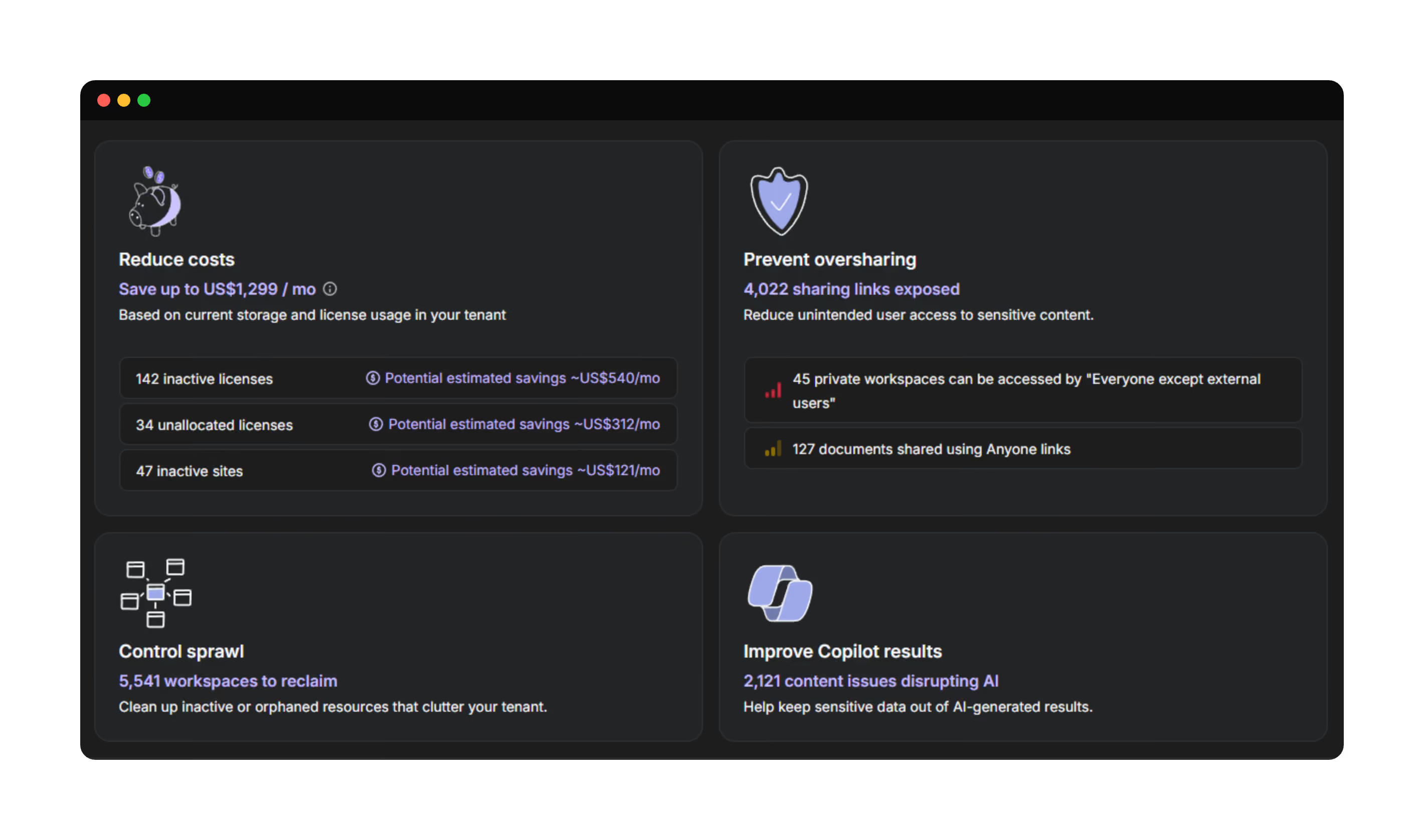
Do that math manually and you'll dread it. That's where our cost optimization capabilities come in. ShareGate Protect is the operational governance layer for Microsoft 365. Spend sits right next to access and workspace health. It's cost visibility built into governance, not bolted on afterward.
It puts estimated dollar amounts right next to the waste. Inactive workspaces, unallocated seats, inactive sites, and orphaned OneDrives all show what they're costing you, so you skip the spreadsheet gymnastics entirely.
A summary banner rolls the whole thing into one total potential savings number. That's the figure you drop into a slide. One number, board-ready, no manual tallying.
Its license usage reporting closes the loop. You see unassigned licenses, OneDrives for unlicensed or inactive users, and per-user allocation, so you know exactly which seats to reclaim before the renewal invoice shows up. This is the practical side of cost optimization: evidence first, then the ask.
Microsoft 365 license optimization is a habit, not a renewal scramble
Here's the trap many teams fall into. They only think about Microsoft 365 cost optimization in the two weeks before a renewal, panic-audit the tenant, and then forget about it for another year.
Waste doesn't work on your renewal calendar. Seats go idle in March. Workspaces die in July. OneDrives get orphaned every time someone leaves.
The renewal scramble catches maybe half of it. You're auditing a moving target with a stale snapshot, and the number you present is already out of date.
If a price hike is what's forcing the conversation, that's a different play with its own renewal action plan, and a webinar on building a smarter licensing strategy. This isn't that. This is about the waste that piles up every other week of the year.
Ongoing visibility changes the shape of the problem. When the dollar cost of idle assets is always in view, you right-size continuously instead of cramming it into a deadline. Savings get quantified over time. License savings reporting gives you the numbers to take into leadership and CFO conversations. You walk into renewals already knowing your number.
That's the difference between reacting to a bill and managing a budget. One's a fire drill. The other's just Tuesday.



Frequently asked questions

Start by identifying unassigned licenses and seats belonging to inactive or departed users, then multiply by each license's monthly cost and annualize it. Microsoft recommends removing unused licenses so you're not paying for more than you need, but native reports won't do the dollar translation for you. Tools that attach cost estimates to unused seats save you the manual spreadsheet math.














.avif)

Don’t just migrate it, ShareGate it.
Your source is never touched — ShareGate only copies.
Re-running is safe, included, and free.