.svg)
%20(1).avif)
Master Hacks: Migrate like a pro
Check out our video series to help you turn migration projects into masterpieces!
Table of contents
TL;DR: An Exchange Online delta migration copies each mailbox once, then syncs only what changed on each later pass until cutover. That keeps mailboxes current across every wave, so switchover moves just a few minutes of changes, and users barely notice. ShareGate Migrate runs those delta passes for tenant-to-tenant Exchange Online moves, keeping your cutover short.
You're about to move thousands of mailboxes. The plan looks solid. The batches are scoped. But one part trips up most Exchange Online migrations, and it hits right after the copy finishes.
The moment your first copy lands, mailboxes start drifting. Mail keeps arriving. Calendars keep shifting. People book rooms, cancel meetings, and file messages into folders. Your source keeps moving while your destination sits frozen in time.
That's the real gap many Exchange Online migrations face. The window between "copy done" and "cutover done." Cut over on a stale copy, and users open their new mailbox to missing mail. And you're stuck cleaning up on a weekend you'd rather keep.
An Exchange Online delta migration closes that gap. Here's what delta means for mailboxes, how incremental sync works, and where it fits when you move users in waves. If you want the full playbook first, start with our Exchange Online migration guide.
What is a delta (incremental) migration for Exchange Online mailboxes?
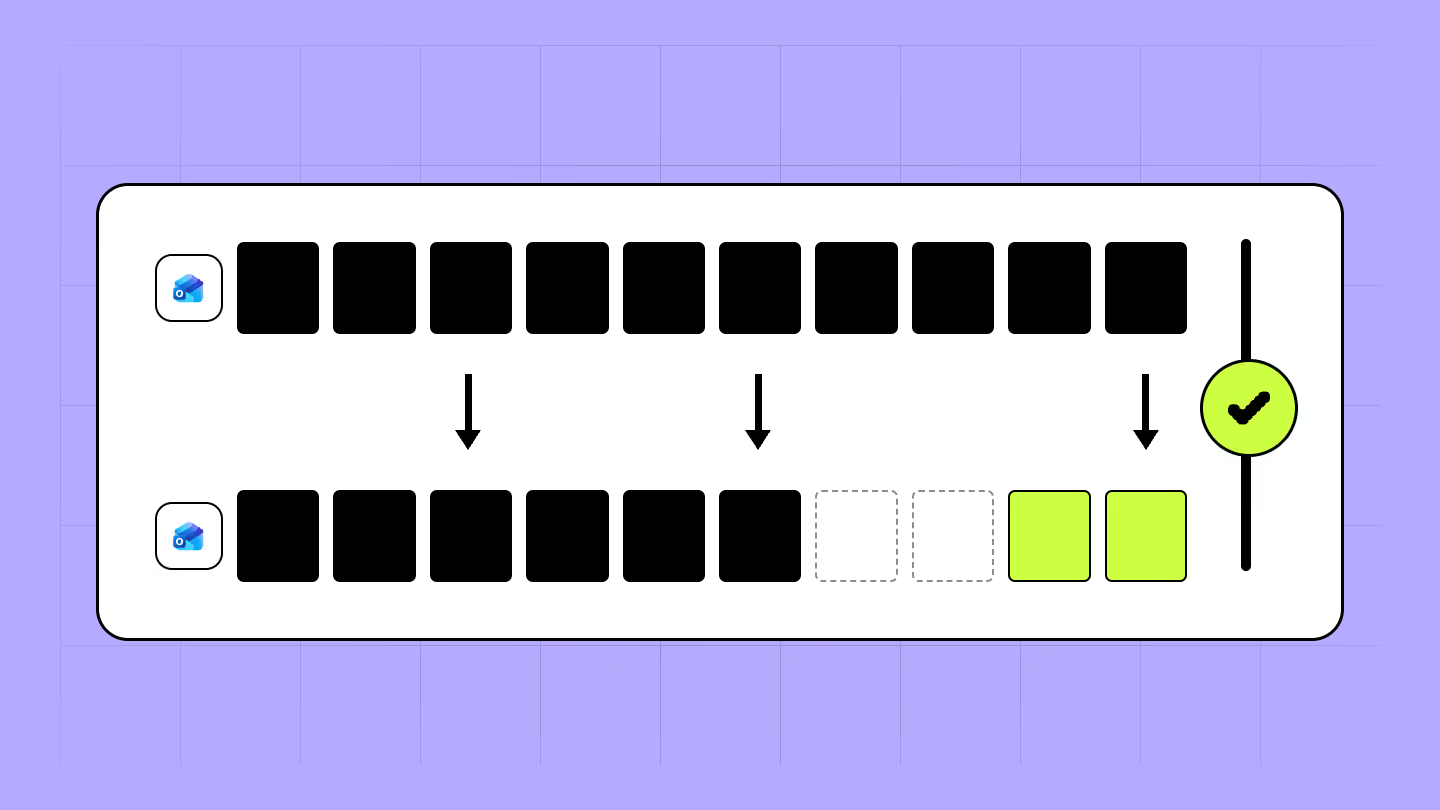
A delta migration copies a mailbox once, then moves only the changes on every pass after that. New mail, edited calendar items, moved messages. Just the diff. Microsoft calls this incremental synchronization.
The mechanics are simple. Once a migration batch reaches the "Synced" state, the initial copy is done. For most types of migrations, mailboxes then keep synchronizing roughly every 24 hours. Your destination stays close to live without you recopying a single gigabyte.
So "delta" comes in two forms, and they don't work the same way.
In a native Exchange Online migration batch, it's automatic. Once the batch hits "Synced," Microsoft keeps re-syncing on a schedule until you complete it. You don't trigger anything.
In a migration tool, you're driving. You run the initial copy, then kick off follow-up delta copies yourself. Knowing which form you're in is the whole trick. For a broader primer, see our overview of mailbox migration.
How incremental mailbox sync actually works
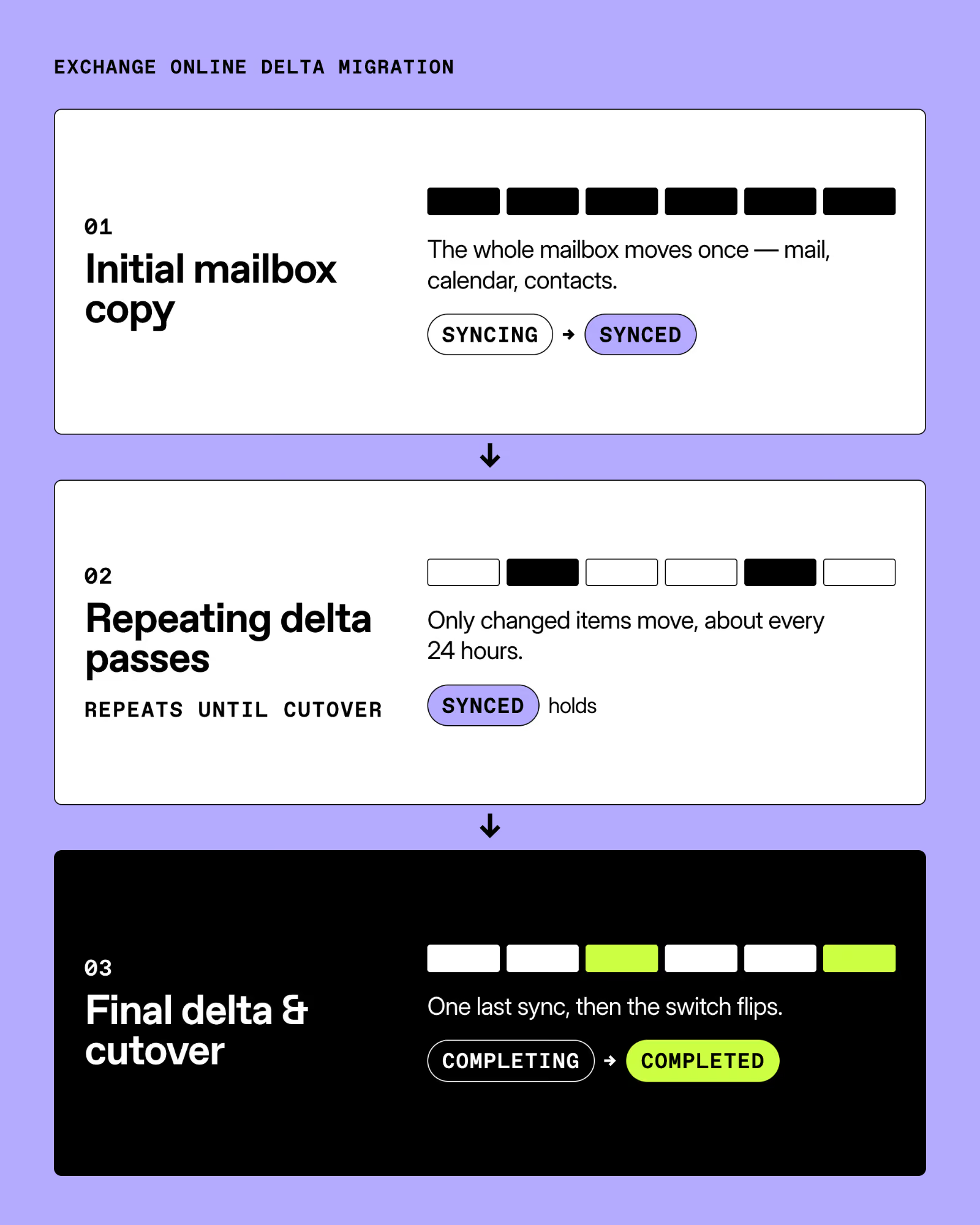
Think of it as three stages: initial copy, delta passes, final delta.
- Initial copy. You submit a batch and it moves everything in scope. Microsoft's batch lifecycle walks through statuses as it goes: Syncing, then Synced.
- Delta passes. Once the batch hits Synced, incremental sync takes over. Every pass grabs only what changed since the last one. Users keep working on the source. The destination quietly catches up in the background.
- Final delta. On cutover day, you complete the batch. That last pass moves the final changes, then flips the switch.
The final stage is where the batch earns its keep. Running Complete-MigrationBatch triggers a final incremental synchronization, repoints the Outlook profile to the target, and converts the source mailbox to a mail-enabled user. The batch moves Completing, then Completed. That final sync is your cutover-day delta, so nothing from the last few hours gets left behind. Want the hands-on version? Here's our step-by-step cross-tenant mailbox migration guide.
Delta vs. re-running a full mailbox migration
A delta pass copies only what changed since your last run. A full re-run copies the entire mailbox again. For a short cutover window, delta wins every time.
Picture this. You're running follow-up copies yourself, and the last one felt off. Maybe you don't trust it. Maybe an index dropped, or a fresh start just feels safer.
The instinct is to recopy the whole mailbox from scratch. Resist it. A delta pass is the better call, and it's not close.
A full re-run recopies every item, changed or not. On a 30 GB mailbox, that's hours you don't have on cutover day. Multiply by a wave of users and your window explodes.
A delta pass moves only the changed items. Usually minutes, not hours. Your cutover window stays short and predictable, which is the whole point.
Risk drops too. Every full recopy is another chance to hit throttling, a timeout, or a conflict on an item you already moved cleanly. Delta touches less, so less can break. Fewer moving parts, fewer 2 a.m. surprises. Our mailbox migration best practices go deeper on keeping runs clean.
Where delta fits in a multi-wave Exchange Online migration
A multi-wave migration moves mailboxes in scheduled groups, not all at once. Delta is what holds it together between waves. It keeps already-moved mailboxes current while you work through the rest.
Nobody moves 8,000 mailboxes in one shot. You move them in waves. Delta is what makes waves work.
Here's the pattern. Submit a wave's batch early, let it reach Synced, and let incremental sync keep it warm while you prep the next wave. Microsoft recommends submitting cross-tenant batches two weeks before cutover, since there's no impact on end users during synchronization. Start early. Cut over calm.
A few limits to plan around:
- 2,000 mailboxes per batch. Microsoft caps cross-tenant batches at 2,000 mailboxes each. Size your waves under that ceiling so no single batch chokes.
- Large mailboxes need extra sync time. Microsoft says to submit large mailboxes well ahead of cutover so their initial copy finishes early.
- 60-day auto-stop. A Synced batch with no admin activity for 60 days gets stopped automatically. Don't submit a wave and ghost it.
Stagger your waves so each one reaches Synced with room to spare. Then cutovers become a scheduled event, not a scramble. See how it maps end to end in our Microsoft 365 tenant-to-tenant mailbox migration walkthrough.
What to watch for with incremental mailbox passes
Delta is reliable, not magic. A few behaviors will bite you if you don't plan for them.
- Deletions don't sync backward. Events removed or cancelled at the source after the initial migration aren't removed at the destination during an incremental copy. Your target can end up holding items the user already trashed.
- Renamed categories pile up. Rename a mailbox category at the source after the initial copy and the delta creates it as a new category instead of updating the old one. You end up with both.
- Destination edits can get overwritten. Changes made on the target before cutover can be overwritten by a later pass from the source. Keep users on the source until you complete.
Scope matters too. Cross-tenant migration copies user-visible content like email, contacts, calendar, tasks, and notes. The Teams chat folder and Outbox items don't migrate, and Teams meeting URLs aren't updated. Set that expectation with users before go-live, not after.
The fix for most of this is timing. Run your final delta close to cutover so the source and destination barely have time to diverge. The tighter that window, the fewer surprises land in someone's inbox.
How ShareGate handles Exchange Online delta migrations and cutover
You're the one triggering these delta copies and timing that final pass before cutover. So the tool you run them from matters. ShareGate Migrate is a tenant-to-tenant Microsoft 365 migration tool, and delta sits at the core of how it keeps cutovers short.
Everything above comes down to one job. Keep mailboxes current from the initial copy through cutover, without recopying everything each time. That's what incremental migration buys you. Switchover day stays a short, boring event. Boring is good.
Here's how that lines up with the problems you just read about:
- Incremental copy across runs. Only what changed since the last pass moves. Your initial copy stays fresh right up to cutover, so the final delta is quick.
- One place for the whole tenant-to-tenant move, across Entra ID, Exchange Online, SharePoint, OneDrive, and Teams. Your mailbox waves stay in step with the identities and content around them. No orphaned moves.
- Mailbox tracking by user ID, not display name. Rename a user mid-project, and they don't become a duplicate.
We support both paths. Cutover moves everyone at once. Or stage the move in waves, where delta copies keep each wave current between the initial copy and cutover. Full coexistence is coming soon.
Wrapping up your cutover plan
Delta is the difference between a cutover you schedule and a cutover you survive. Copy early, let incremental sync keep each wave current, and save the final pass for switchover day. Do that and stale mailboxes stop being your problem.
Map your waves, size your batches, and time that last delta tight. Then hand your users a mailbox that's actually current on day one. See how you can migrate Exchange Online mailboxes with ShareGate.


Frequently asked questions







.avif)








Don’t just migrate it, ShareGate it.
Your source is never touched — ShareGate only copies.
Re-running is safe, included, and free.