


.svg)

%20(1).avif)
Master Hacks: Migrate like a pro
Check out our video series to help you turn migration projects into masterpieces!
Table of contents
TL;DR: ShareGate now migrates Entra ID users, groups, and licenses between tenants with conflict detection, domain mapping, and unlimited re-runs. All inside the same tool you use for mailboxes and content.
Identity migration problems aren't discovered during migration. Most of the time, you find them after the fact. For example, a user can't log in, a mailbox landed in the wrong place, a permission didn't follow.
That's exactly what ShareGate's new Entra ID migration is built to prevent.
Every identity mapping is visible and confirmed before anything moves, so conflicts get caught in planning, not in the cleanup. ShareGate’s Entra ID migration is available now in our Migrate Pro and Enterprise plans, inside the same tool you already use for mailboxes and content.
Why identity has to come first
The sequence is non-negotiable for a reason. Every workload depends on identity existing in the destination first:
- OneDrive content needs target accounts to migrate into
- SharePoint permissions need groups that already exist
- Teams membership needs owners and members who are real accounts
- Mailbox migration needs target users with matching UPNs and active licenses
What makes Entra ID migration hard—and how ShareGate fixes it
For years, the answer was PowerShell scripts stitched together over a weekend, or a separate tool running completely outside the rest of your migration workflow. Either way, there was no visibility into conflicts before execution. And no way to know if something landed wrong until a mailbox failed, or a user couldn't log in on Monday morning.
ShareGate gives you full control of every mapping decision before execution, so the usual problems get caught before anything moves:
- See every identity and what will happen to it. Get a full view of all users, groups, and security groups as well as every conflict before anything runs.
- Fix mismatches before they become failures. Choose how users match between tenants and correct issues before execution. No mid-migration surprises.
- Assign licenses during migration, not after. Users arrive in the destination tenant licensed and ready for mailbox migration.
- Re-run without rebuilding. Save your mapping plan and reuse it across sessions. No starting over every time you return to the tool.
- Get your domains to translate between tenants the first time. Define exactly how domains map from source to destination, even across complex multi-domain environments.
- Have your users ready to work. An automated first-login flow means migrated users can access their new account immediately.
The cherry on top: You handle identity migration inside ShareGate, the same tool you already use for mailboxes and content. No scripts, no extra tools.
Step-by-step: How to copy identities in ShareGate
Performing an Entra ID migration between tenants in ShareGate follows a structured workflow. Here's how each step works.
1. Go to Copy, then select the Copy identities tab. Click Copy identities to start a new task.

2. On the Review identity mappings screen, select your source tenant from the left dropdown and your destination tenant from the right dropdown. If it's your first time connecting a tenant, click Add connection and you'll be prompted to consent to the required Microsoft 365 permission scopes. Source and destination must be different tenants.
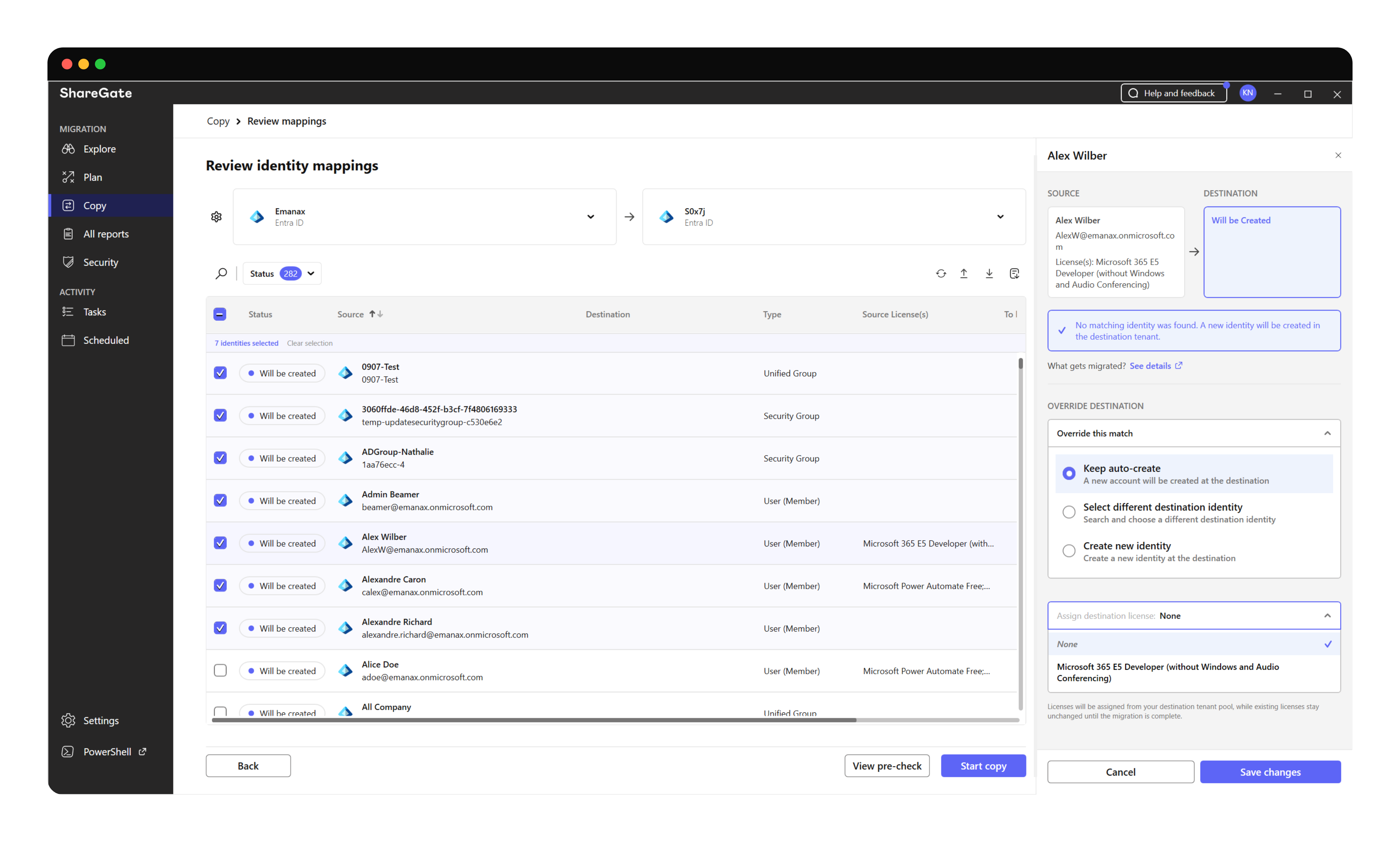
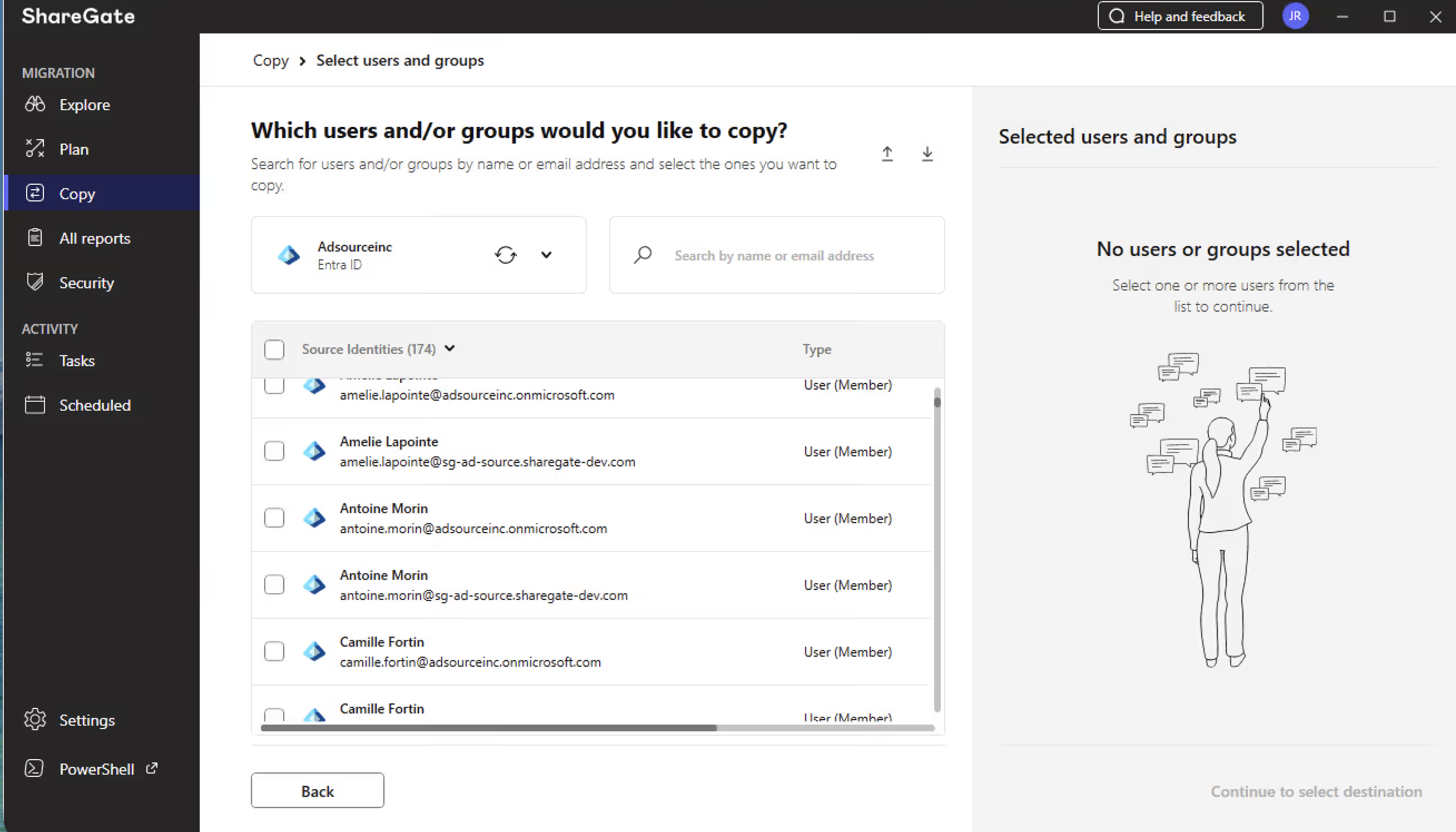
3. Select identities to migrate. You can also use the search bar to find specific identities or filter by department, source license, or group type.
4. Review and adjust your mapping decisions.
For each identity, ShareGate shows a mapping status:
- Will be created—no match found; ShareGate provisions a new identity in the destination
- Needs review—two destination identities match the same source; ShareGate won't pick one, you resolve it from the side panel
- Not supported—Distribution Lists and Mail-enabled Security Groups can't be migrated; they're skipped during the copy
What gets copied
Who moves: Member users, guest users, shared mailboxes, room mailboxes, and equipment mailboxes.
What comes with them: Core profile properties, group memberships, delegate permissions (Full Access, Send As, Send On Behalf), and license assignments.
Groups: Security groups and Microsoft 365 groups — static and dynamic. Distribution lists and mail-enabled security groups aren't supported.
What doesn't transfer: Passwords (users reset on first sign-in), manager relationships, and on-premises attributes.
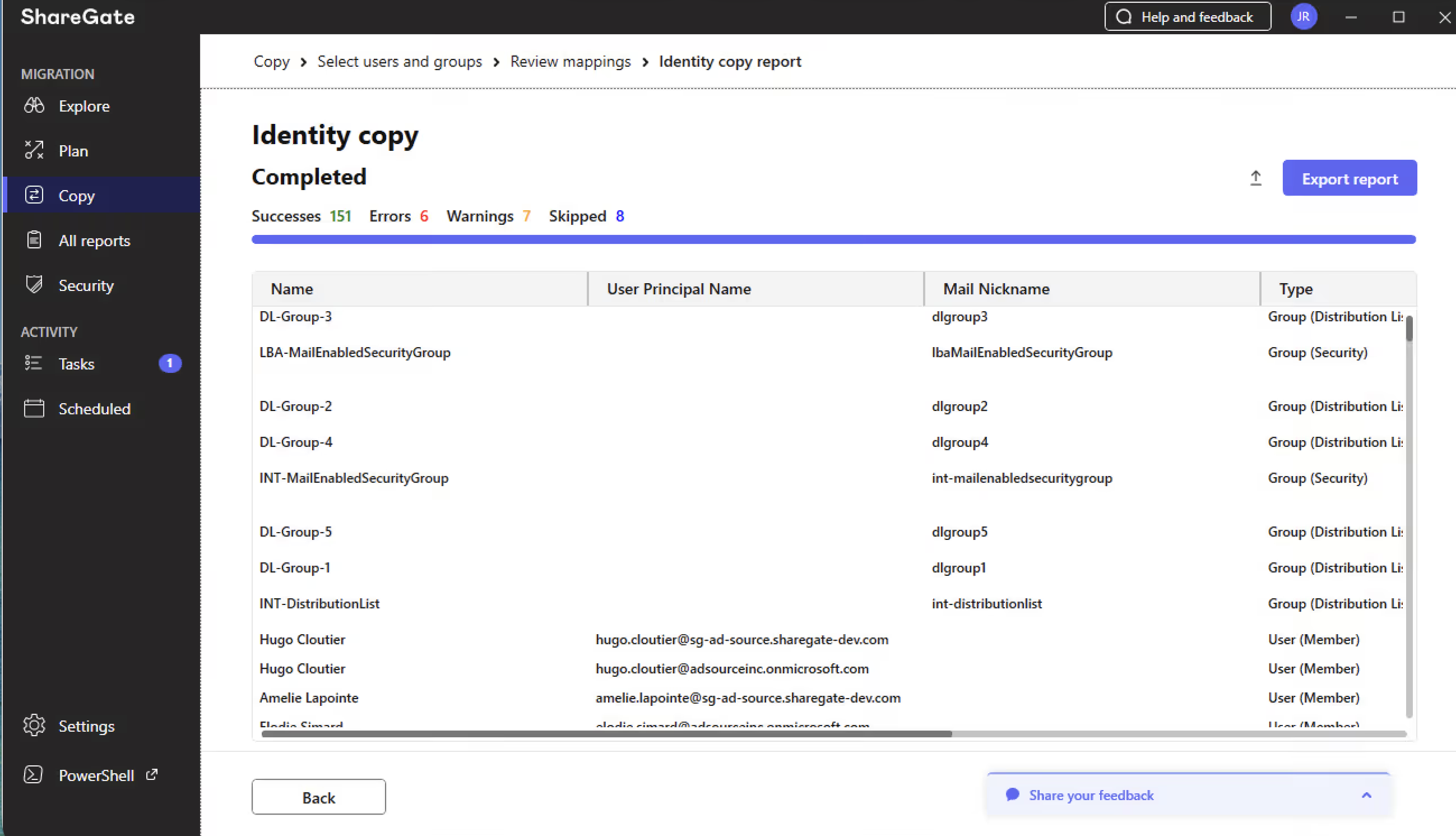
For the full technical details, check out the Copy identities overview.
Start your tenant migration project right
Copy identities is now available for ShareGate Migrate Pro and Enterprise customers. Connect your tenants. Map your identities. Run the precheck. Then move to mailboxes with confidence, not crossed fingers.
Want to see how it works? Book a live demo with one of our experts.
If you want to try it out in your own tenant, you can start a free ShareGate Migrate trial.















.avif)

Don’t just migrate it, ShareGate it.
Your source is never touched — ShareGate only copies.
Re-running is safe, included, and free.

