


.svg)
%20(1).avif)
Master Hacks: Migrate like a pro
Check out our video series to help you turn migration projects into masterpieces!
Table of contents
TL;DR: Entra ID migration covers three different things: moving from on-premises AD to the cloud, moving identities between Microsoft 365 tenants, and migrating devices to an Entra-joined state. They're different projects with different tools, timelines, and teams. This guide helps you identify which one applies to your situation, and whether you're dealing with more than one at once.
Leadership wants everyone on the new tenant. You open a browser and type "Entra ID migration."
Half the results are about moving workstations off Active Directory. The other half cover tenant-to-tenant identity migration. A few are about device management in Intune. Different workstreams, different toolsets, different teams, all hiding behind the same search term.
Before you pick a tool or build a timeline, you need to know which migration you're actually running.
What are the three types of Entra ID migration?
Entra ID migration covers at least three distinct workstreams. Mixing them up is how projects go sideways before they start.
1. On-premises AD to Entra ID
This is modernization. You're moving from on-premises Active Directory or AD FS to Microsoft Entra ID as your primary identity provider.
Microsoft frames this as a staged approach: Discover, Pilot, Scale out, Cut over. The tools are Microsoft Entra Connect and Microsoft Entra Cloud Sync. Staged rollout lets you move groups of users to cloud authentication incrementally before cutting over your domains. If your project starts with "we need to get off our domain controllers," this is your workstream.
2. Tenant-to-tenant identity migration (cloud-to-cloud)
This is the M&A and divestiture workstream. Two Microsoft 365 tenants exist. You need to migrate users, groups, and security groups from one to the other. No domain controllers. No workstation re-imaging. Pure cloud directory work.
Get this wrong and every downstream migration—mailboxes, SharePoint, Teams—inherits the mess. Identity has to come before content, every time.
3. Device and workstation migration
This is about moving endpoints. Converting domain-joined or hybrid-joined Windows devices to Entra-joined. It touches Intune, Autopilot, and endpoint management tools. Without the right tooling, this process typically needs a full device reset, wiping the machine and rebuilding the user profile from scratch.
It's a different team, different timeline, and different risk profile. Device migration can run in parallel with identity work but it's not the same project. A device migration project running alongside a tenant-to-tenant migration is like packing boxes while someone's still renovating the kitchen. Same building, very different jobs.
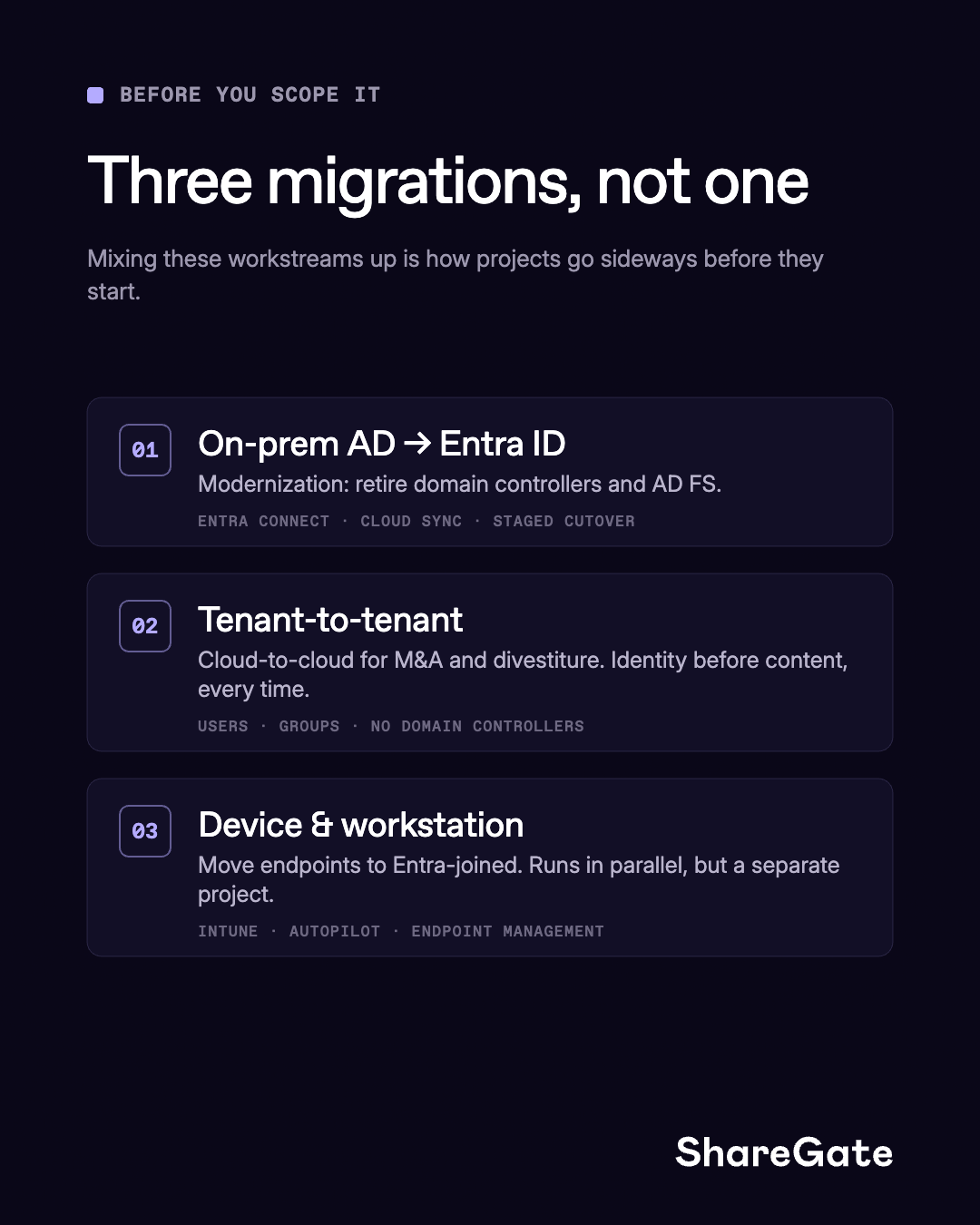
Which Entra ID migration applies to your project?
| Your situation | Your workstream |
|---|---|
| Getting off on-premises domain controllers | On-premises AD to Entra ID modernization |
| Merging or splitting Microsoft 365 tenants (M&A, divestiture, consolidation) | Tenant-to-tenant identity migration (cloud-to-cloud) |
| Re-joining Windows devices after a tenant move | Device and workstation migration |
| All three | They run in parallel but sequence matters. Identity first, devices alongside or after. |
Most M&A and divestiture projects involve all three. The mistake is treating them as one project. They have different owners, different tools, and different failure modes.
Tenant-to-tenant Entra ID migration: why identity must come first
In a tenant-to-tenant migration, identity is the foundation every workload sits on. Before a single mailbox or SharePoint site moves, users and groups need to exist in the target tenant with the right attributes.
Skip identity or get it wrong and:
- Mailbox migration fails—Exchange Online needs a matching user object in the target tenant with the correct attributes already stamped
- Permissions break—SharePoint and Teams permissions reference specific identity objects; if the user in the target doesn't match the source, permissions don't come across
- Duplicates create drift—if identity mapping isn't persistent, re-running a migration creates duplicate users and a cleanup project inside your migration project
The correct sequence is: identity first, mailboxes second, then workloads. Every step depends on the one before it.
On-premises AD to Entra ID modernization: tools and approach
The tools and sequence are different. Microsoft's guidance covers this workstream through Entra Connect Sync, cloud sync, and staged rollout. This is outside the scope of tenant-to-tenant migration tooling — ShareGate Migrate is cloud-to-cloud only and doesn't handle on-premises AD modernization.
For on-premises AD to Entra ID, start with Microsoft's road-to-the-cloud guidance at learn.microsoft.com.
Entra ID device migration: what it covers and when it applies
Device migration to Entra ID (converting domain-joined or hybrid-joined Windows devices) is a separate workstream from identity or content migration. It typically runs alongside or after identity migration, not before it.
Quest On Demand Migration covers device migration to Entra ID including Windows 10 and Windows 11 devices, Intune enrollment switching, and endpoint profile preservation.
How to choose an Entra ID migration tool
An Entra ID migration tool built for cloud-to-cloud tenant-to-tenant work, like ShareGate Migrate, handles identity, mailboxes, and workloads in one sequence. A tool built for on-premises AD and hybrid environments can go deeper on device migration and directory sync.
The right tool depends on which of the three migrations or which combination your project actually involves.
Start with the right migration, then get the right tool
Tenant-to-tenant migration projects often stall not because the tools failed but because the wrong migration was scoped. Spend the first conversation with your team agreeing on which of the three workstreams you're actually running. It changes the tools, the timeline, and the sequence.
If your project is cloud-to-cloud tenant-to-tenant (M&A, divestiture, or consolidation), ShareGate Migrate handles identity, mailboxes, and workloads in one tool, in the right sequence, at a flat annual price.
Learn more about ShareGate Migrate!



Frequently asked questions

No. Workstation migration involves converting device join states (domain-joined to Entra-joined) and migrating user profiles, policies, and local data. Entra ID migration in a tenant-to-tenant context is about moving cloud directory objects: users, groups, and security groups. They're separate workstreams with different tools and different teams. You can run them in parallel, but don't confuse them.
It depends on scope and complexity. Based on migrations we've supported, a 100-user cloud-to-cloud tenant-to-tenant migration with clean identity data typically executes in days. A 5,000-user migration with hybrid environments and complex group structures can stretch to weeks or months. The migration execution itself is the shortest part. Assessment, mapping, validation, and stakeholder alignment take the most calendar time. Plan for that.









.avif)



Don’t just migrate it, ShareGate it.
Your source is never touched — ShareGate only copies.
Re-running is safe, included, and free.

